For parishes and church communities

Parish festival software: Keep coffee, cake and kitchen apart

At the table, guests order coffee, cake and a hot dish together – but three stations prepare them. With Bierblock, your helpers record the round on a phone; the coffee station, cake station and kitchen each see only their own item under the same order number. The devices need internet access.

The Problem

Three points where a parish-festival order gets stuck

Coffee, cake and hot food are physically separate – the slip still has to reach all three.

One round, three stations.

Coffee, cake and a dish belong together but are handed out at different counters.

Changing helpers.

Many helpers cover only one shift. Without a shared status, the next team lacks the overview.

Questions about sold-out items.

If the cake is gone, service must clarify this before sending – not first at the counter.

The Solution

One order, three stations – each sees its own item

Bierblock splits the recorded round according to the configured product assignment. The stations work their items separately under the same order number.

Set up before the festival

Create coffee, cake and hot dishes as items and assign them to Kaffeeausgabe, Kuchenausgabe and Küche. Check the assignment with a complete test order.

Record at the table

Choose the table, tap the items, check the quantity and send the one order.

Prepare separately

Each station sees only its item and moves it through Open, In progress and Ready. Serving and checkout remain separate steps at the table.

Brief helpers and hand over

Show new helpers the access, table selection and order check with a sample round. At a shift change, outgoing and incoming helpers review open items together and agree who handles questions.

01

How is a mixed round recorded at the table?

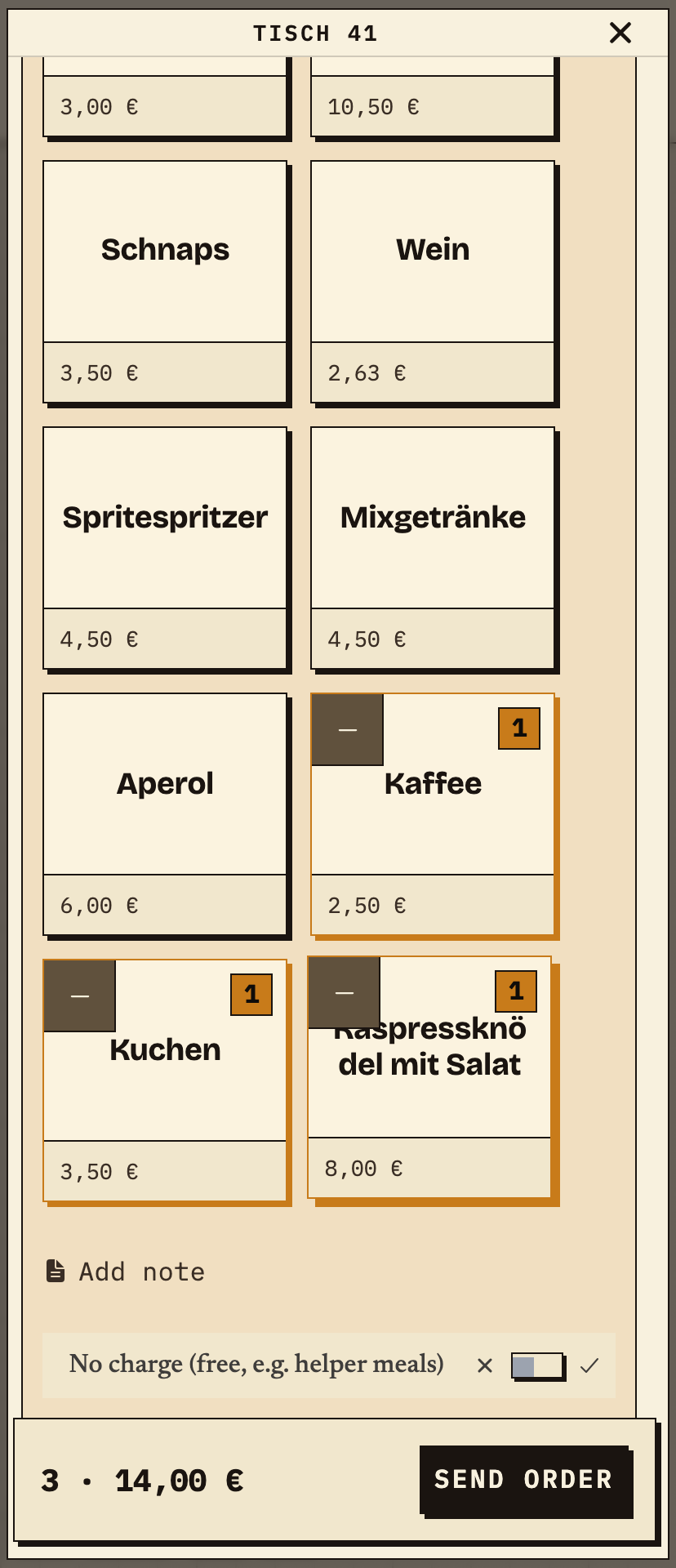
A helper selects coffee, cake and Kaspressknödel with salad at table 41. All three items stay in one order; before sending, the helper checks items, quantities and total.
Observation
Table 41: 1× Kaffee (€2.50), 1× Kuchen (€3.50), 1× Kaspressknödel mit Salat (€8.00) – 3 items, €14.00.
Next check
Send the order and check that each station receives only its own item.
Phone at table 41: Kaffee, Kuchen and Kaspressknödel mit Salat selected, total 3 items €14.00, Send order button
Table 41: coffee, cake and hot food in one order, 3 items, €14.00 (test data).
02

Which item does the coffee station see?

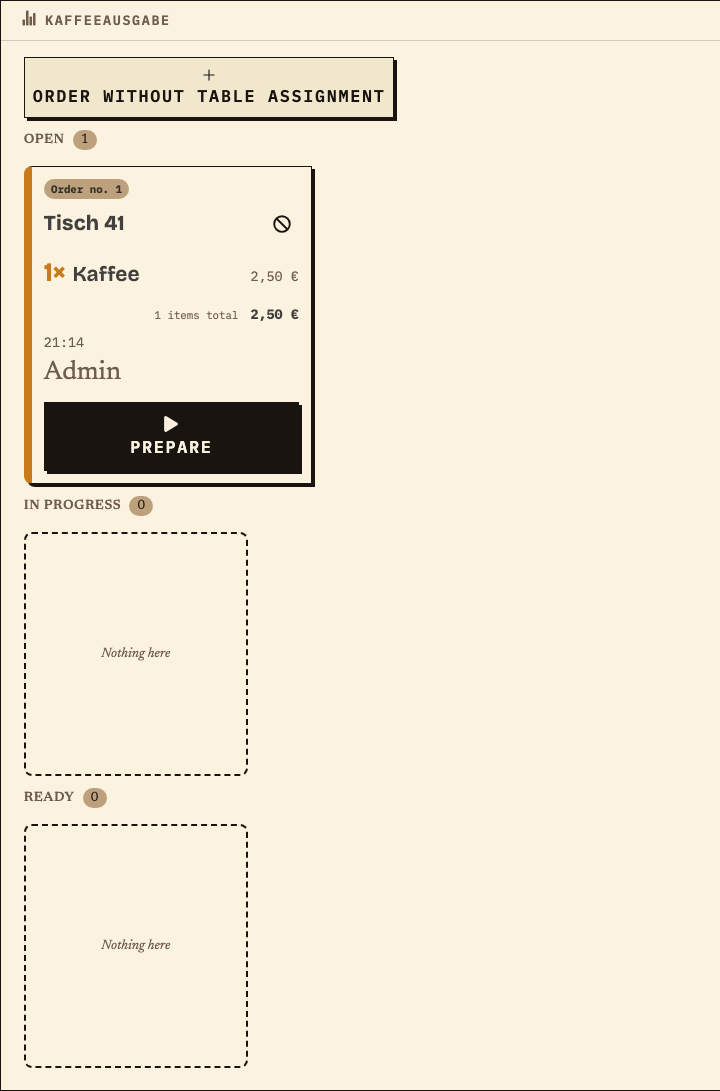
After sending, the same order no. 1 appears on the Kaffeeausgabe monitor: table 41, 1× Kaffee. Cake and hot food do not appear here – the station works only its coffee with “Prepare”.
Observation
Kaffeeausgabe: order no. 1, table 41, 1× Kaffee, €2.50, status Open.
Next check
Prepare the coffee and mark it ready; cake and food continue at their own stations.
Kaffeeausgabe monitor with order no. 1 for table 41, only 1× Kaffee, €2.50, status Open, Prepare button
Kaffeeausgabe: only the coffee item of this round, same order no. 1 (test data).
03

Which item does the cake station see?

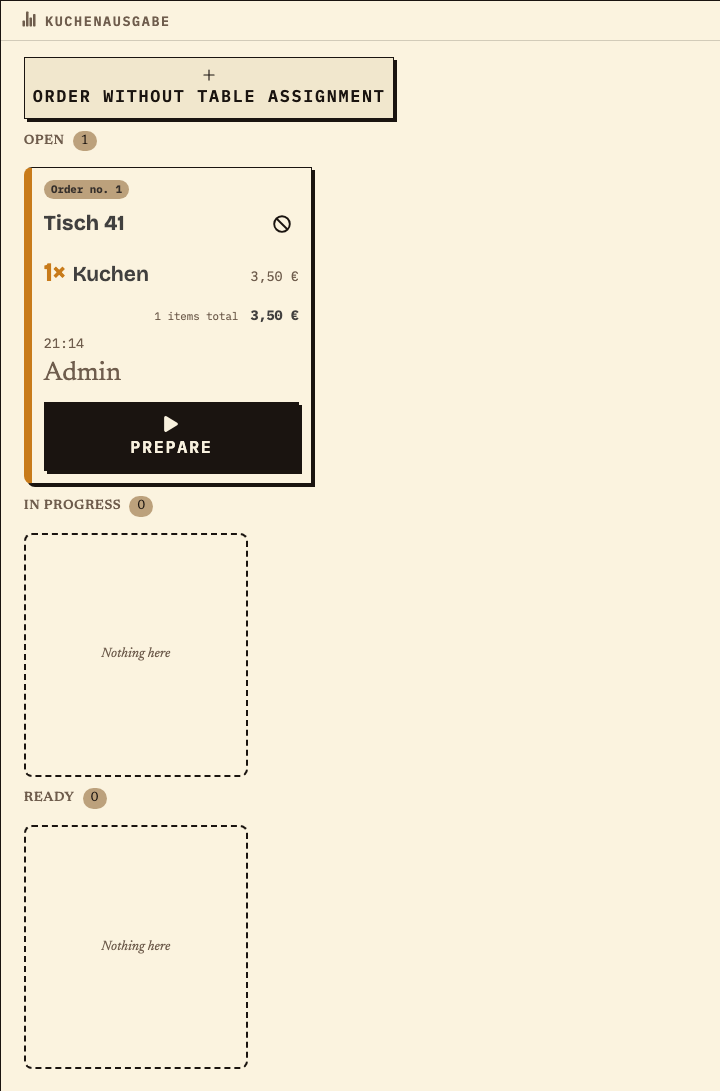
The same order no. 1 appears in parallel on the Kuchenausgabe monitor: table 41, 1× Kuchen. This station sees neither coffee nor hot food and marks only its cake as ready.
Observation
Kuchenausgabe: order no. 1, table 41, 1× Kuchen, €3.50, status Open.
Next check
Prepare the cake and mark it ready; the other items are unaffected.
Kuchenausgabe monitor with order no. 1 for table 41, only 1× Kuchen, €3.50, status Open, Prepare button
Kuchenausgabe: only the cake item of the same order no. 1 (test data).
04

Which item does the kitchen see?

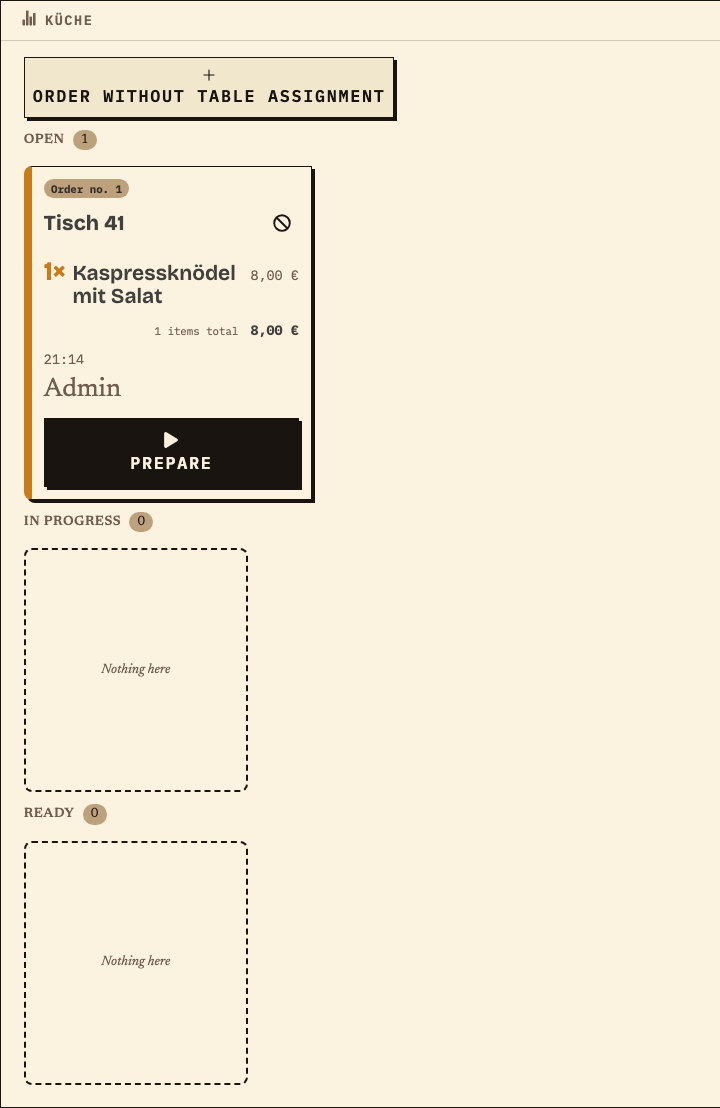
The hot Kaspressknödel with salad appears in the kitchen – also under order no. 1 and table 41. Coffee and cake are missing from this view because they are assigned to other stations.
Observation
Küche: order no. 1, table 41, 1× Kaspressknödel mit Salat, €8.00, status Open.
Next check
Prepare the dish and mark it ready; the round is then ready to serve.
Küche monitor with order no. 1 for table 41, only 1× Kaspressknödel mit Salat, €8.00, status Open, Prepare button
Küche: only the hot dish of the same order no. 1 (test data).
05

How is the round handed over at the table?

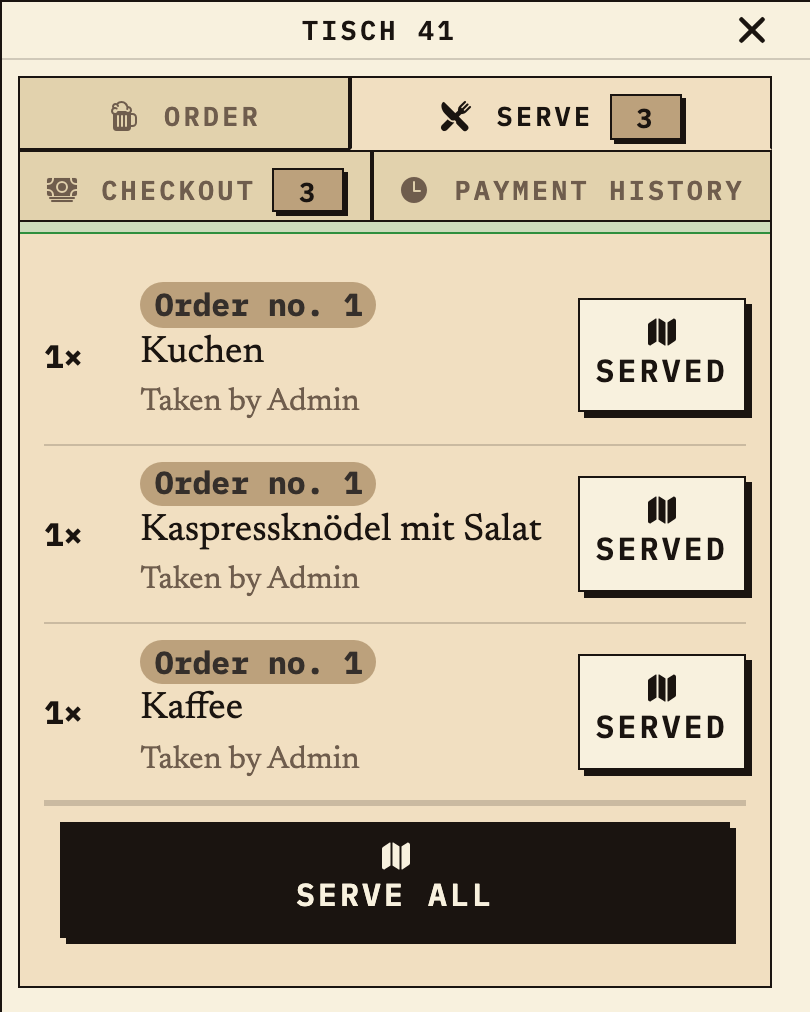
When all three items are ready, they appear at the table under “Serve” and are served in one step. “Checkout” is a separate tab; before a shift change, outgoing and incoming helpers review the status together.
Observation
Table 41, “Serve” tab: order no. 1 with Kaffee, Kuchen and Kaspressknödel mit Salat, all three ready to serve.
Next check
Serve the items or – for open items – pass the question to the agreed contact person.
Table 41, Serve tab: order no. 1 with Kaffee, Kuchen and Kaspressknödel mit Salat, all three ready, Serve all button
Handover at the table: the round is ready to serve (test data).

Benefits at a glance

How Bierblock helps your team

  • Record coffee, cake and hot food in one round
  • Let each station see only its assigned item
  • Hand over open orders together at a shift change
Fictional example

An example from festival operations

Cake sold out: ask before sending

The parish coordinator sets up coffee at the Kaffeeausgabe, cake at the Kuchenausgabe and hot dishes in the Küche. A helper records coffee, cake and Kaspressknödel at the table. When she hears that one cake is sold out, she asks the coordinator for the available alternative before sending and records it. The three items appear under the same order number at the responsible stations. At the shift change, the outgoing and incoming teams review the still-open items together; the coordinator decides who handles a question. The app does not perform allergen advice, kitchen capacity or stock logic – those decisions stay with the team.

Frequently asked questions

What organisers often ask.

Everything about setup, usage and costs.

Can coffee, cake and hot food be assigned separately?
Yes. Each item is assigned to a station. A mixed order then appears as separate items at the Kaffeeausgabe, Kuchenausgabe and Küche – under the same order number. Check the assignment with a test order.
What happens when an item is sold out?
Before sending, service can remove the item from the cart and clarify the alternative with the coordinator. Items already sent are handled at the responsible station; whether a correction is possible depends on the agreed workflow. The app does not perform stock or allergen logic.
How do we brief helpers with different experience?
Show the access, choose a table together and record a sample round with coffee, cake and a dish. Then check the incoming items at all three stations and agree who answers questions. A short rehearsal on the planned devices is enough.
How do we hand over open orders at a shift change?
The monitor and the table tab show open, in-progress and ready items. Outgoing and incoming helpers review this status together and agree who handles an open question.
Do the devices need internet access?
The Kaffeeausgabe, Kuchenausgabe, kitchen and service need internet access to share new orders. During a short interruption, an order may wait on the device where it was entered and be sent later. Other devices cannot see it until then. Check the waiting order on the original device before entering it again, and agree on a fallback for longer outages.
Can we reuse the setup for next year’s parish festival?
Paid plans can duplicate an event and adapt it. Afterwards, check items, prices, stations, tables and access with a test order.

Ready?

See how your team could take orders.

Open the public demo to explore order taking, the kitchen and the bar. No account is needed. To prepare your own setup, start a test event afterwards.

Open the demo — no sign-upBuild your own test event

Start without an account. Register to save. Your own demo events allow up to 20 test orders.

See pricing