Ordering system for club festivals: Decide on needs and booking
Five workflow criteria and your event dates decide whether a simple process is enough or whether kitchen and bar need separate serving points. Then match your festival to an access period: one-time purchase, event pack, monthly or yearly plan. All paid plans include the same features; devices need internet access.
Fill in the rows for your festival. The right-hand column is pre-filled with a fictional club festival; replace the sample values with your own.
Fictional example in the right-hand column (test data): table service at twelve tables, food from the grill and drinks from the bar, shift change at 21:00, two festivals in different months. The values only serve as a pattern and are not a recommendation for your size.
Step or entry
Simple workflow is enough if …
Separate serving points help if …
Example: club festival with grill and bar
Scroll horizontally to see the full table.
Entries are not saved. Print the completed sheet before reloading or record the values separately.
The Problem
When a simple workflow is enough and when separate serving points help
Both scenarios are fictional club festivals. They are not a recommendation based on size; they show the questions to answer before choosing.
01
Scenario A: One serving point, an experienced team
Four helpers run the bar and kitchen at one stand. Orders are passed on verbally or noted on a slip of paper; the crowd is manageable and the team stays the same all evening. A legible paper slip can be enough here. If you still take orders digitally, one serving point that sees every item is sufficient; separate stations and shift handovers are not required. Beforehand, check that devices at the stand connect reliably to the internet.
02
Scenario B: Table service, separate kitchen and bar, shift change
Service takes orders at twelve tables, the grill serves food and the bar serves drinks; the shift changes at 21:00. A shared order view helps here: each serving point sees only its assigned items, open orders stay visible during the handover, and an order taken at the table does not need to be passed on as a paper slip. Preparation covers products, stations, helper access, devices and a test order with food and a drink.
The Solution
Which booking fits your festival dates?
All paid plans include the same features; your dates and required access period decide. Current prices and terms are on the pricing page.
01
One festival in one month
The one-time purchase costs €99 and opens one month of access from activation. It fits when your festival falls within that period and no other dates are planned. There is no renewal and no cancellation.
02
Several dates within 24 months
Event pack 6 costs €149 and credits six events; pack 9 costs €199 for nine. Credits are valid for 24 months from purchase; multi-day festivals count as one event. Without a subscription, an event uses one credit from the 21st order and remains usable without limits afterwards. This fits if you plan several festivals but do not want an ongoing subscription.
03
Several festivals per year
The monthly plan costs €49 per month and can be cancelled at any time; access remains until the end of the paid period. The yearly plan costs €299 for twelve months and renews automatically. Both include all features and up to 30 events per calendar year under fair use.
04
Calculate first, then book
Two festivals in different months require two one-time purchases. Compare event packs or a subscription using your actual dates. The full overview with access periods and terms is on the pricing page.
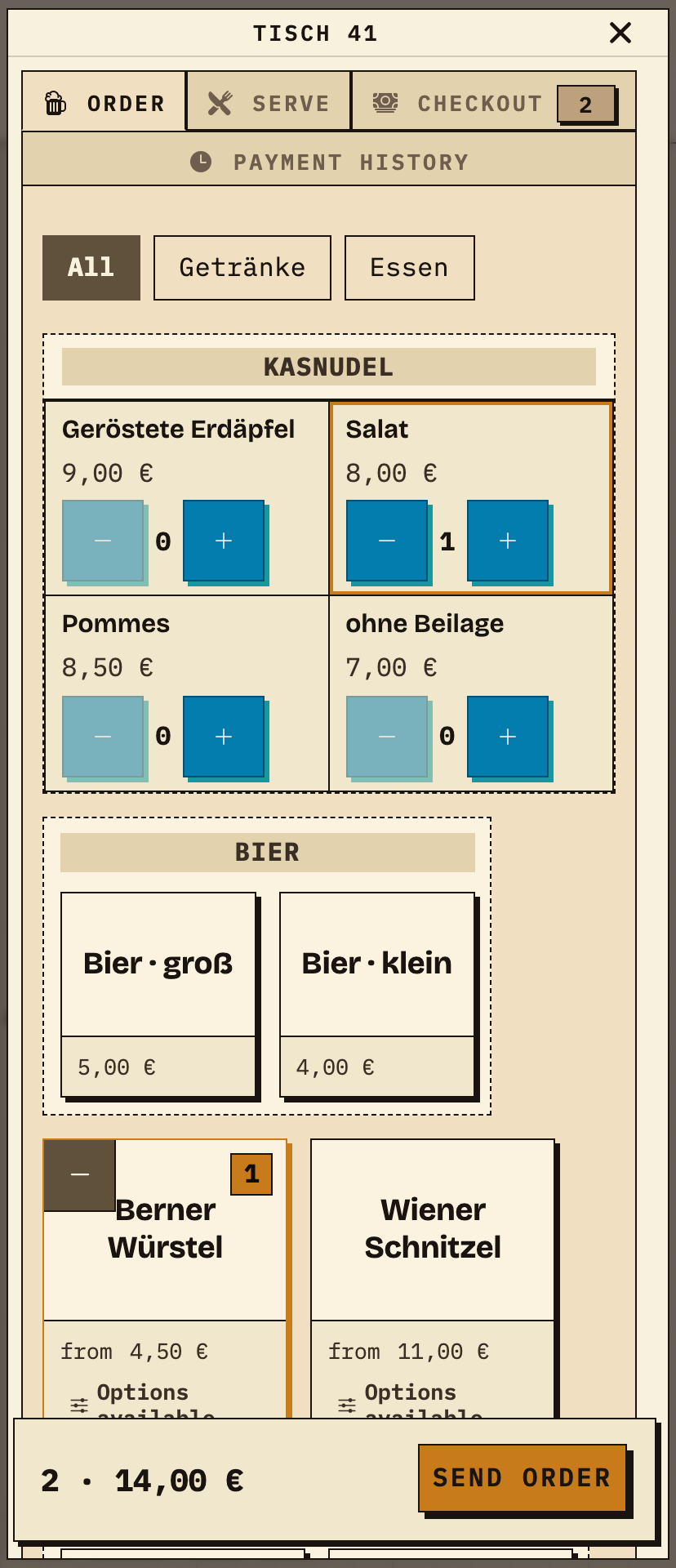
Table 41 orders a Kasnudel with salad and a Berner Würstel with fries. In the “Order” tab, service selects both dishes; the total shows 2 items for €14.00. Orders are taken on a phone; no fixed POS terminal is required.
Table 41: two dishes, 2 items, €14.00 (test data).
02
The responsible station sees only its items
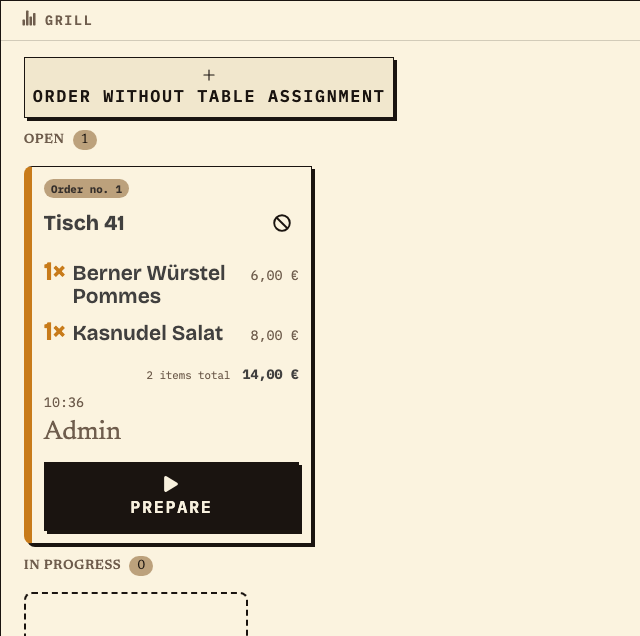
After sending, order no. 1 appears on the Grill station monitor: table 41, Kasnudel salad and Berner Würstel with fries, 2 items, €14.00, status Open. Drinks appear at the bar station configured for them; in this example the table only orders food. The kitchen starts with “Prepare”.
Grill station: the same order no. 1, only this table’s food items (test data).
Benefits at a glance
What this page helps you do
||||Record your needs across five workflow criteria and your dates
||||Compare a simple workflow with separate serving points
||||Match access period and cost to your festival dates
Fictional example
An example from festival operations
Example: two festivals in different months
A club holds a summer festival in June and a harvest festival in September; assume both festivals go beyond the test limit of 20 orders. With the one-time purchase (€99 for one month), two purchases would be needed. Event pack 6 costs €149 once and provides six event credits valid for 24 months; both festivals use one credit each, leaving four for further dates. Clubs running festivals throughout the year compare the monthly plan (€49 per month) or the yearly plan (€299 for twelve months, up to 30 events per calendar year under fair use). This is an example, not a recommendation: your dates and the terms on the pricing page decide.
Frequently asked questions
What organisers often ask.
Everything about setup, usage and costs.
Our festival only has 50 guests – do we need an ordering system at all?
The number of guests alone does not decide that. If you work at one serving point with an experienced team and no shift change, paper can be enough. As soon as table service, separate kitchen and bar, or open handovers are involved, test a shared order view with a test order.
How many devices do we need for order taking?
Plan one device per person taking orders and one browser for each serving point that should see its items. Paid plans do not charge separately for devices or helpers. Test the planned number at the venue.
Can we use an event pack for several festivals a year?
Yes. Pack 6 covers six events and pack 9 covers nine; credits are valid for 24 months from purchase. Multi-day festivals count as one event. Without a subscription, an event uses one credit from the 21st order and remains usable without limits afterwards. Event packs are exempt from the 30-events-per-year fair-use limit; their use is limited by the purchased credits.
What happens after the one-time purchase?
Access ends automatically after one month; there is no renewal and no cancellation. If your next festival is later, you need new access or an event pack. Details are on the pricing page.
Do we need an IT person in the club?
An event lead configures products, stations and helper access. Helpers need their access and a short introduction. The public demo and your own demo events help with practice; demo events in an account are limited to 20 orders each.
Ready?
See how your team could take orders.
Open the public demo to explore order taking, the kitchen and the bar. No account is needed. To prepare your own setup, start a test event afterwards.
We measure page views, calls-to-action clicks, and opening the print dialog for work materials using a random, pseudonymous identifier on our servers. Work-material entries are not collected. No advertising cookies or sharing with third parties. You can withdraw consent at any time via “Cookie settings” in the footer.Privacy
We measure page views, calls-to-action clicks, and opening the print dialog for work materials using a random, pseudonymous identifier on our servers. Work-material entries are not collected. No advertising cookies or sharing with third parties. You can withdraw consent at any time via “Cookie settings” in the footer.Privacy