For fire brigades with a wine tavern tradition

Fire brigade wine tavern: Record wine variants and snacks at the table

At the table, guests choose wine by grape and serving size, plus a snack platter. With Bierblock, service records both in one order; the bar sees only the wine, the kitchen only the snack. Another round stays a separate order at the same table. The devices need internet access.

The Problem

What is different at a wine tavern compared with a beer festival

Less rush, but more variants and several rounds per table.

Wine is not one item.

Grape and serving size determine price and station; a long list becomes confusing at the table.

Snacks and wine run separately.

The Küche prepares the snack, the Schank the wine. Both need the same order number but only their own item.

Rounds arrive one after another.

Guests order repeatedly. Without separate orders, it is unclear which items belong to which round.

The Solution

Keep setup and service separate

Product management defines variants and stations; service keeps only the quick selection.

Maintain variants once

Create grape and serving size as required groups; service then sees a matrix with only a few fields.

Assign the snack to the kitchen

Wine and snack get their station. A mixed round appears separately but under the same order number.

Record rounds separately

Open the table again and send the next round as a new order; the order numbers remain traceable.

Separate direct sale

Without a table, direct sale is intended for the counter or pickup. For table service, choose the table on the floor plan.

Handover and review

Review open rounds together at a shift change; the report shows recorded quantities, not stock.

01

How is the wine prepared for service?

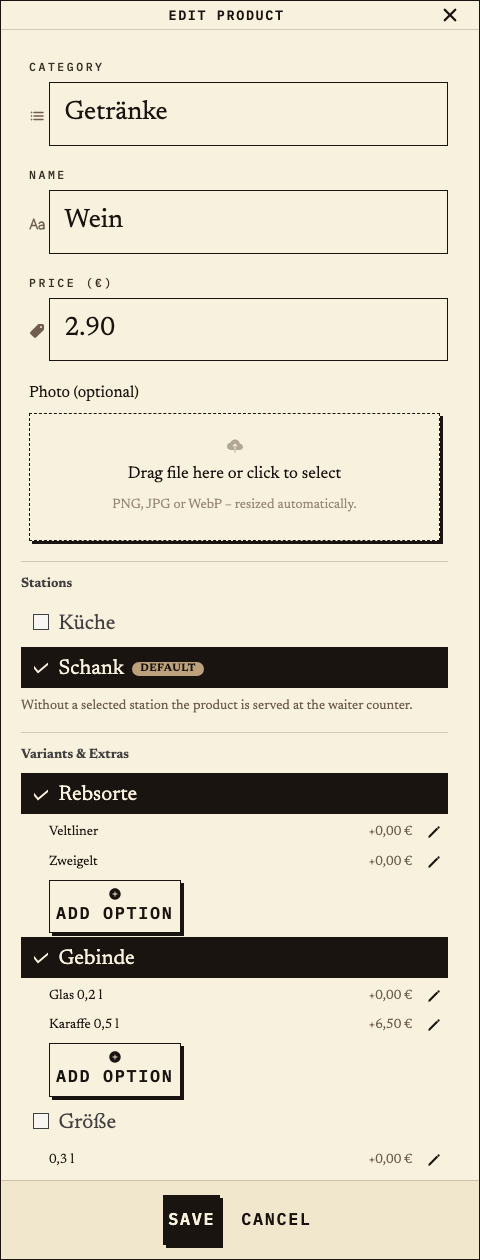
In product management, “Wein” gets the required groups “Rebsorte” (Veltliner, Zweigelt) and “Gebinde” (Glas 0,2 l, Karaffe 0,5 l). The Brettljause is assigned to the Küche. Service then shows a variant matrix instead of a long list.
Observation
Product “Wein”: Rebsorte Veltliner/Zweigelt, Gebinde Glas 0,2 l/Karaffe 0,5 l; station Schank (default). Brettljause: station Küche.
Next check
Before the evening, record a complete test order with one grape, one serving size and the snack.
Product management: Wein with the required groups Rebsorte (Veltliner, Zweigelt) and Gebinde (Glas 0,2 l, Karaffe 0,5 l), station Schank selected
Product setup: wine with grape and serving size, station Schank (test data).
02

How does service record the first round?

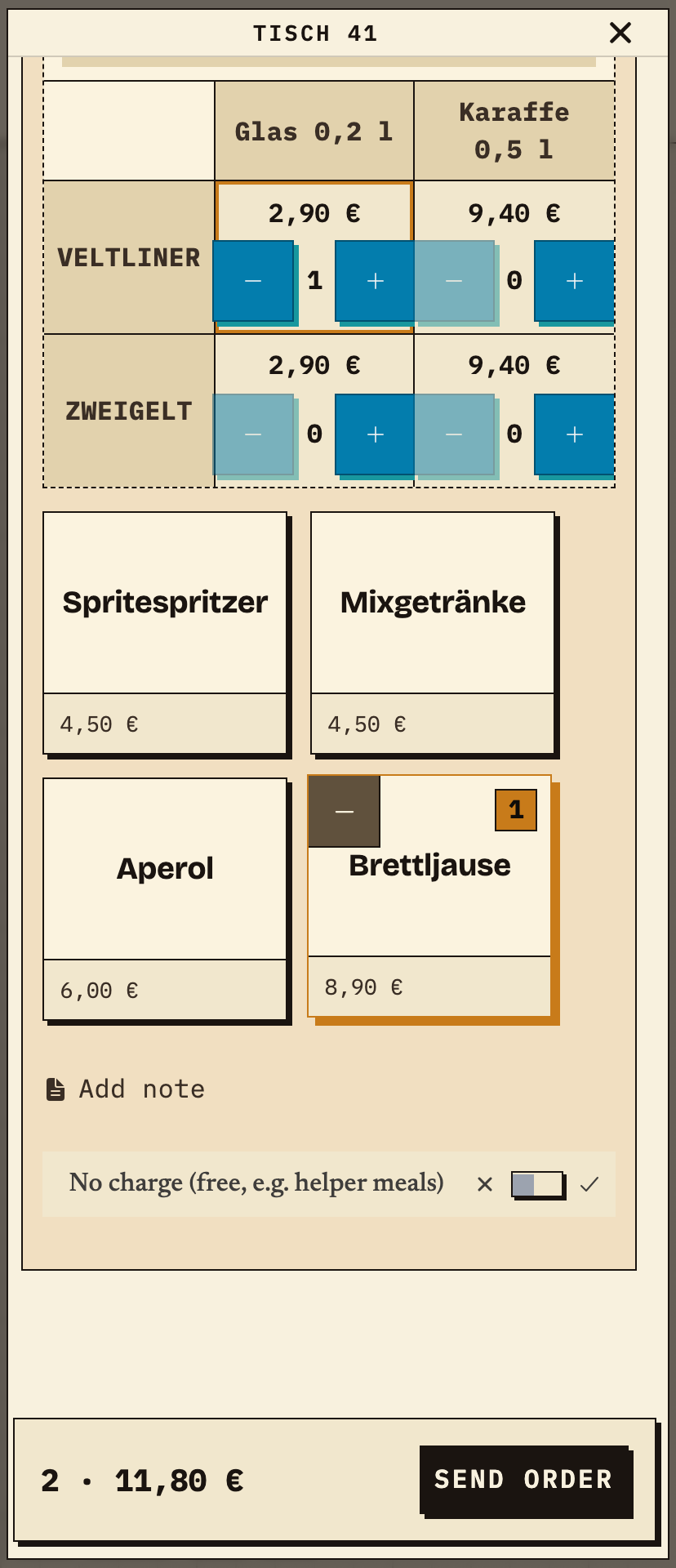
At table 41, the helper taps Veltliner/Glas 0,2 l in the matrix and adds the Brettljause. Before sending, the helper checks two items and €11.80.
Observation
Table 41: 1× Wein · Veltliner · Glas 0,2 l (€2.90) + 1× Brettljause (€8.90) = 2 items, €11.80.
Next check
Send the order and check that the Schank and Küche receive only their own item.
Table 41 on a phone: wine variant matrix with Veltliner and Zweigelt plus Glas 0,2 l and Karaffe 0,5 l, Veltliner by the glass and Brettljause selected, total 2 items €11.80
First round: Veltliner by the glass and Brettljause, 2 items, €11.80 (test data).
03

What does the Schank see from this round?

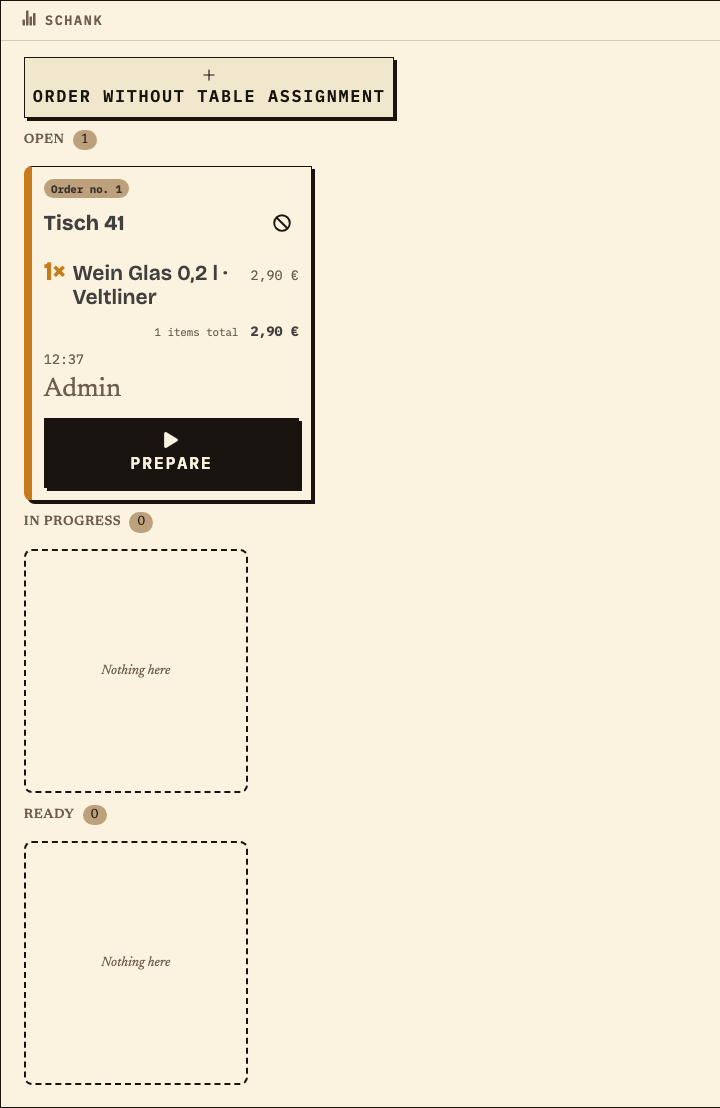
The Schank receives order no. 1 for table 41 with the wine, but without the snack. It moves the item through “Prepare” and “Ready”.
Observation
Schank: order no. 1, table 41, 1× Wein Glas 0,2 l · Veltliner, €2.90, status Open.
Next check
Prepare the wine; the snack continues in parallel at the Küche.
Schank monitor with order no. 1 for table 41, only 1× Wein Glas 0,2 l Veltliner, €2.90, status Open
Schank: only the wine of the first round, order no. 1 (test data).
04

What does the Küche see from the same round?

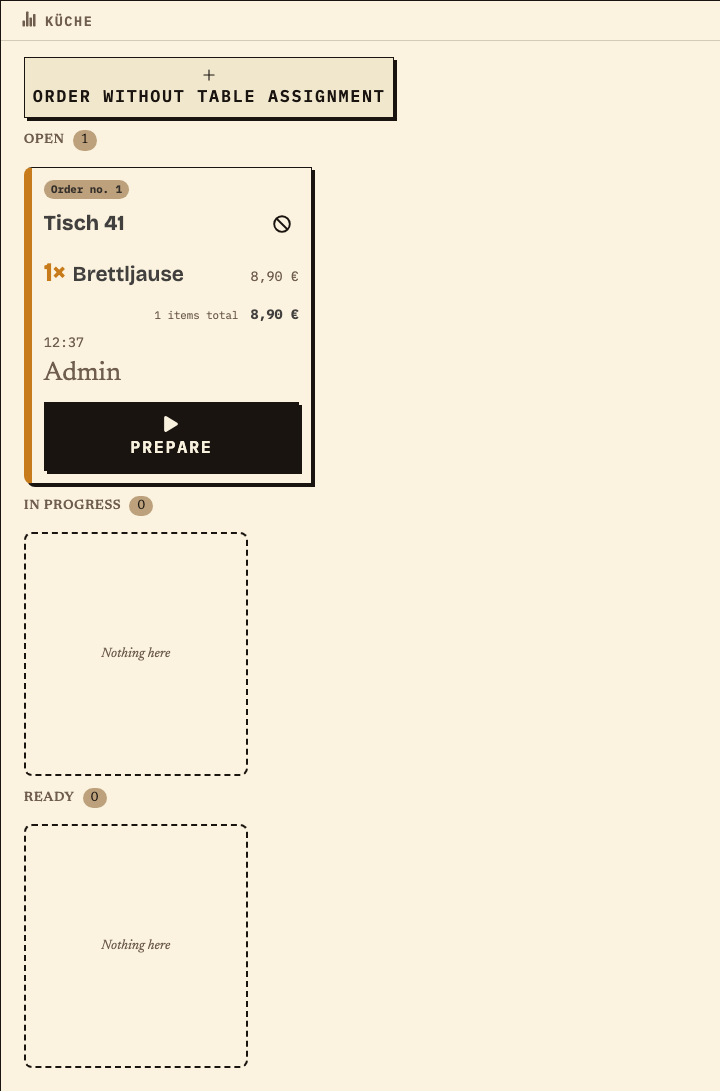
The Küche sees only the Brettljause under the same order number. Wine and snack remain separate items at their stations.
Observation
Küche: order no. 1, table 41, 1× Brettljause, €8.90, status Open.
Next check
Prepare the snack and mark it ready; the first round is then ready to serve.
Küche monitor with order no. 1 for table 41, only 1× Brettljause, €8.90, status Open
Küche: only the snack of the same order no. 1 (test data).
05

How does the second round reach the same table?

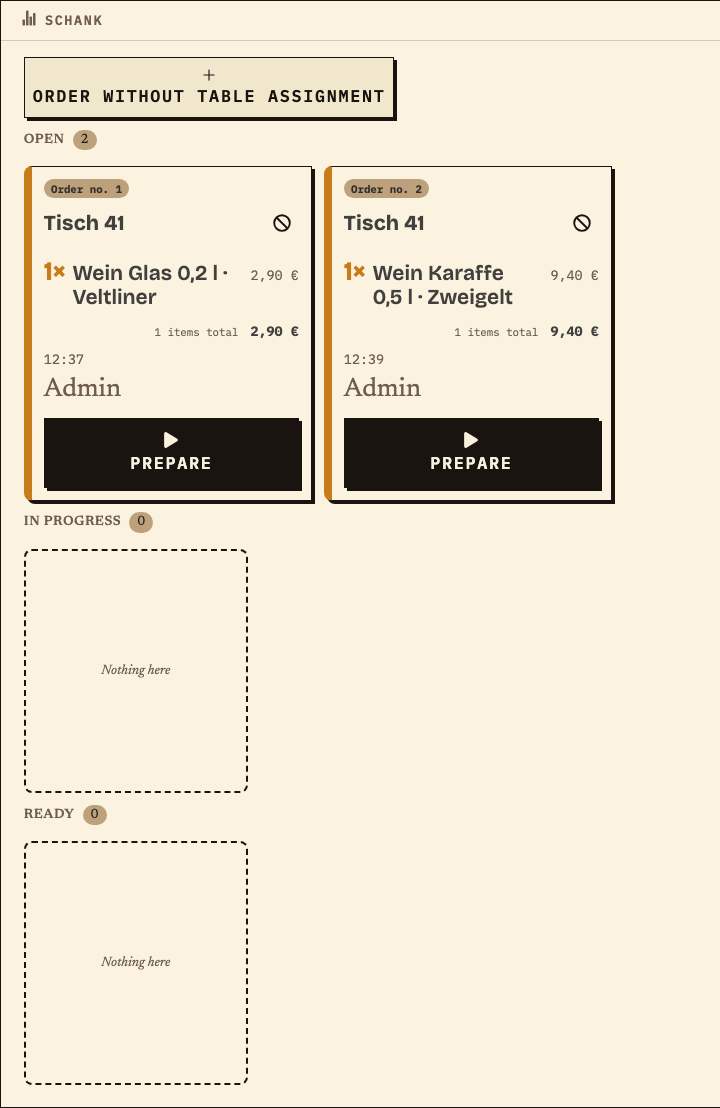
Service opens table 41 again and records a carafe of Zweigelt as a new order. The Schank sees order no. 1 and no. 2 side by side; the rounds are not merged into one order.
Observation
Schank: table 41, order no. 1 (Glas Veltliner, €2.90) and order no. 2 (Karaffe Zweigelt, €9.40), both Open.
Next check
Prepare round 2 and check at serving which items belong to which order number.
Schank monitor with two orders for table 41: no. 1 with Wein Glas 0,2 l Veltliner, no. 2 with Wein Karaffe 0,5 l Zweigelt, both status Open
Second round at the same table: order no. 1 and no. 2 side by side (test data).
06

What does the review show after the evening?

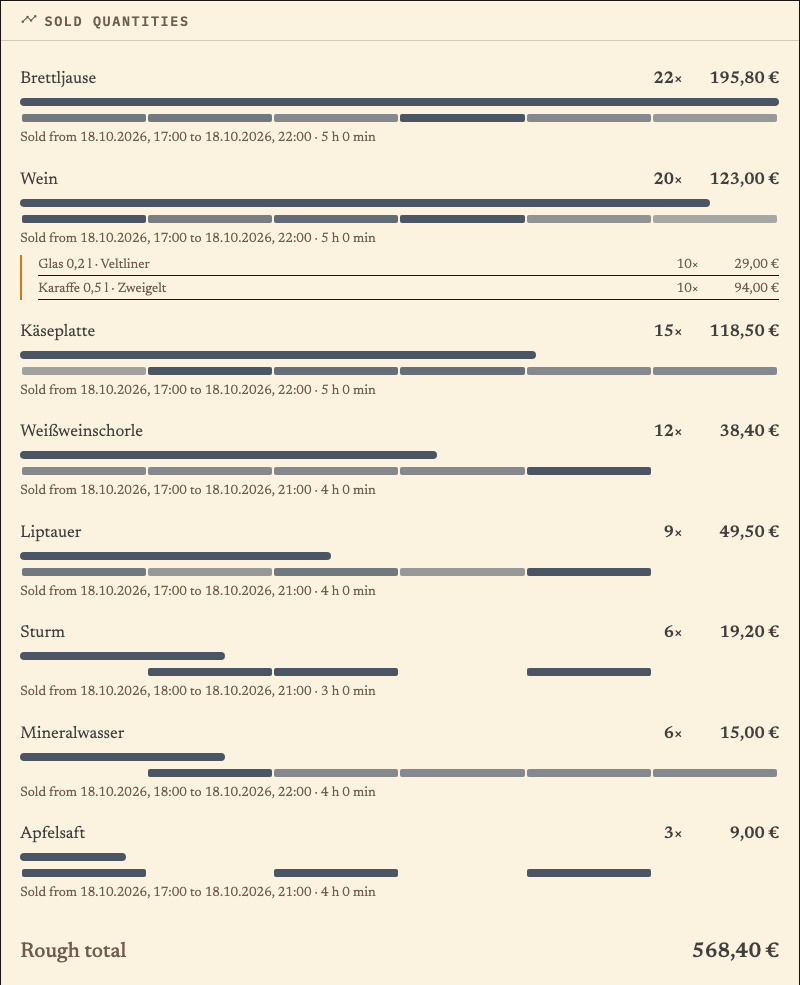
For the review we created a separate test run with 32 rounds and the extended wine-tavern menu; example rounds no. 1 and 2 are included. The upper bar shows the share of total quantity, the timeline below the hours 17:00–22:00. It is not a stock count: check remaining bottles, serving loss and open rounds separately.
Observation
Sold quantities: Brettljause 22×, Wein 20× (10× Glas Veltliner, 10× Karaffe Zweigelt), Käseplatte 15×, Weißweinschorle 12×, Liptauer 9×, Sturm 6×, Mineralwasser 6×, Apfelsaft 3×; total €568.40, period 17:00–22:00.
Next check
Compare the quantities with remaining stock and purchases before ordering for the next wine tavern evening.
Product report Sold quantities: Brettljause 22×, Wein 20× (10× Glas Veltliner, 10× Karaffe Zweigelt), Käseplatte 15×, Weißweinschorle 12×, Liptauer 9×, Sturm 6×, Mineralwasser 6× and Apfelsaft 3×, total €568.40, period 17:00–22:00
Quantity review from a separate test run with 32 rounds (including example rounds no. 1 and 2): upper bar = share of total quantity, timeline = hours 17:00–22:00 (test data).

Benefits at a glance

How Bierblock helps your team

  • Choose grape and serving size in a few steps
  • Let the Schank and Küche see only their own item
  • Keep the second round traceable at the same table
Fictional example

An example from festival operations

Veltliner, a snack and a carafe of Zweigelt

The fire brigade sets up “Wein” with the required groups Rebsorte and Gebinde and assigns the Brettljause to the Küche. At table 41, a helper records the first round: Veltliner by the glass and a Brettljause, €11.80 in total. The Schank sees only the wine, the Küche only the snack – both under order no. 1. Later, the guests order a carafe of Zweigelt. The helper opens table 41 again; the Schank shows order no. 2 next to the first round. At the shift change, the helpers review the open order numbers together. After the evening, the organisers compare the recorded quantities with remaining bottles and purchases; the report does not replace a stock count.

Frequently asked questions

What organisers often ask.

Everything about setup, usage and costs.

How are grape and serving size selected during an order?
When both are required groups on the product, the order dialog shows a matrix: grapes in the rows, serving sizes in the columns. One tap on plus records the combination; the price is the base price plus the serving-size surcharge.
Where do we maintain wine varieties and serving sizes?
In product management under “Varianten & Extras”. Create the groups and options once and assign them to the product. Service only shows the finished selection, not the management view.
Does a second round stay with the same table?
Yes. Service opens the same table again and sends a new order. The rounds keep separate order numbers; the Schank shows them side by side. At serving, check which item belongs to which order number.
Does the kitchen see the wine?
No. The Küche sees only the items assigned to it, which is the Brettljause. The wine appears at the Schank. Both views carry the same order number so the round fits together at the table.
Is the report a stock count?
No. It shows recorded order quantities. Check remaining bottles, serving loss, open rounds and purchases separately; the report is not a stock or cash system.
Do the devices need internet access?
The Schank, Küche and service need internet access to share new orders. During a short interruption, an order may wait on the device where it was entered and be sent later. Other devices cannot see it until then. Check the waiting order on the original device before entering it again, and agree on a fallback for longer outages.

Ready?

See how your team could take orders.

Open the public demo to explore order taking, the kitchen and the bar. No account is needed. To prepare your own setup, start a test event afterwards.

Open the demo — no sign-upBuild your own test event

Start without an account. Register to save. Your own demo events allow up to 20 test orders.

See pricing