Membership records
Contact details, consents and subscriptions need a maintained club or membership platform. Bierblock does not hold membership data.
 BierblockDELogin
List your recurring tasks, compare frequency, effort and errors, and name one responsible person. That gives you a prioritised gap. Bierblock only covers festival orders; membership, communication, planning and finance stay with tools built for those tasks.
Work material
This is what a completed needs review looks like. Frequency, effort, errors and the responsible person sit in the same row; the last column names the first check. Replace the example values with your own.
Fictional example, not a customer reference. Frequency and error counts are assumptions; check them for your festival. Bierblock covers only the “Orders at the event” row.
| Step or entry | Frequency | Effort | Errors / questions | Responsible | Tool type | First check |
|---|---|---|---|---|---|---|
Scroll horizontally to see the full table.
Entries stay in the browser only. Print the completed matrix before leaving the page.
The Problem
Write down each recurring task and assign it to one area. A tool can only be compared once the task and the responsible person are clear.
Contact details, consents and subscriptions need a maintained club or membership platform. Bierblock does not hold membership data.
Invitations and regular updates need a reliable channel. Check whether your existing group reaches the volunteers who need the information.
Programme, setup, shifts and responsibilities belong in a plan or calendar. This area stays separate from ordering software.
Payments, cash status and receipts need a solution that meets your legal requirements. Bierblock does not issue fiscal receipts or process card payments.
This is the only area Bierblock covers: taking orders, assigning them to kitchen and bar, and keeping the processing status visible. Test the workflow with a mixed trial order.
Compare ordering systems for eventsThe Solution
Each task needs a tool that solves that task. Bierblock is the ordering tool for the event evening; membership, communication, planning and finance stay with their own tools.
Start with the task that consumes the most time or causes the most errors, not with the feature that sounds best on a product list.
Helpers take orders; kitchen and bar see their assigned items and status. That is the verified product scope.
A membership platform, calendar and register do not need to be replaced if they already do their job. Check first whether the gap really sits in ordering.
A mixed test order at your stations proves more than a feature list. Decide on purchase and rollout only afterwards.
The table separates the five task areas. It names no competitor products or unverified prices, only the tool type, the result you can check, and Bierblock’s part. On narrow screens the table scrolls sideways.
| Membership & communication | Planning & dates | Finance & register | Orders at the event | |
|---|---|---|---|---|
| Typical task | Contact records, consents, invitations and regular updates. | Programme, setup, shifts and responsibilities. | Payments, cash status and receipts. | Take orders and pass them to kitchen and bar. |
| Suitable tool type | Club or communication platform. | Planning, calendar or spreadsheet tool. | Accounting or register system. | Ordering system for tables, products and stations. |
| Result you can check | A current contact list and a sent invitation. | A shift plan with owners and deputies. | A receipt or cash status for the agreed period. | A mixed test order appears at both stations. |
| Bierblock part | No. | No. | No. No card payment and no fiscal receipts. | Order taking, station assignment and processing status. |
| Not suitable if … | You need membership records or invitations. | You need date or programme planning. | You need payment processing or receipts. | One serving point without handover or shift change is enough. |
| First check | Clarify data maintenance and consents. | Set the date and responsible people. | Clarify requirements with your register and authorities. | Trial with a mixed order at two stations. |
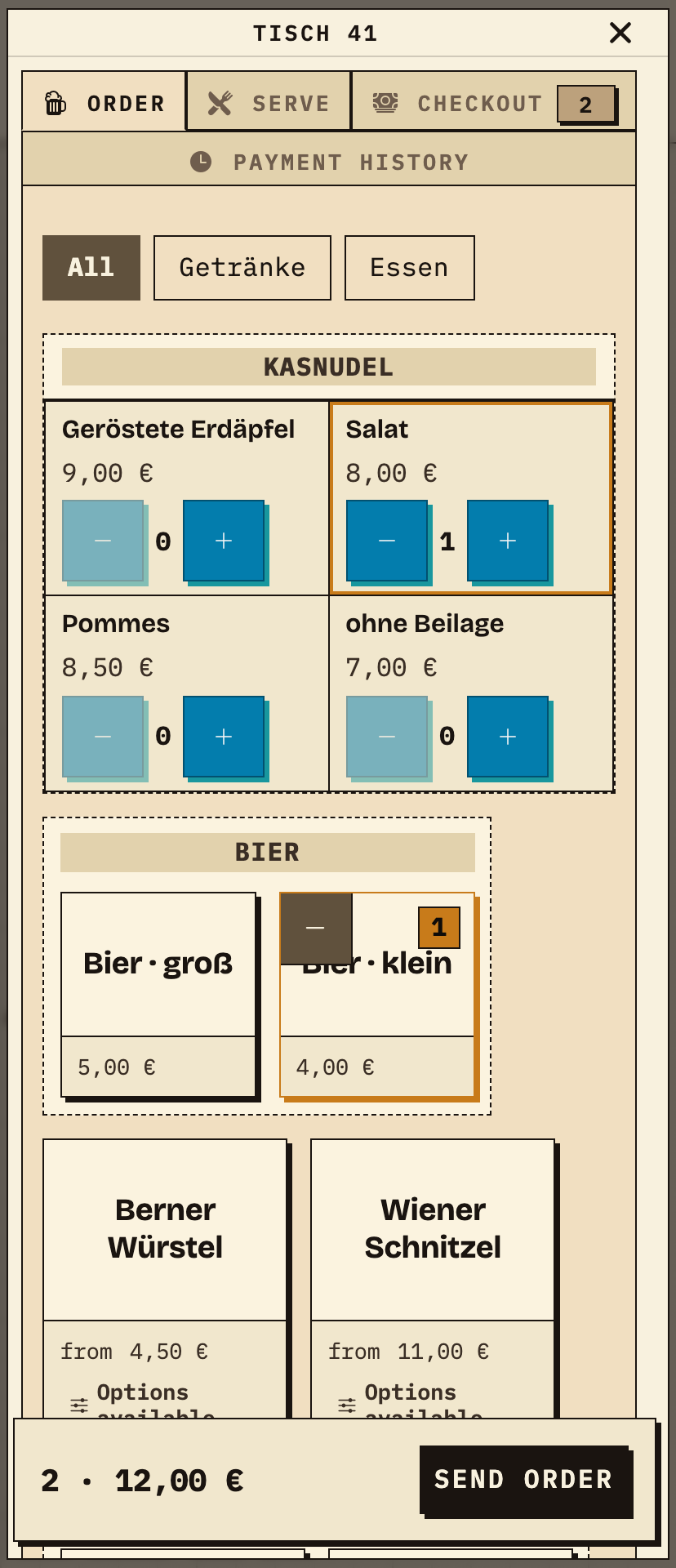
Helpers choose a food item and a drink for the same table, review the quantities and send the order. The example uses table 41 with one small beer and one Kasnudel salad.
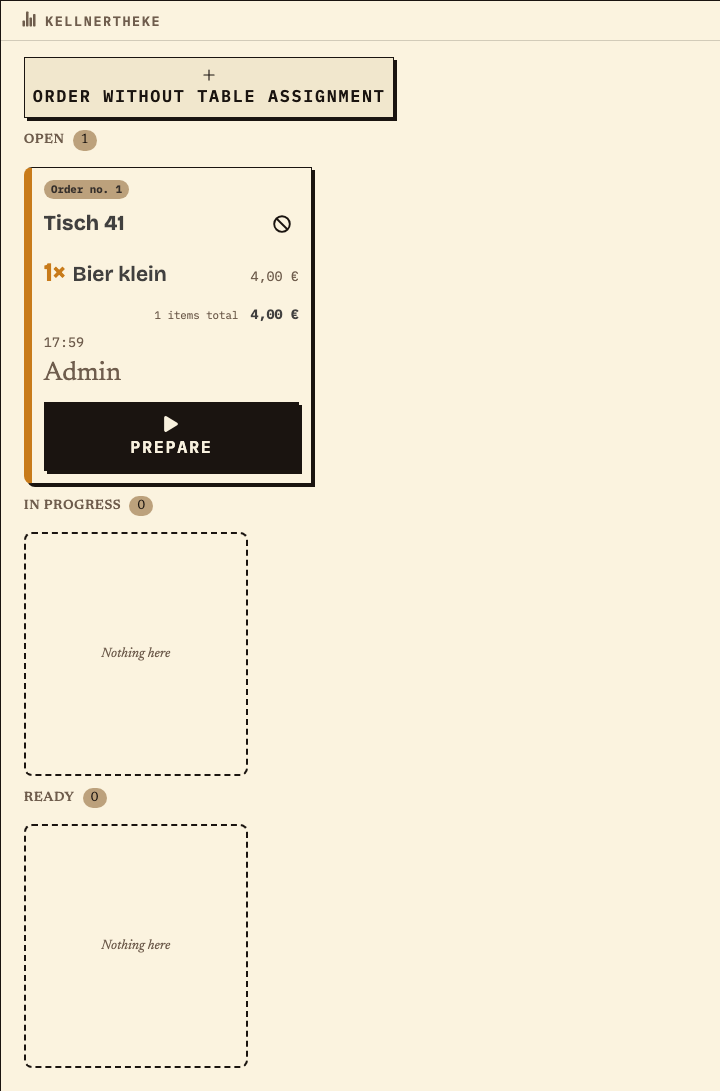
After sending, the bar station sees the drink position of the same order. It does not receive the food item.
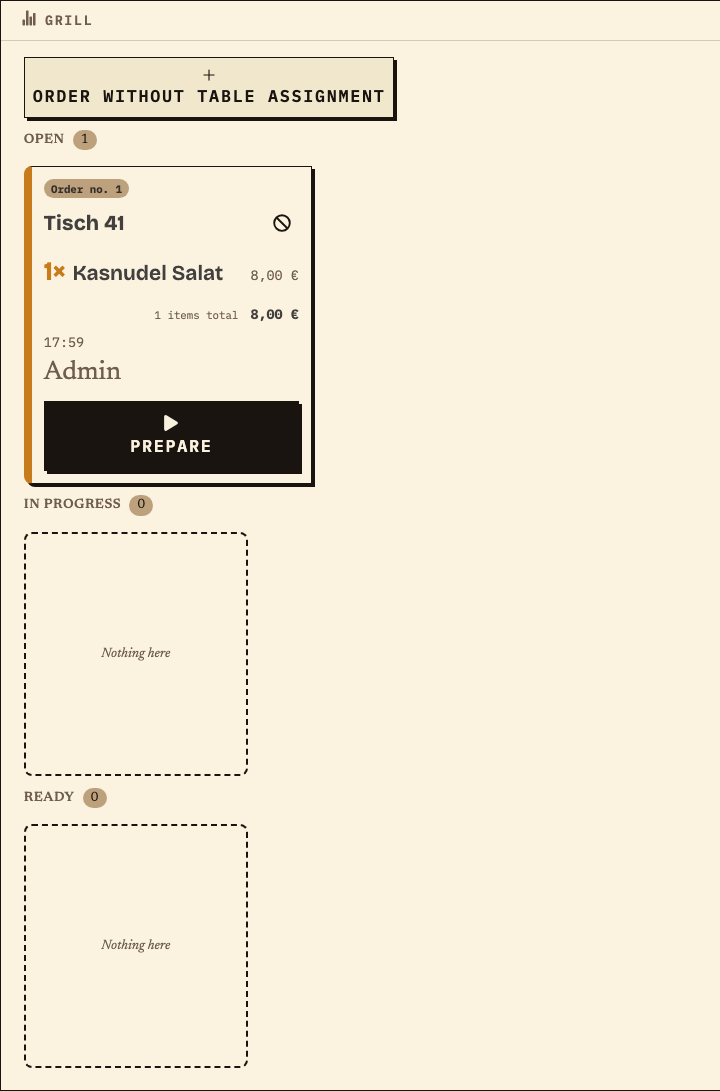
The kitchen station receives the food position under the same order number. The two stations can work in parallel without duplicating the whole order.
Benefits at a glance
A music club runs three festivals a year, each over two evenings. Membership records and invitations live in an existing club platform, dates in a calendar, and payments in the club register. At the festivals, helpers take orders at tables; the kitchen and drink counter are separate, and paper slips are carried between them. In the needs matrix, orders show the most frequent errors with a direct effect on the evening. The event lead therefore checks this area first with a mixed trial order. Countercase: a club with one serving point and no shift change stays with paper; if the biggest gap is membership data or receipts, that area gets a tool first.
Frequently asked questions
Everything about setup, usage and costs.
Ready?
Open the public demo to explore order taking, the kitchen and the bar. No account is needed. To prepare your own setup, start a test event afterwards.
Start without an account. Register to save. Your own demo events allow up to 20 test orders.
See pricing