For clubs running recurring wine tavern evenings

Club wine tavern: Prepare the next date and keep table rounds assigned

Copy an existing event as the starting point for the next date: products, prices, options, rooms, tables and stations are carried over. Orders, helper PINs, co-organizers and the event date are not. Check the setup with one table round afterward; without an event package, the copy counts toward the fair-use yearly limit.

The Problem

What goes wrong before the next wine tavern evening

The setup looks familiar, but prices, menu, table plan and helpers change.

Copying is not a fresh start

The copy carries over last year’s setup. Orders, helper PINs, co-organizers and the date stay behind; without a check you start from an old state.

Prices and sold-out markers remain

Products and prices are copied, including a product’s sold-out marker. Compare both with the current menu before the first guest.

Rounds need their own order number

A follow-up round is recorded as a new order at the same table. Without that separation, nobody knows which item belongs to which round.

The Solution

Prepare, check, test one round

The copy provides the setup; the check decides whether it fits the next date.

Carry over the structure

Copies categories, products, prices, options, photos, rooms, tables and stations into a new event.

Set date and access again

The date is not copied. Helper PINs and co-organizers are not copied; the person duplicating becomes the sole owner.

Check prices and menu

Compare prices, sold-out markers and options with the menu for the next date.

Review the table plan

Rooms and tables are copied with their positions; check that table 41 is still where you need it.

Test one table round

Record one round at the table and check that the bar and kitchen see only their items. Direct sale remains for counter or pickup.

01

How do you prepare the next date from last year’s event?

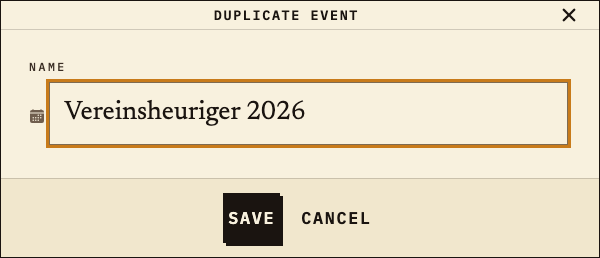
Open “Duplicate event” on last year’s event in the dashboard and give the copy the name of the next date. The copy is a new event with its own public identifier; the event date is not carried over. Categories, products with prices, options and photos, rooms, tables and stations with their assignments are copied. Orders, helper PINs, co-organizers and event settings such as the revenue share for waiters stay behind.
Observation
“Duplicate event” dialog: name “Vereinsheuriger 2026”; the copy is saved as its own event.
Next check
After saving, set the date and helper access again and check the copied structure.
“Duplicate event” dialog with the name Vereinsheuriger 2026
Copy for the next date: new name, new public identifier (test data).
02

What does the copy take from the menu?

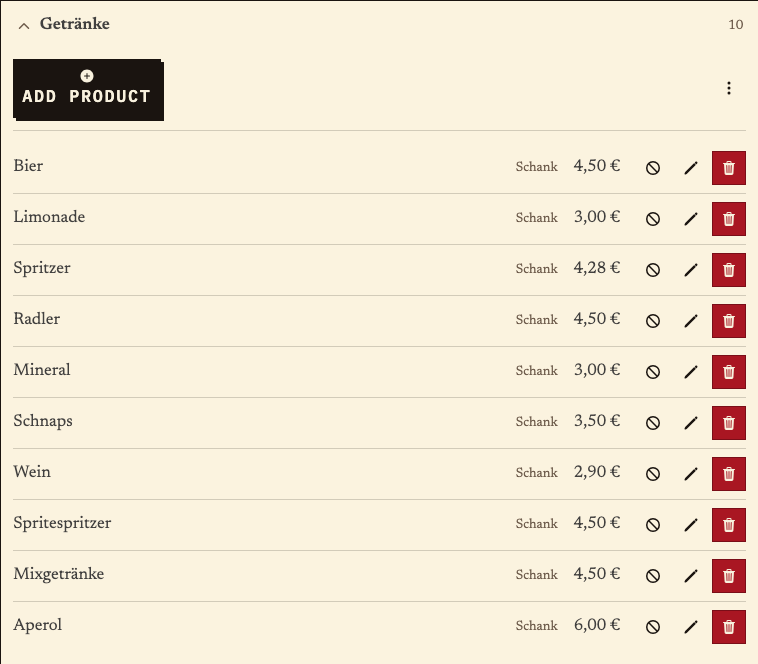
The copy’s product list contains the same categories, products, prices, options and station assignments as the source event. In the example, wine is listed at €2.90 at the bar; the food category with the snack platter is also retained. Prices and sold-out markers reflect the source state and must be checked before the date; sold-out option variants are reset when copying.
Observation
Product list: 10 drinks, including wine at €2.90 at the bar station.
Next check
Compare prices, options and sold-out markers with the menu for the next date.
Drinks product list after copying: ten products, wine €2.90, bar station
Copied menu: drinks with prices and stations (test data).
03

Is the floor plan retained for the next date?

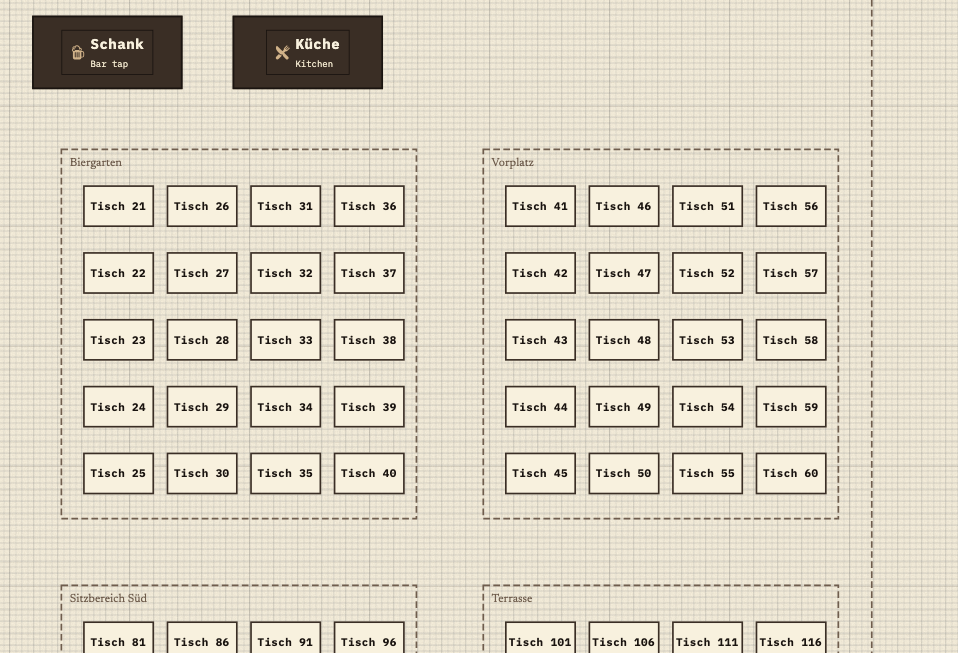
Rooms, tables and stations are copied with their positions and assignments. In the example, table 41 stays in the front area, with the bar and kitchen at the top. Before the date, check whether tables, rooms and station assignments still match your setup.
Observation
Copied floor plan: beer garden and front area with table 41, bar and kitchen at the top.
Next check
Review the table plan and stations; remove or rename tables you do not need this year.
Copied floor plan with beer garden, front area and table 41, plus the bar and kitchen stations
Copied floor plan: table 41 in the front area, bar and kitchen (test data).
04

How does the service record the first table round?

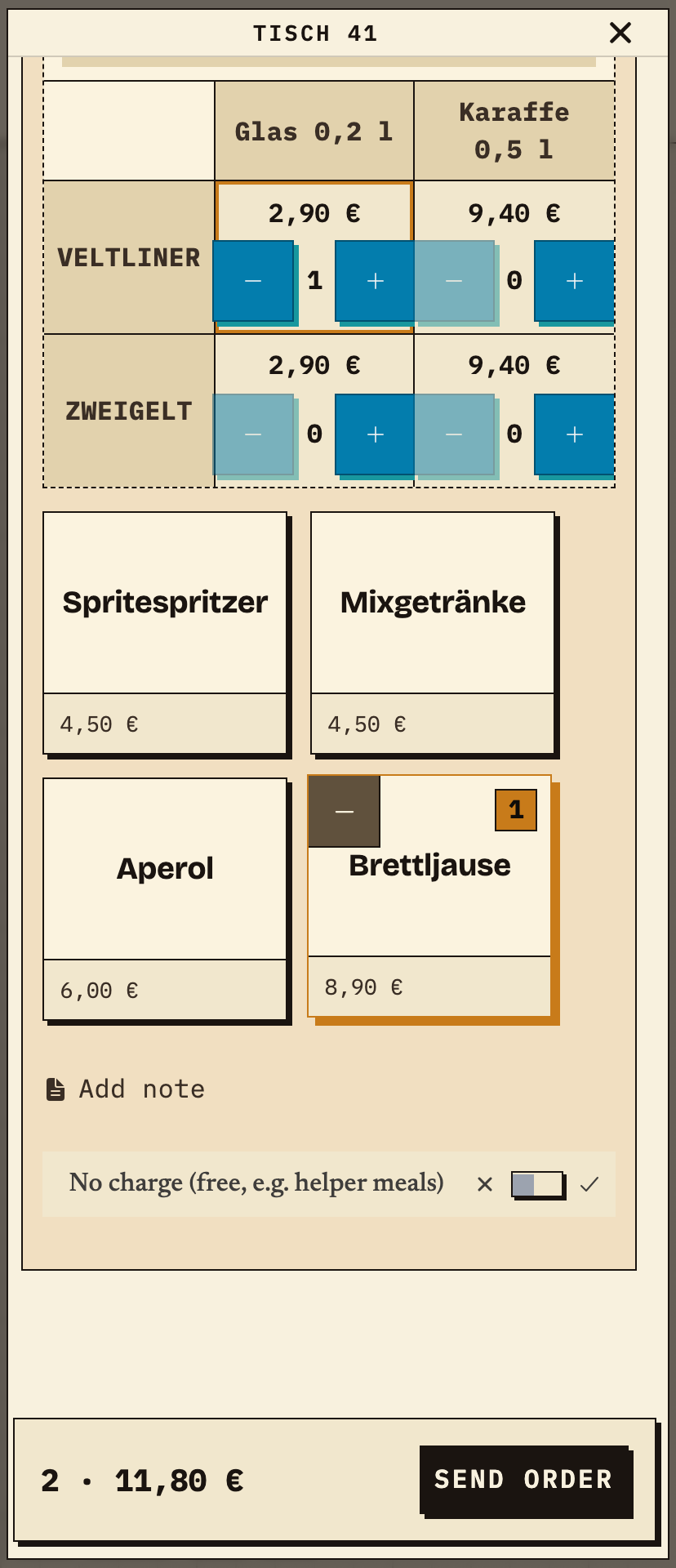
The helper opens table 41 in service mode and selects Veltliner by the glass plus a snack platter. Before sending, the helper checks two items and €11.80. The order reaches the responsible stations as one order.
Observation
Table 41: 1× Wein · Veltliner · Glas 0,2 l (€2.90) + 1× Brettljause (€8.90) = 2 items, €11.80.
Next check
Send the order and check that the bar and kitchen receive only their own items.
Table 41 on a phone: wine option matrix with Veltliner and Zweigelt plus 0.2 l glass and 0.5 l carafe, Veltliner by the glass and a snack platter selected, total 2 items €11.80
First round: Veltliner by the glass and a snack platter, 2 items, €11.80 (test data).
05

What does the bar see from this round?

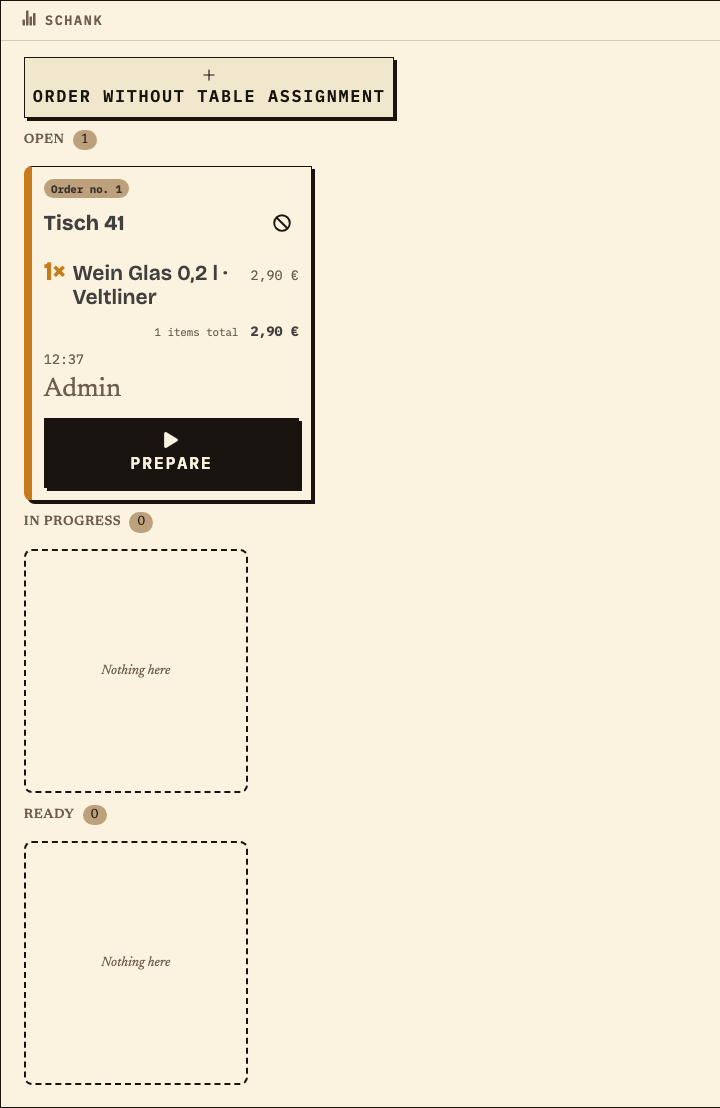
The bar receives order no. 1 for table 41 with the wine but without the snack. It moves the item through “Prepare” and “Ready”. Under the same order number, the kitchen sees only the snack platter.
Observation
Bar: order no. 1, table 41, 1× Wein Glas 0,2 l · Veltliner, €2.90, status Open.
Next check
Prepare the wine; the snack is handled in the kitchen in parallel.
Bar monitor with order no. 1 for table 41, only 1× Wein Glas 0,2 l Veltliner, €2.90, status Open
Bar: only the wine from the first round, order no. 1 (test data).
06

How does the next round stay assigned to the table?

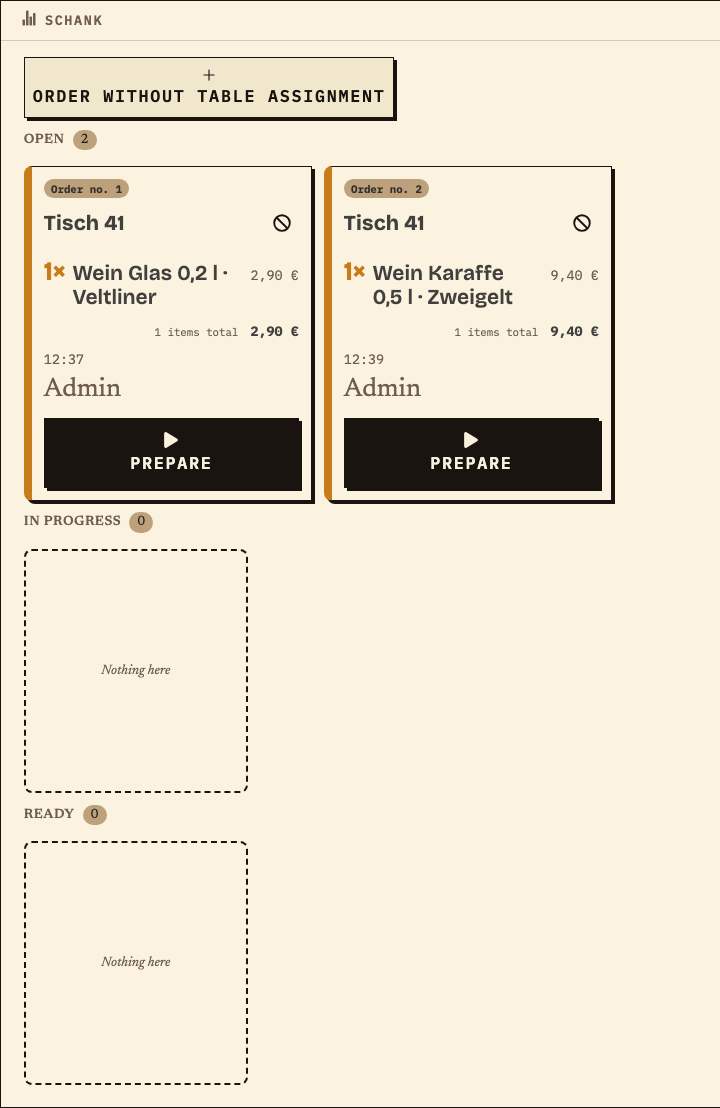
The service opens table 41 again and records the second round as a new order. The bar shows order no. 1 and no. 2 side by side; the rounds are not merged into one order. When serving and handing over, check which item belongs to which order number.
Observation
Bar: table 41, order no. 1 (glass of Veltliner, €2.90) and order no. 2 (carafe of Zweigelt, €9.40), both Open.
Next check
Prepare round 2 and match the order numbers when serving.
Bar monitor with two orders for table 41: no. 1 with a glass of Veltliner, no. 2 with a carafe of Zweigelt, both status Open
Second round at the same table: order no. 1 and no. 2 side by side (test data).

Benefits at a glance

How Bierblock helps your team

  • Reuse last year’s setup as a copy
  • Check prices, options and tables before the date
  • Keep table rounds traceable by order number and station
Fictional example

An example from festival operations

Recurring club wine tavern

The club copies “Vereinsheuriger 2025” as “Vereinsheuriger 2026”. The date is set again and new helper PINs are issued. In the copy, wine is still €2.90 at the bar and the snack platter €8.90 in the kitchen; the carafe price is checked for 2026. A test round at table 41 – Veltliner by the glass and a snack platter, €11.80 – reaches the bar and kitchen under order no. 1. The second round with a carafe of Zweigelt remains order no. 2 at the same table. After the evening, the team compares recorded quantities with remaining bottles and purchases; the report is not a stock count.

Frequently asked questions

What organisers often ask.

Everything about setup, usage and costs.

What is copied when I duplicate an event?
Product categories, products with prices, photos, options and station assignments, rooms, tables, and stations with their positions and assignments are copied. The copy gets a new name and a new public identifier; the person duplicating becomes the sole owner.
What is not copied?
Orders and payments, helper PINs, co-organizers, the event date and event settings such as the revenue share for waiters are not copied. Set these again for the next date.
Does the copy count toward the fair-use yearly limit?
Yes, unless an event package applies: a copy is a real event and counts toward the limit of 30 real events per calendar year. An event package removes the yearly limit; “Save as template” is excluded. Prices and terms are listed on the pricing page.
Do two rounds at the same table stay separate?
Yes. The service opens the same table again and sends a new order. The rounds keep separate order numbers, and the bar shows them side by side. When serving, check which item belongs to which order number.
Does the kitchen see the wine?
No. The kitchen only sees the items assigned to it, which is the snack platter. The wine appears at the bar. Both views carry the same order number so the round stays together.
Is the report a stock count?
No. It shows recorded order quantities. Remaining bottles, serving losses, open rounds and purchases must be checked separately; the report is not a stock or cash register system.
Do the devices need internet?
The bar, kitchen and service need internet access to share new orders. During a short interruption, an order may wait on the device where it was entered and be sent later. Other devices cannot see it until then. Check the waiting order on the original device before entering it again, and agree on a fallback for longer outages.
What does Bierblock cost for a club wine tavern?
One-time: €99 for one month. Monthly: €49. Yearly: €299 for up to 30 real events per calendar year within the fair-use framework.

Ready?

See how your team could take orders.

Open the public demo to explore order taking, the kitchen and the bar. No account is needed. To prepare your own setup, start a test event afterwards.

Open the demo — no sign-upBuild your own test event

Start without an account. Register to save. Your own demo events allow up to 20 test orders.

See pricing