For music clubs, brass bands and festival teams

Music festival software: clear order peaks during the break

When the music stops for a break, several tables order at almost the same time. Your helpers take the rounds on their phones; the bar and kitchen see their items as readable tickets under the same order number. This keeps the order status traceable despite the noise. The devices need internet access; how quickly a round is ready depends on the team, preparation and crowd. Test the flow before the festival with one test round.

The Problem

Where the break becomes unclear

The music break is short, while the routes between table, bar and kitchen stay separate.

Several rounds at the same moment

As soon as the break starts, several tables order at once. A shout does not reliably show who is first.

Shouts are lost in the noise

Between the stage and the bar, the order is hard to understand. A readable channel does not replace your process, but it makes the items unambiguous.

Kitchen and bar count separately

Drinks and food run at different stations. Without a shared order number, it is unclear which items belong to the same round.

The Solution

How the order status stays readable during the break

The flow stays small: take a round, work the stations separately, hand over open items.

Take a round at the table

The helper selects the table and collects drinks and food in one order. The round carries one order number; quantities are checked before sending.

Bar sees drinks, kitchen sees food

Each product is assigned to a station. The bar works only its drinks, the kitchen only its food – both under the same order number.

Bar management

Keep open work in view

Open, In progress and Ready show what is still open and what is done at each station. At a helper change, review the open items together; ready means prepared, not served or paid.

Digital order taking

Prepare before the break

Define the menu, stations and a fallback for connection outages. Test one round with a drink and a food item at the actual work positions; the devices need internet access.

Volunteer management
01

What does a helper take during the break?

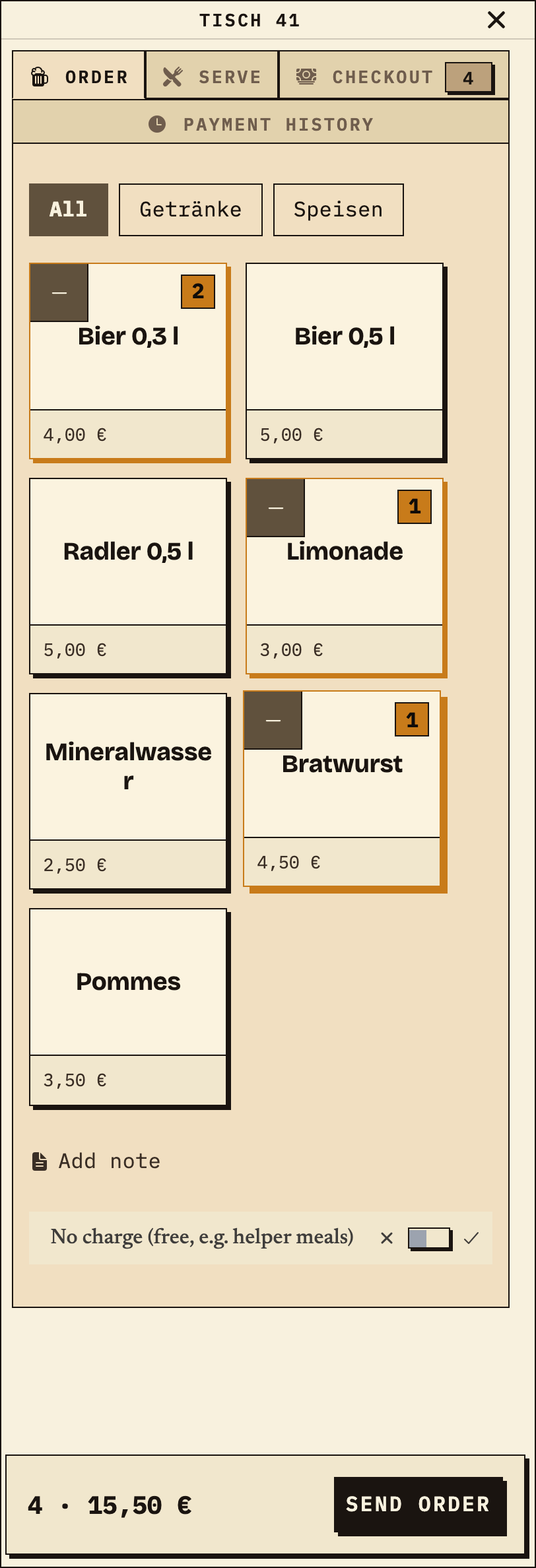
At table 41, the helper collects two 0.3 l beers, one lemonade and one bratwurst in a single order. The basket shows four items and €15.50. Sending creates one order number for the bar and kitchen.
Observation
Table 41: 2× 0.3 l beer, 1× lemonade, 1× bratwurst; 4 items · €15.50.
Next check
Check that the round appears at both stations under the same number and that the quantities match.
Bierblock order overview on a phone: table 41 with 2× 0.3 l beer, 1× lemonade and 1× bratwurst, total 4 · €15.50, before sending
Mixed break-time round at table 41: four items, €15.50, before sending (test data).
02

How does the bar keep several rounds in view?

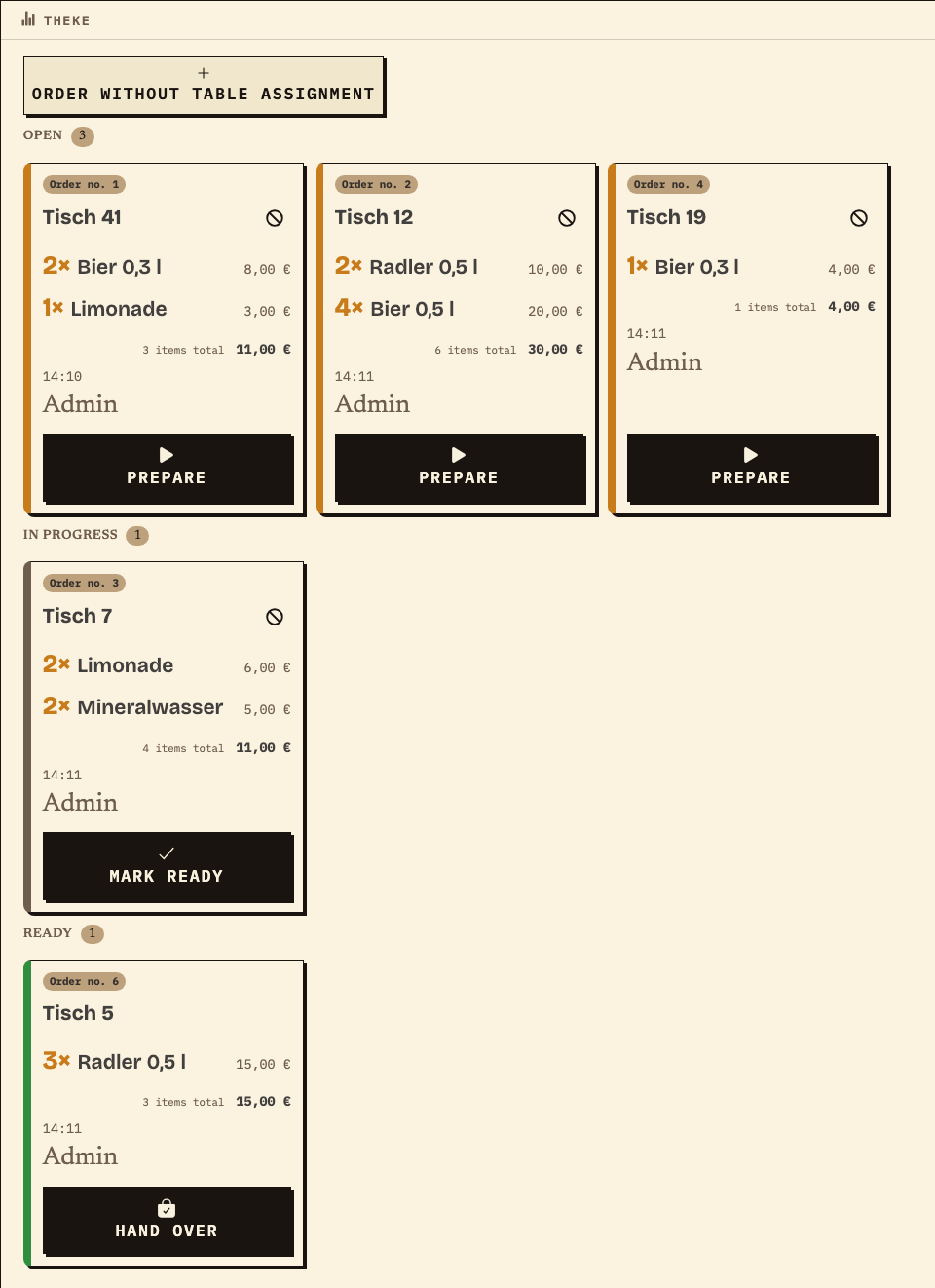
The bar shows the drinks from round no. 1 together with other drink orders. Open, In progress and Ready are separate; each card shows the table, items and order number. The bratwurst is not visible here.
Observation
Bar: no. 1 table 41 with 2× 0.3 l beer and 1× lemonade (3 items · €11.00) open; plus no. 2 table 12, no. 4 table 19, no. 3 table 7 in progress and no. 6 table 5 ready.
Next check
Move one round to “Prepare” and check that it moves to “In progress”.
Bar monitor with several drink orders: order no. 1 at table 41 with 2× 0.3 l beer and 1× lemonade open, further orders in progress and ready
The bar sees only drinks, but all open rounds with table, number and status (test data).
03

What does the kitchen see from the same rounds?

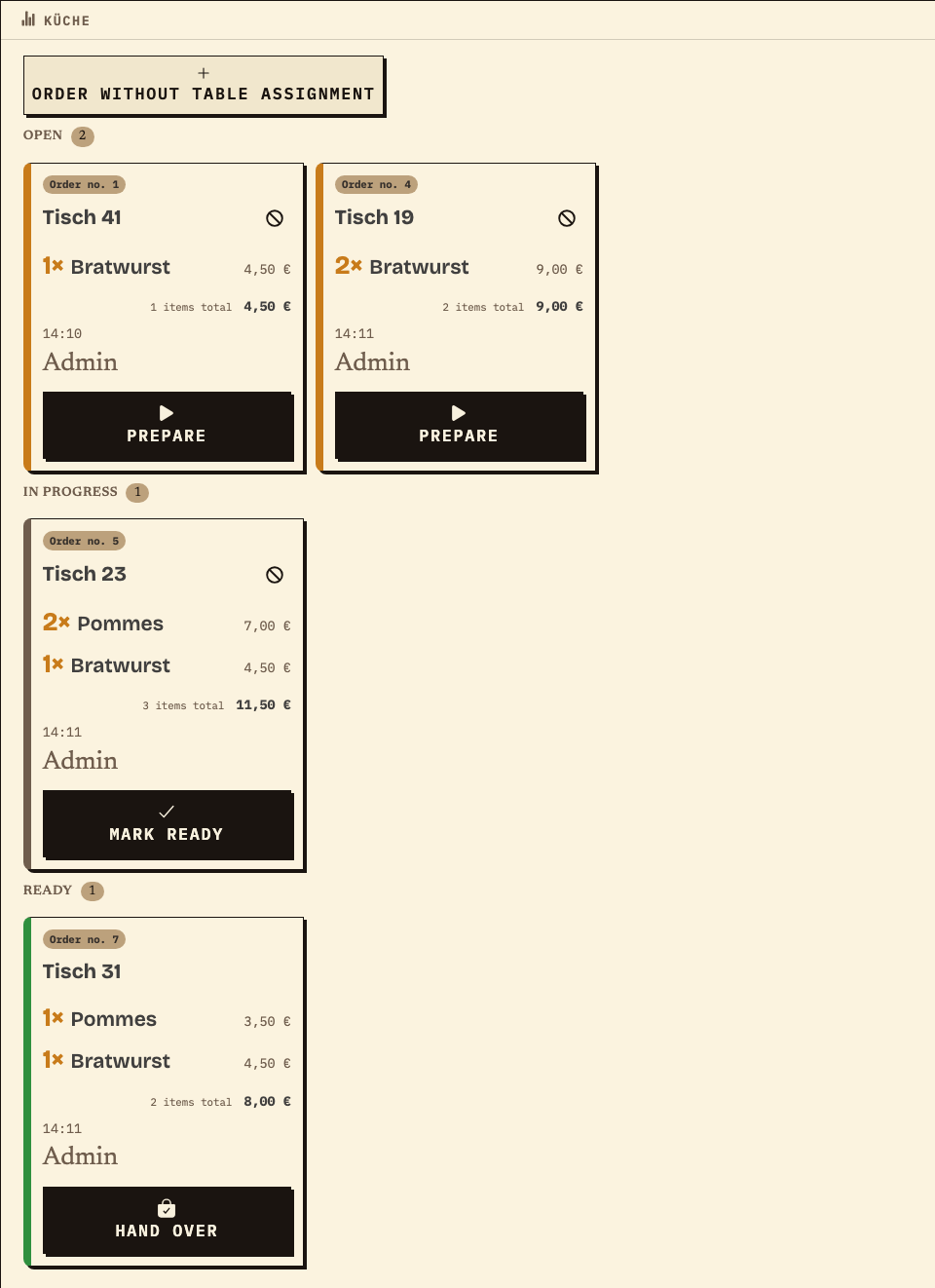
The kitchen shows only food: the bratwurst from round no. 1 plus other food orders. The drinks from the same rounds are absent; the order number remains visible.
Observation
Kitchen: no. 1 table 41 with 1× bratwurst (1 item · €4.50) open; plus no. 4 table 19 open, no. 5 table 23 in progress and no. 7 table 31 ready.
Next check
Mark one food item ready and check that the drinks from the same round remain untouched at the bar.
Kitchen monitor with several food orders: order no. 1 at table 41 with 1× bratwurst open, further orders in progress and ready
The kitchen sees only food; the order number links it to the round at the bar (test data).
04

How do you see what is done after the break?

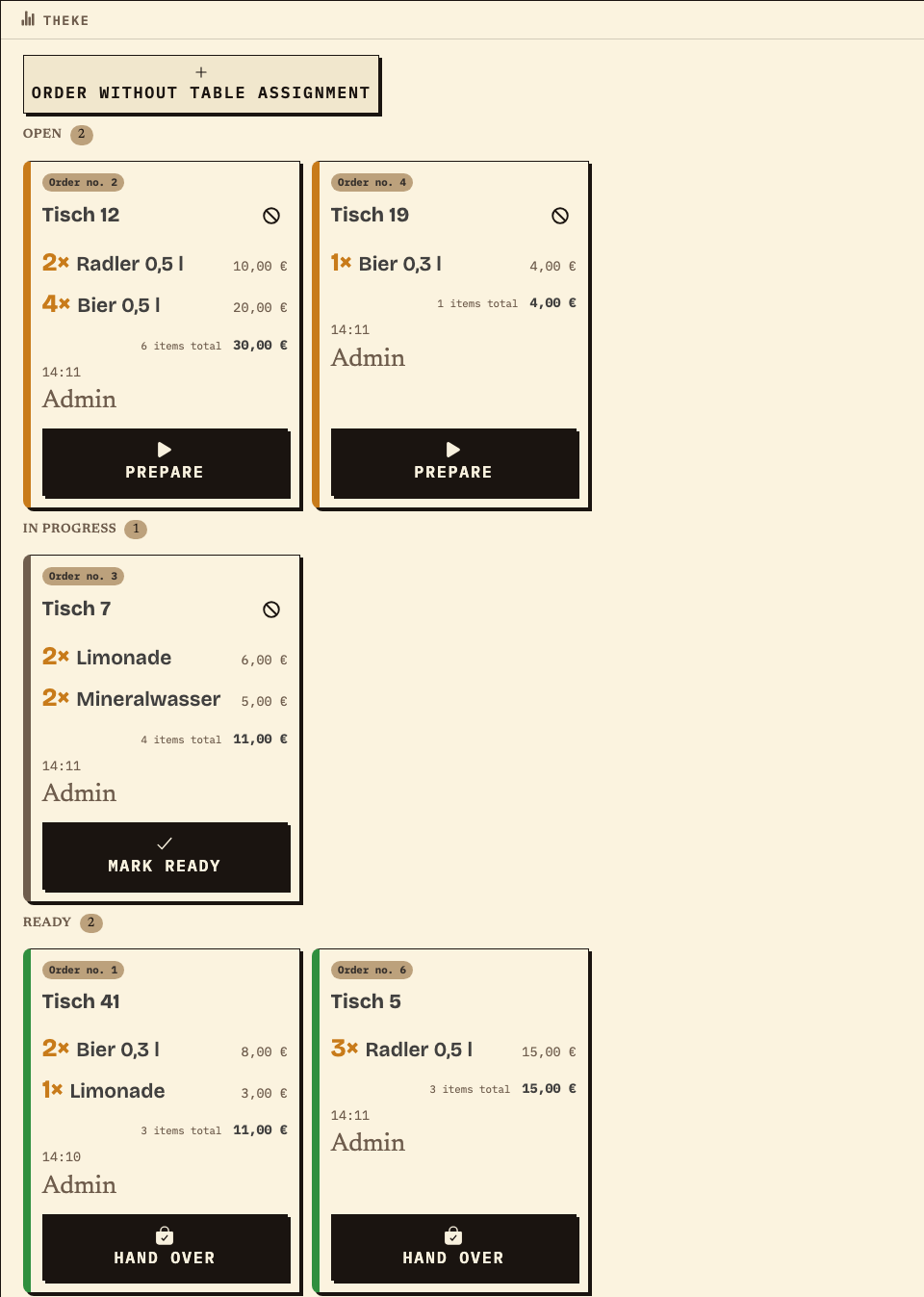
When the bar marks the drinks from round no. 1 as ready, the card moves to “Ready”. The other rounds remain open or in progress. This lets you hand over the status without counting every item out loud.
Observation
Bar after the break: no. 1 table 41 ready; no. 2 table 12 and no. 4 table 19 open, no. 3 table 7 in progress.
Next check
Review the open cards together at the shift change and agree who takes them over.
Bar monitor after the break: order no. 1 at table 41 is ready, further orders remain open or in progress
The same bar monitor after marking ready: no. 1 is done, open rounds remain visible (test data).

Work material

Break-time rehearsal for your music festival

Fill in the list before the festival and review it with the bar, kitchen and helpers. The right column states the expected result.

Example (test data): round no. 1 at table 41 with 2× 0.3 l beer, 1× lemonade and 1× bratwurst. The values are a pattern, not a measurement of waiting time or capacity.

Step or entryStation, products and testExpected result

Scroll horizontally to see the full table.

Entries are not saved. Print the completed list before reloading or note the values separately.

Benefits at a glance

How Bierblock helps your team

  • Take drinks and food in one round
  • Give the bar and kitchen their own item views
  • Review open orders together at a helper change
Fictional example

An example from festival operations

Example: music break with two stations

A fictional music club offers beer and lemonade at the bar plus bratwurst and fries in the kitchen. Before the performance, the person responsible assigns the products to the two stations and tests a mixed round at table 41. During the break, helpers take one round per table; the bar sees only drinks, the kitchen only food, both under the same order number. A named person answers questions about sold-out items. At the helper change, the open cards are handed to the next person. The devices need internet access; how quickly a round is ready depends on the team, preparation and crowd. All names, times and prices are test data.

Frequently asked questions

What organisers often ask.

Everything about setup, usage and costs.

Is one device enough for the bar and kitchen?
Technically, several stations can be shown on one device. During the break, what matters is who works which card. For separate work positions, each station needs its own access and a short briefing; check the permissions before the festival.
What happens with weak Wi-Fi?
The bar, kitchen and helpers need internet access to see new orders together. During a short interruption, an order can wait on the device that took it and be sent later. Until then, the other devices do not see it. Check the waiting order on that device and agree a fallback for longer outages.
Can we cover several breaks in one evening?
Yes, one event can run all evening. Orders stay under the same event; there is no automatic shift change. Decide who takes over the open cards at each break.
Does Bierblock measure waiting time during the break?
No. The view shows order status and items, but not waiting time or preparation duration. How quickly something is ready depends on the team, preparation and crowd.
Do we need a new event for every break?
No. A configured event can be reused. Check the menu, stations and access before the festival; a new event is only needed if you want separate data or a clear cut.
How do we avoid mixing up drinks and food?
Each product is assigned to a station. The bar sees only drinks, the kitchen only food, both under the same order number. Check the assignment with a test round at the actual work positions.

Test your break-time round with one test order

Take a mixed round at one table and check it at the bar and kitchen. The public demo is free; your own demo events are limited to 20 orders per event.

Open the demo — no sign-upBuild your own test event

Start without an account. Register to save. Your own demo events allow up to 20 test orders.

See pricing