Paper, printer or screen: which ordering workflow fits your event?
A single serving point needs a different ordering workflow from a festival with table service, a separate kitchen and a bar. This page compares paper slips, a register with order printing and the browser-based screen workflow using the same criteria. The page provides a requirement list with the next test step — not a product recommendation. Every digital workflow needs power and a connection at the workplace.
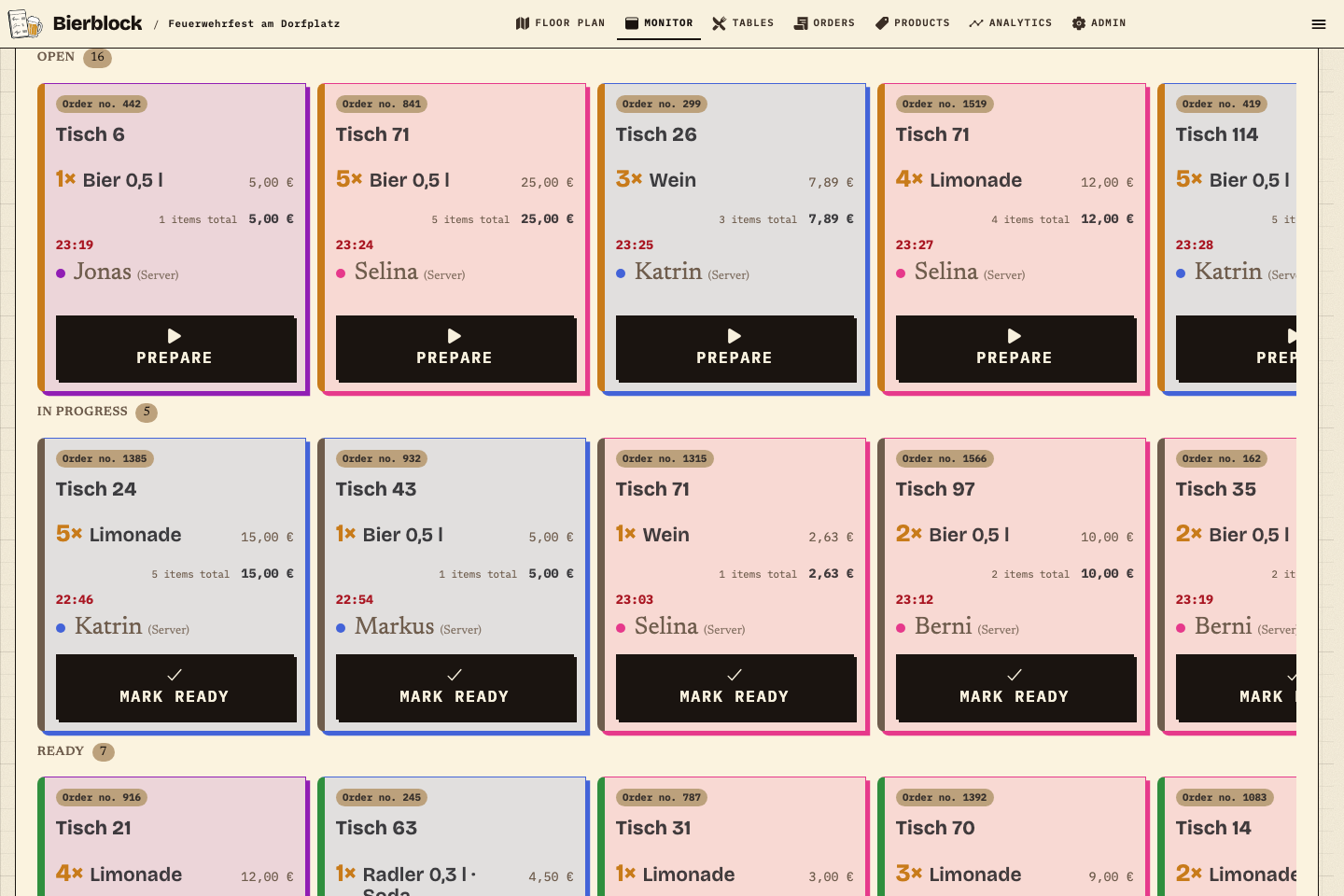
The screen workflow at a glance: items appear as cards in Open, In progress and Ready — without a receipt printer (demo festival test data).
The Problem
One serving point, or a separate kitchen and bar?
Both scenarios are fictional festivals run by the same club. They are not a size recommendation; they show the questions to answer before choosing, and the only difference is the workflow.
01
Scenario A: One serving point, everything in one place
Drinks and food are served at one counter, guests collect their own order, there is no table service and the team stays the same all evening. The slip is handed in at the counter and the status is discussed verbally. A legible paper slip can be enough here. If you still take orders digitally, one screen that sees all items is sufficient; separate stations and shift access are not needed.
Scenario B: Table service, separate kitchen and bar
Service takes orders at tables, the kitchen works in a side room and the bar at the counter; the shift changes at 9 pm. What matters is how the order reaches the right serving point and who can see what is still open. If your existing register already forwards orders to separate serving points, check that workflow first. Otherwise the screen workflow shows how kitchen and bar each see only their items and the status survives the shift change.
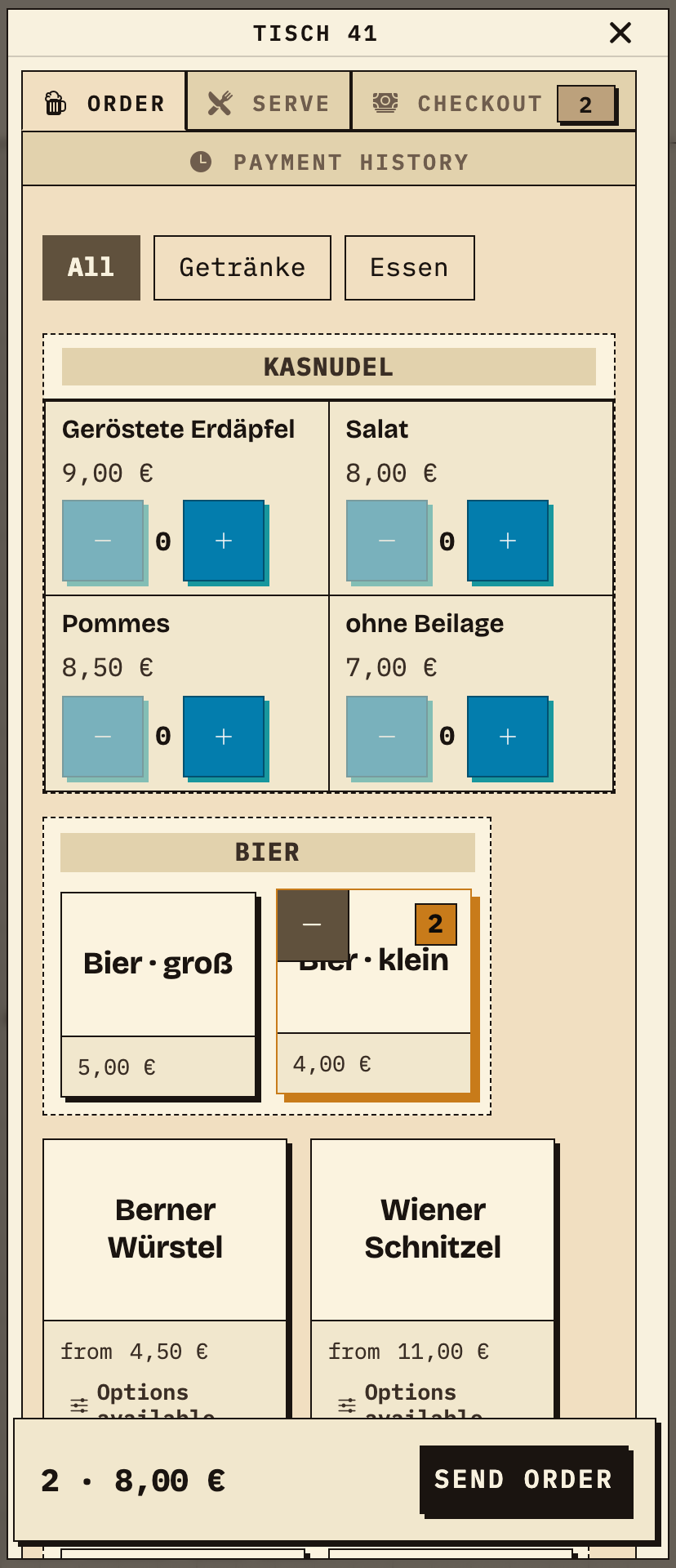
In the screen workflow, service takes the order at the table in the browser: table 41, two small beers, 2 items totalling €8.00. The same step happens on a paper slip, at a register, or on a handheld. No fixed POS terminal is needed for the browser workflow.
Take the same test order on the planned device and check that it is complete without asking again.
Order taken at the table: table 41, 2× small beer, €8.00, before sending (demo festival test data).
02
The same order at the responsible serving point
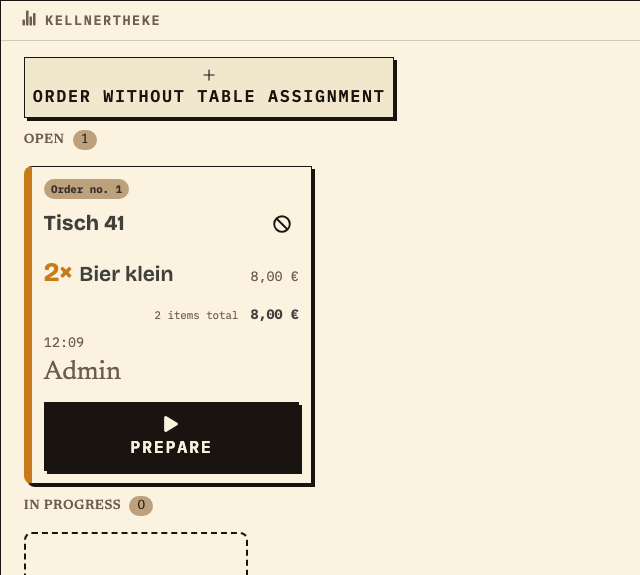
After sending, order no. 1 appears on the monitor of the Kellnertheke station: table 41, 2× small beer, €8.00, status Open. The Kellnertheke selects “Prepare” and later marks the item ready; serving and cashiering happen separately at the table. Paper reaches the serving point as a slip, a register system as a printed ticket — the difference is the work status, not the order itself.
Observation
Order no. 1, table 41, 2× small beer, €8.00, Open 1 / In progress 0.
Next check
Send a test order through Open, In progress and Ready and check that the status remains visible at the shift change.
The same order at the serving point: order no. 1 with items and status (demo festival test data).
Work material
Requirement list for your ordering workflow
Fill in the list for the workflow you are checking — paper, register or screen. The middle column names the result that shows the point is met; the right column gives a test step as a pattern.
The test step is a fictional example (test data), not a recommendation for a system. What counts is the trial at the actual workplace.
Step or entry
Requirement
Fits when …
Next test step (example)
Scroll horizontally to see the full table.
Entries are not saved. Print the completed list before reloading or note the values separately.
Side by side
Paper, register and screen judged by the same criteria
The table orders the three workflows by the actual work. Register systems differ in scope and order routing by provider, so check the specific solution separately. On narrow screens the table scrolls sideways.
Paper or tally sheet
Bierblock for orders
Register with order printer
Taking orders
Written by hand at the table or counter; agree on shorthand and legibility.
In the browser on a phone or tablet: table or direct sale, product, variant, quantity.
At the register or on a handheld; whether table service is possible depends on the system.
Devices
Slips, pens and a fixed place to store them; no extra technology.
One order-taking device per person taking orders and one browser per serving point that should see its items; power or a charged power bank.
Register or handheld, a receipt printer at the serving point and paper rolls; setup and power needs vary by system.
Hand-off
The slip is carried to the serving point or left there.
Assigned items appear at the responsible station after successful transmission. Before that, the order is only visible on the order-taking device.
The ticket is printed at the serving point. Whether several serving points are supplied separately depends on the configuration.
Work status
The team marks the slip or discusses status; there is no shared overview.
Stations move items through Open, In progress and Ready; serving and cashiering are separate steps.
The printed ticket is usually ticked off. A digital status exists only if the system provides one.
Connection
Paper works without internet or power.
Wi-Fi or mobile data on the order-taking and station devices. A queued order is not visible at the station before it is sent.
Depends on the setup: a connected printer needs a connection, a standalone ticket does not.
Payment and receipt
Through the usual register or cash; separate from the order slip.
Bierblock records cashiering status and captured amounts but does not process card payments or issue fiscal receipts.
Payment and fiscal receipt run through the register; the printed order ticket is an internal work slip.
Preparation
Agree on shorthand, storage and handover within the team – usually one briefing.
Set up the event, products, stations, access and devices; send a test order through the whole workflow.
Configure items, receipt printer and routing, train staff and clarify the provider’s support.
The Solution
What you decide after the comparison
The comparison gives no recommendation; it shows the points where the workflows differ. These four decisions remain with you.
01
Check the workflow, not the product
If a legible slip is enough because everything is served in one place, that is the simplest solution. If you need separate serving points, a shared status and a handover between shifts, test the screen workflow with a test order.
02
Include your existing register first
If your register already forwards orders to the right serving points, check that workflow before adding another system. Bierblock sits alongside it, not in its place.
Bierblock records cashiering but does not process card payments or issue fiscal receipts. The register process remains a separate decision.
04
Record the next test step
The requirement list above captures what the chosen workflow must do. A trial with a typical order shows whether devices, connection and hand-off work together at the venue.
||||Compare three ordering workflows by the same criteria
||||Place paper, register and screen without a blanket verdict
||||Record the requirement list and next test step for your festival
Fictional example
An example from festival operations
Example: the same club, two festivals
A fictional club celebrates a summer festival in June at a single serving counter: drinks and food come from the same place and four helpers stay on all evening. A legible paper slip is enough; the register stands next to it as usual. In September the same club runs a harvest festival with table service, a kitchen in a side room and a bar at the counter, and the shift changes at 9 pm. For this second workflow the team checks the screen workflow: service takes orders on a phone, kitchen and bar each see their items, and the open status remains visible at the shift change. The comparison changes nothing about the register: payment and receipts run separately at both festivals. Both festivals and all details are an example, not a customer reference.
Frequently asked questions
What organisers often ask.
Everything about setup, usage and costs.
Is a paper slip enough for our festival?
At a single serving point with an experienced team and no shift change, often yes. What matters is whether the hand-off works reliably and someone knows the open status. If the slip becomes the bottleneck because kitchen and bar work separately, test a shared order view with a test order. The number of guests alone does not decide this.
When is a register with order printing the better fit?
When you handle payment and receipts through the register anyway and it already forwards orders to your serving points. Scope, routing and cost differ by provider; this page deliberately names no competitor prices. Check the specific solution with your serving points in a trial.
How is Bierblock different from a register system?
Bierblock organises order taking and hand-off to the responsible serving points and records captured cashiering. It does not process card payments or issue fiscal receipts. A separate register remains responsible for payment and receipts.
Can we try the screen workflow beforehand?
Yes. The public demo is free; your own demo events are limited to 20 orders each. Take the devices you plan to use at the venue and send one order through every planned serving point.
What happens during an internet outage?
Paper keeps working as long as slips and pens are there. The screen workflow needs a connection for order taking and serving points. An order that has not been transmitted can wait on the order-taking device and is not visible at the station until then. For longer outages, agree on a fallback in advance.
Does the Bierblock ticket replace the register?
No. The order ticket or work slip is an internal aid and can be printed as a PDF through the browser. It is not a fiscal receipt.
Test your ordering workflow in a trial
Take a typical order on your devices and send it to the planned serving points. The public demo is free; your own demo events are limited to 20 orders each.
We measure page views, calls-to-action clicks, and opening the print dialog for work materials using a random, pseudonymous identifier on our servers. Work-material entries are not collected. No advertising cookies or sharing with third parties. You can withdraw consent at any time via “Cookie settings” in the footer.Privacy
We measure page views, calls-to-action clicks, and opening the print dialog for work materials using a random, pseudonymous identifier on our servers. Work-material entries are not collected. No advertising cookies or sharing with third parties. You can withdraw consent at any time via “Cookie settings” in the footer.Privacy