What exactly was ordered?
Whether 0.5 l or 0.3 l beer, which Radler variant, how many schnitzels with fries: after the festival, tally lists can no longer reconstruct this.
 BierblockDELogin
After the festival, Bierblock answers the questions that otherwise leave only paper slips and memories: what was ordered, when, at which station, at which table — and by whom? Which checkouts are documented? The evaluation shows recorded events, not a counted cash balance or profit.
Work material
Document an observation before you define a cause or a measure. Connect order and checkout data with feedback from bar, kitchen and service.
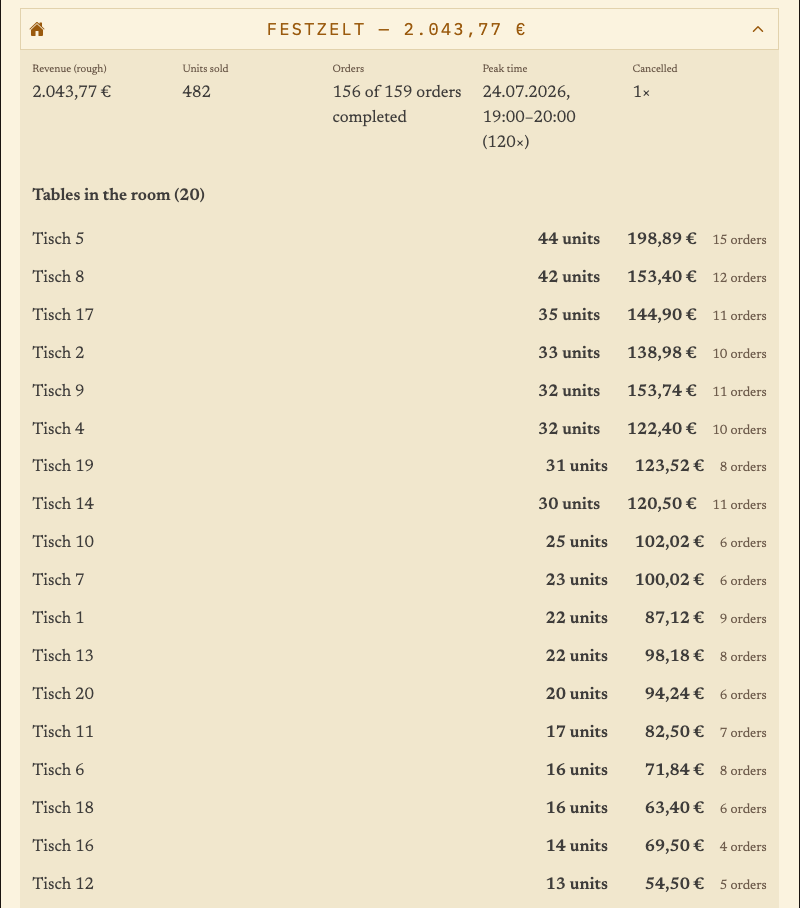
Example from the evaluation: during the peak on 24 July between 7 and 8 pm, 120 orders were recorded in the marquee; table 5 leads across both evenings with 44 units. These figures do not prove waiting time. Keep team observation and data source separately; evaluate the measure again at the next festival.
| Step or entry | Data source and observation | Team feedback | Possible cause (hypothesis) | Measure for the next festival | Responsible | Check at the next festival |
|---|---|---|---|---|---|---|
Scroll horizontally to see the full table.
Entries are not saved. Print the completed sheet before reloading or note the values separately.
The Problem
The evaluation answers concrete questions about the recorded flow. Six questions are at the centre — and each has its own view.
Whether 0.5 l or 0.3 l beer, which Radler variant, how many schnitzels with fries: after the festival, tally lists can no longer reconstruct this.
Order times show which hours recorded a lot. Whether the team was waiting during the same period is not written on any slip.
Orders and checkouts often run through different people. Adding both together mixes two figures that must stay separate.
The Solution
Each view answers one question. Together they describe how the festival ran, without anyone having to sort paper slips.
Quantities sold per product and variant — including sizes, variants and extras.
View drink managementThe timeline and chronological log sort orders, checkouts and cancellations by time.
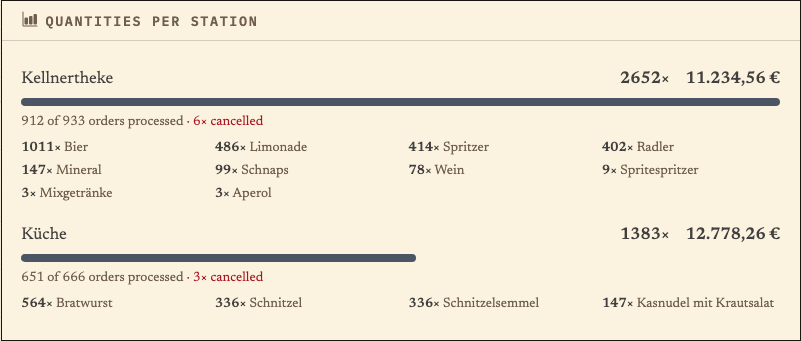
Quantities per station show how drinks and food were distributed across bar and kitchen.
The room report breaks order quantities down by room and table.
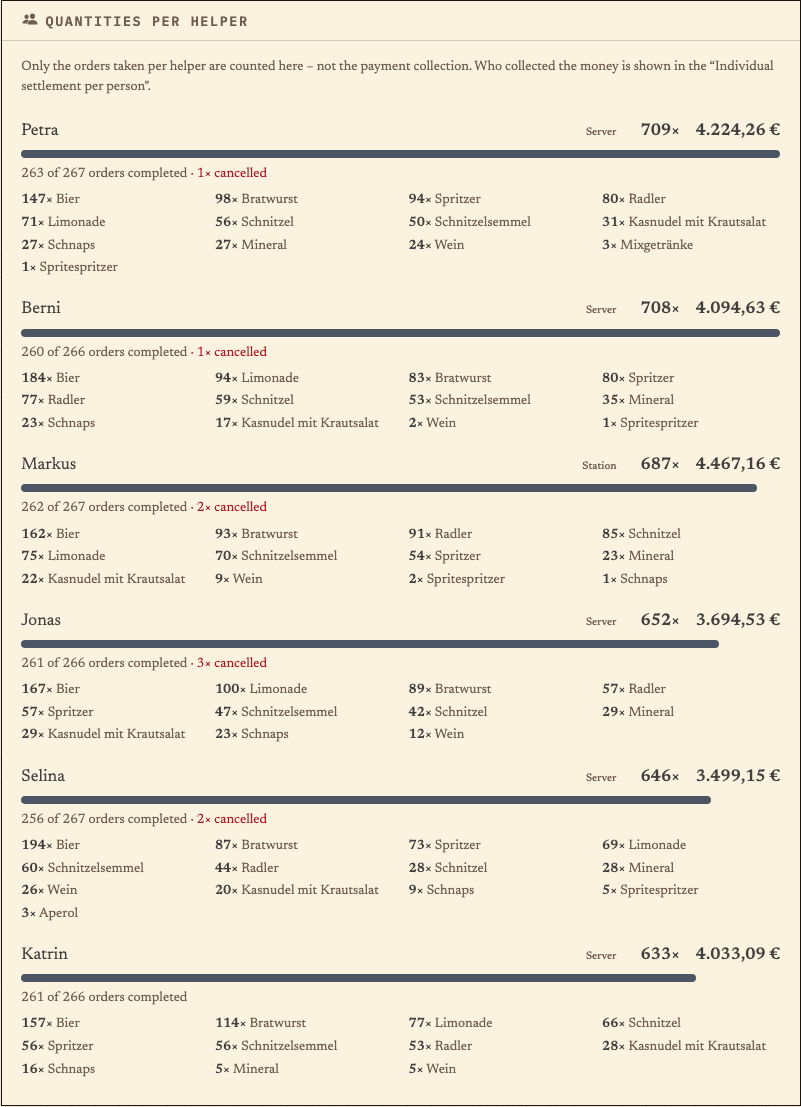
View table managementThe helper view counts recorded orders per person — without judging working time or performance.
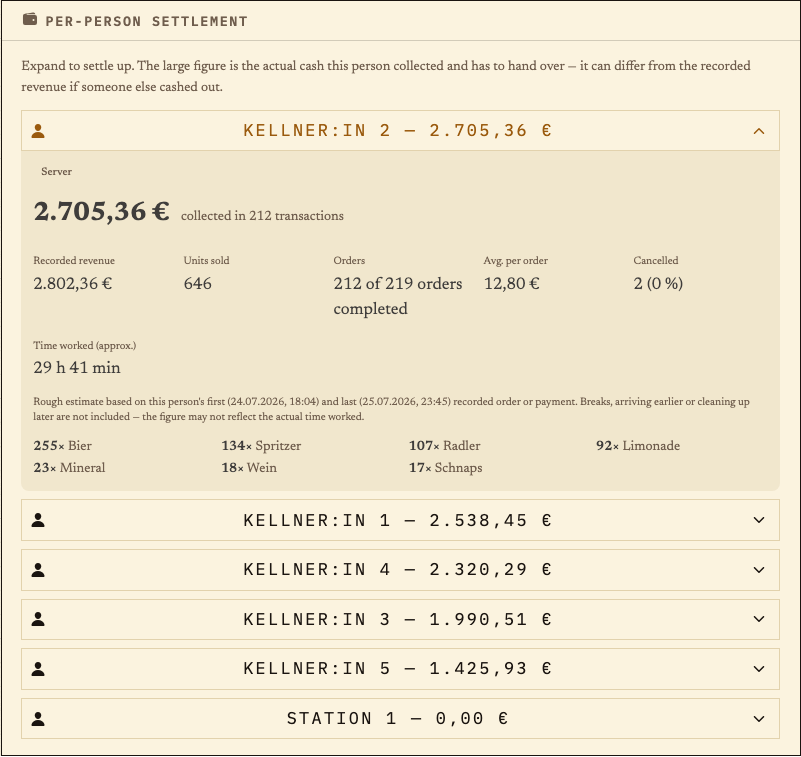
View volunteer managementThe per-person settlement compares collected cash, recorded revenue and orders per person.
The evaluation documents what was recorded in the system. These five figures are often confused during the debrief — only the first two are in Bierblock.
| What the figure shows | What it does not replace | |
|---|---|---|
| Recorded order value | Sum of non-cancelled order lines at the stored prices. Free-of-charge items are excluded. | Not a payment receipt: whether and how someone paid is not part of the order. |
| Documented checkout amount | Amounts entered by the team when collecting payment, with person and time. | Not an automatically counted cash balance; handovers and shortages must be checked separately. |
| Cash in the till | The balance actually counted after the festival. | Cannot be read from Bierblock — you count the till and change yourselves. |
| Consumption | The quantity actually poured or served, including shrinkage, breakage and free drinks. | Cannot be derived from order quantities; this needs counting or a stock reconciliation. |
| Profit | Revenue minus cost of goods and expenses. | Cannot be derived from order values; this needs purchase and cost accounting. |
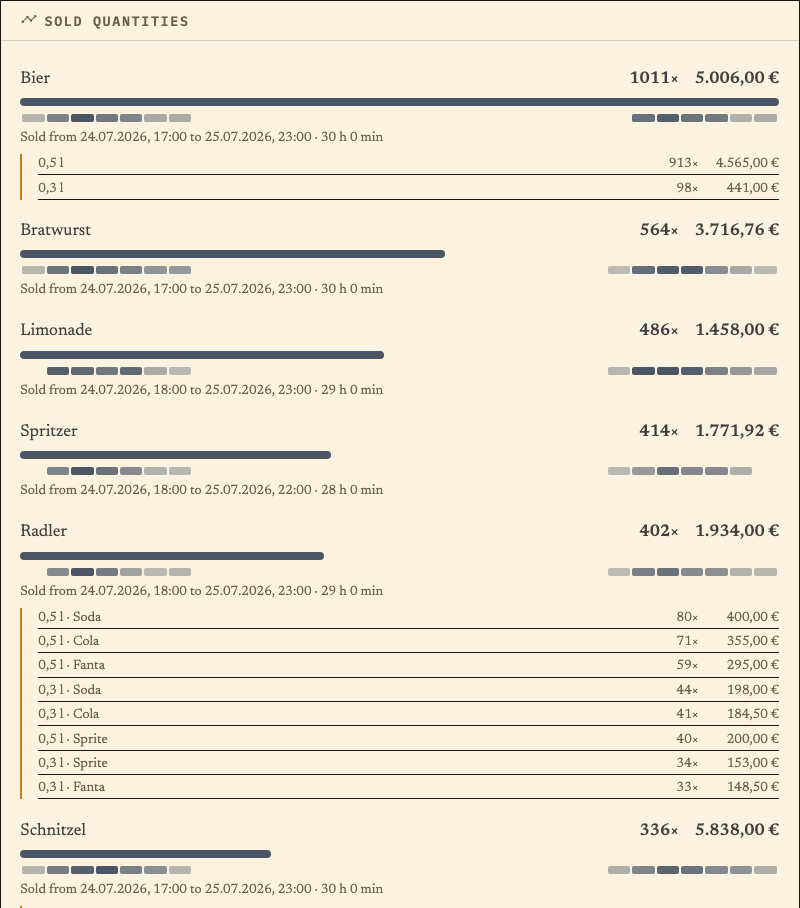
The product view sums non-cancelled order lines per product and shows the stored variants: size, variant and extras. Lines with “Sold from … to …” name the period in which the product was ordered.
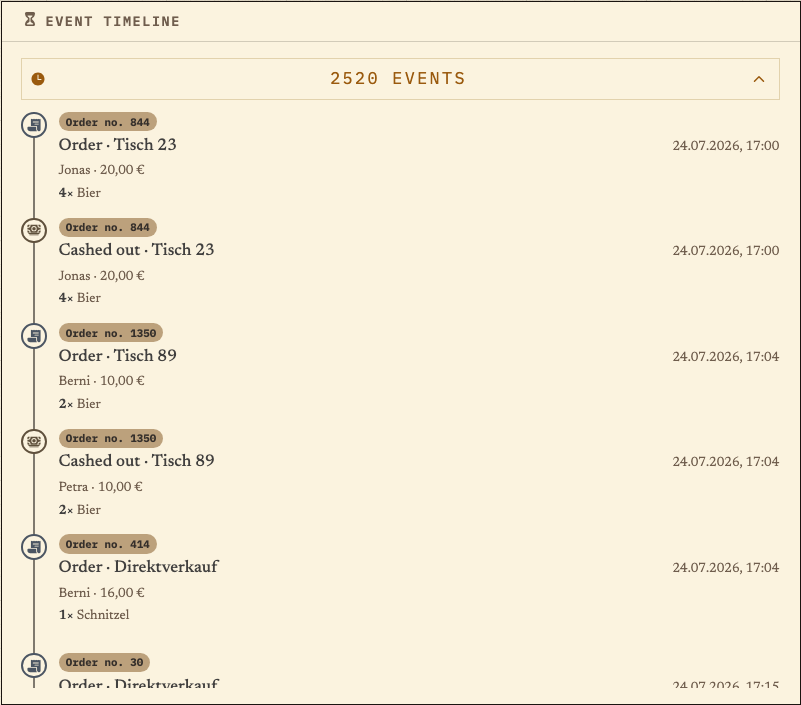
The chronological log lists order, checkout and cancellation events in the order they were recorded. Each entry names time, person, table or direct sale and amount; the number at the top counts all events.
The station view sums order lines per station and shows how many orders were completed or cancelled. An order with food and drinks appears at both stations.
The room view sums orders per room and table. Tables without a room assignment appear under “No room”; in the example that is the direct sale.
The helper view counts recorded orders per person and shows how many were completed or cancelled. Cash is explicitly not included here; it appears in the per-person settlement.
The per-person settlement compares collected cash, recorded revenue, units sold and orders. The displayed time span is a rough estimate from the first and last recorded order or checkout. The app labels it “work time (approx.)”; it means the activity span, not actual hours worked – breaks and periods without recorded actions are not included.
Take it with you
Use the “Export PDF”, “Export CSV” and “Copy anonymized for AI” buttons to start each output. Three outputs for three purposes: a report for the minutes, raw data for your own tables and an anonymised prompt for a first summary.
The dialog lets you choose the sections: overview, sold quantities, quantities per station, per-room report, timeline, quantities per helper, settlement and event timeline. Sections without data do not appear.
Contains title, creation date and the selected tables — for printing and the minutes.
One row per order line with timestamp, room, table, person who took the order, station, product, quantity, unit price, subtotal, status, cancellation details and a free-of-charge flag.
For Excel and your own analysis. The CSV contains the real names of the people who took orders and no total rows.
Copies the figures as a formulated prompt to the clipboard. Person names are replaced by role pseudonyms such as “Waiter 1”; product, station and room names remain.
For pasting into a chat assistant. Check the answer against the tables before adopting a recommendation.
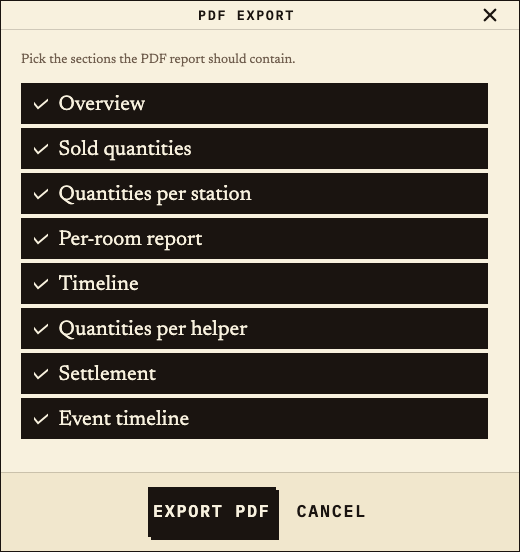
Generated from test data of the example festival. The report contains all sections except the full event timeline (2,520 events); you can add that separately in the dialog.
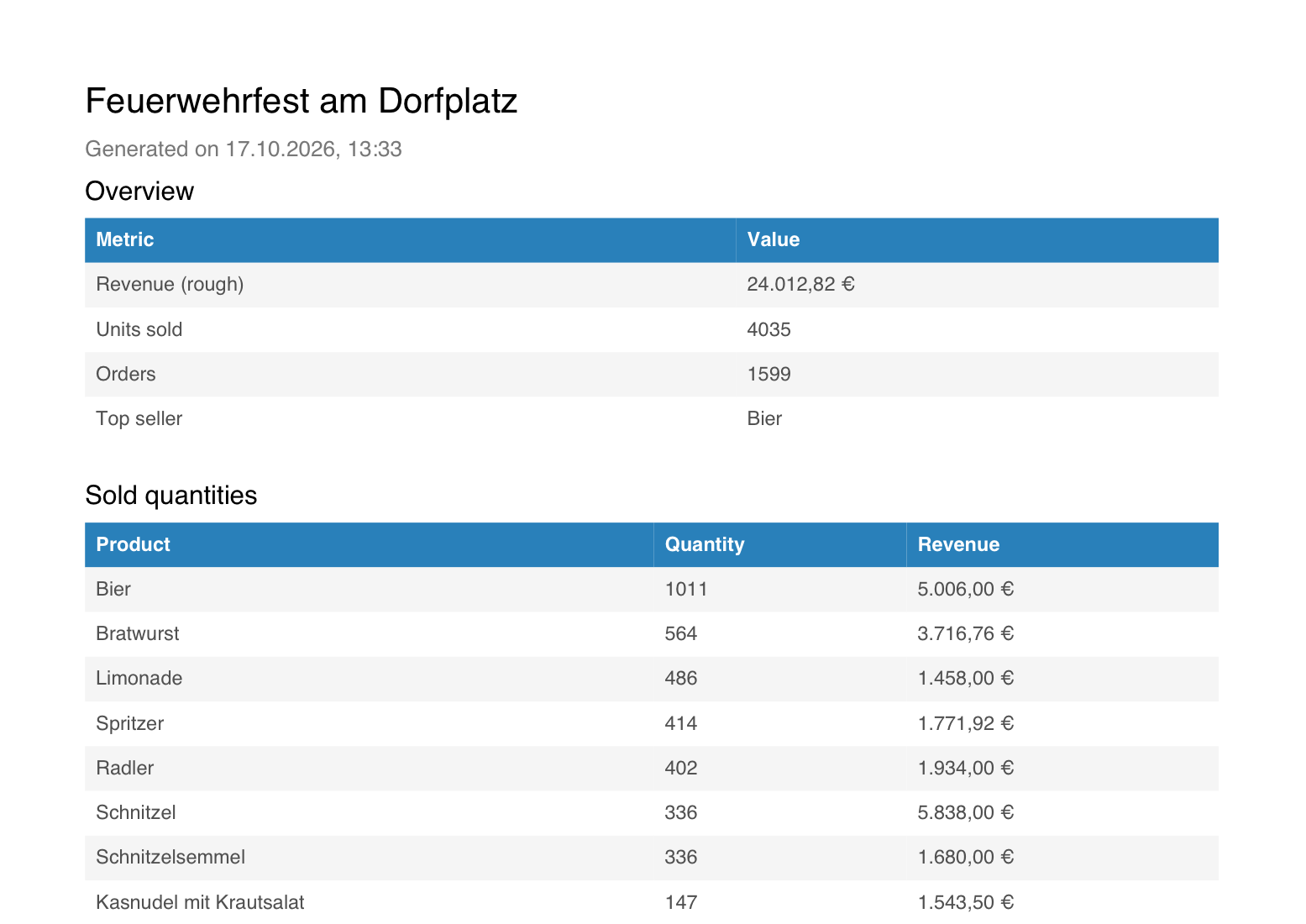
The sample report is a test-data export, not a settlement. It shows which sections the export contains; your file contains your own data.
Benefits at a glance
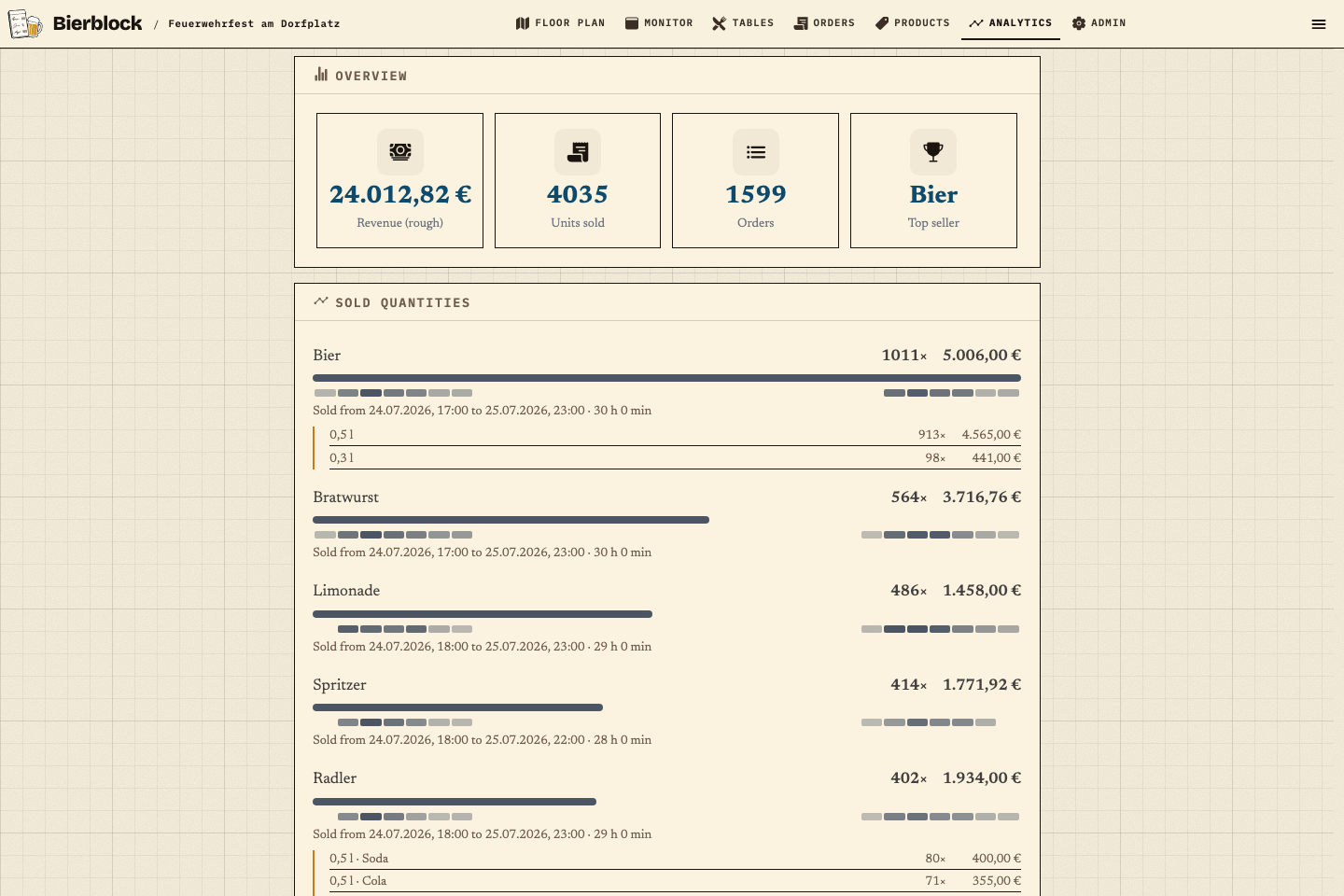
The fictional “Feuerwehrfest am Dorfplatz” with two evenings, two stations and 121 tables comes to 1,599 orders, 4,035 units sold and 24,012.82 € in recorded order value. The per-person settlement shows 2,705.36 € collected for one server against 2,802.36 € recorded revenue. Such differences are the material for the debrief. The full PDF report is available as a download further down; the figures come from test data, not from a customer event.
Frequently asked questions
Everything about setup, usage and costs.
Ready?
Open the public demo to explore order taking, the kitchen and the bar. No account is needed. To prepare your own setup, start a test event afterwards.
Start without an account. Register to save. Your own demo events allow up to 20 test orders.
See pricing