Offer to station
Who confirms the menu and prices? Who decides which station prepares each drink or meal? Make changes known to the whole team.
 BierblockDELogin
Your festival team needs to know who makes decisions, confirms local requirements and runs each serving point. This guide helps you turn those responsibilities into a work plan, rehearse orders and prepare handovers. Requirements depend on the venue and country; the linked official sources are in German.
Before choosing tools
Start with the event decisions and local checks, then use the service workflow below for orders and stations. The planning steps do not depend on Bierblock.
Confirm the date, venue and event format, then record the approved budget range in a shared planning brief.
Name who coordinates the festival and who covers that role. Assign area owners so decisions and open tasks have a clear contact.
Ask the responsible authorities and venue what applies to this event. Record confirmed requirements, responsible contacts and approval deadlines; rules vary by location.
Record each task, owner and due date in the checklist, and review outstanding items with the organising team.
Working guide for the organising team
Enter an owner and due date for every task. This operational list complements, rather than replaces, local planning and authority checks.
Entries are not saved. Print the completed list before reloading, or record it separately. Your browser will ask before leaving the page with unsaved entries.
Work material
This is what a filled-in work plan can look like. Keep the structure and replace the tasks, names and dates with your own. The checklist above runs through the same phases as a directly tickable list.
Illustrative example with invented names and dates. It describes one possible workflow, not a real festival and not a promise of a specific result.
| Step or entry | Owner | Due date |
|---|---|---|
Scroll horizontally to see the full table.
The example is pre-filled and can be edited directly. Entries are not saved; print the filled-in sheet before reloading or note the values separately.
The Problem
Name an owner for each handover. In a small team, one person can take on more than one role.
Who confirms the menu and prices? Who decides which station prepares each drink or meal? Make changes known to the whole team.
Who records table orders, who handles counter sales and where do questions go? Use the same table and station names in the team briefing.
Who checks incoming orders, marks an item ready and physically hands it over? A displayed status does not replace a call or agreed collection point.
The Solution
Use Bierblock for recorded orders and the processing status at configured stations. Rosters, purchasing, the event schedule and cash reconciliation remain with your organising team.
Keeps the overall view and decides who coordinates the menu, volunteer rota and changes. Plan shifts and breaks in your usual rota.
Helpers select configured products and quantities, review the cart and submit the order. Table service starts from a selected table; direct sale is explicitly without a table assignment.
Checks assigned orders on the monitor and moves them from “Open” through “In progress” to “Ready”. The team handles physical collection and questions on site.
Counts and documents cash with the outgoing and incoming cash leads at each handover. Reconcile recorded order quantities separately with cash records and remaining stock; an order proves neither payment nor service or consumption.
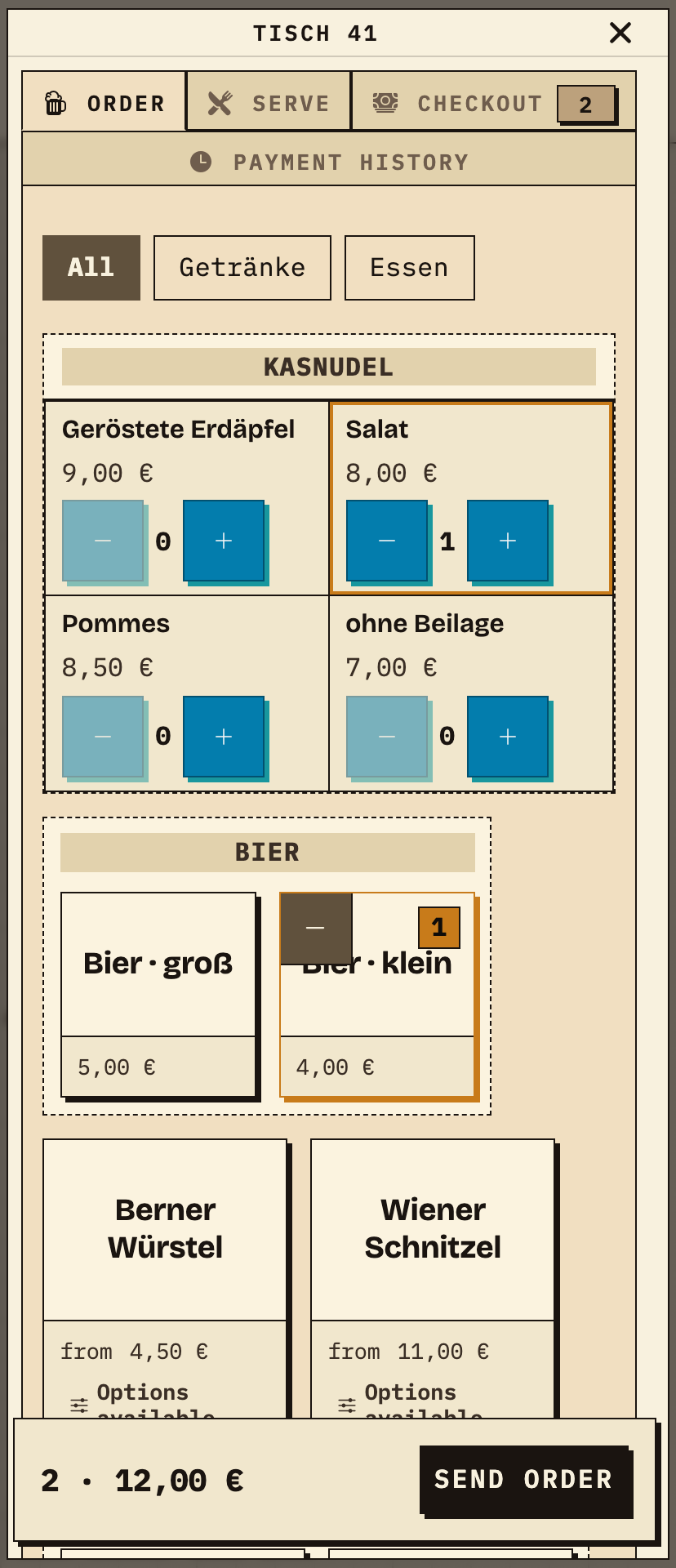
Helpers choose food, drinks and quantities, check the summary and send the order. The image shows a table order for table 41 with one portion of Kasnudel Salat and one small beer (test data). A direct counter sale runs without a table; select the table first for table service.
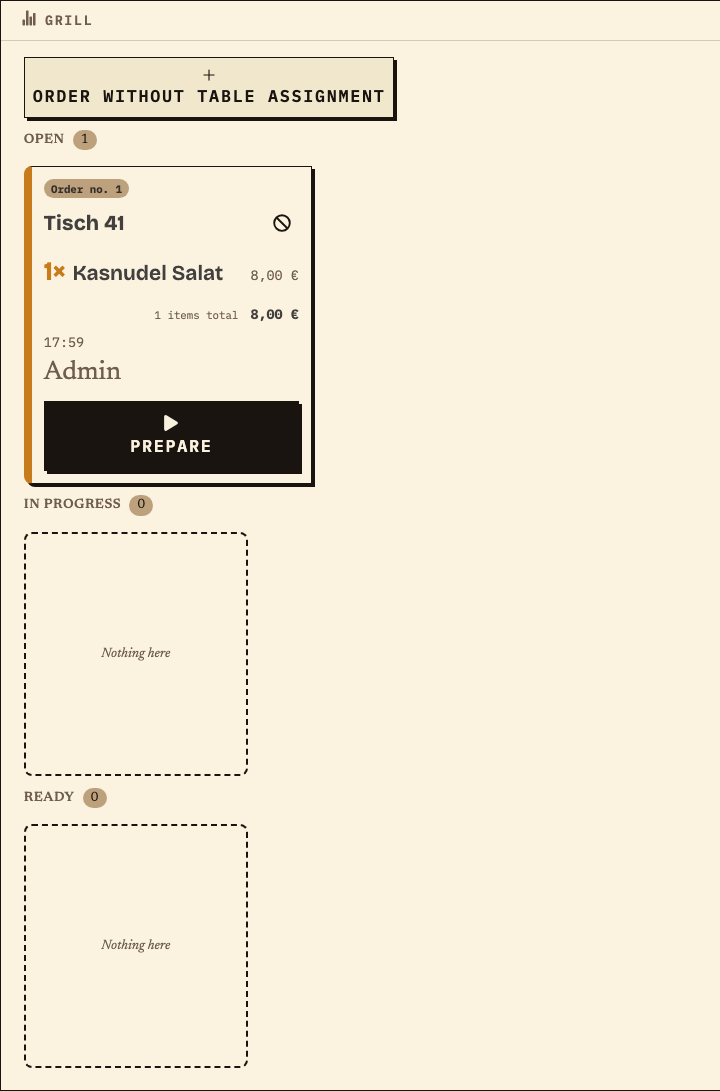
After transmission the assigned items appear on the station monitor. The food station sees only its own item for the same order number, so the kitchen can work independently of the bar. The team advances the status to match the work actually done and agrees who physically brings ready food to collection.
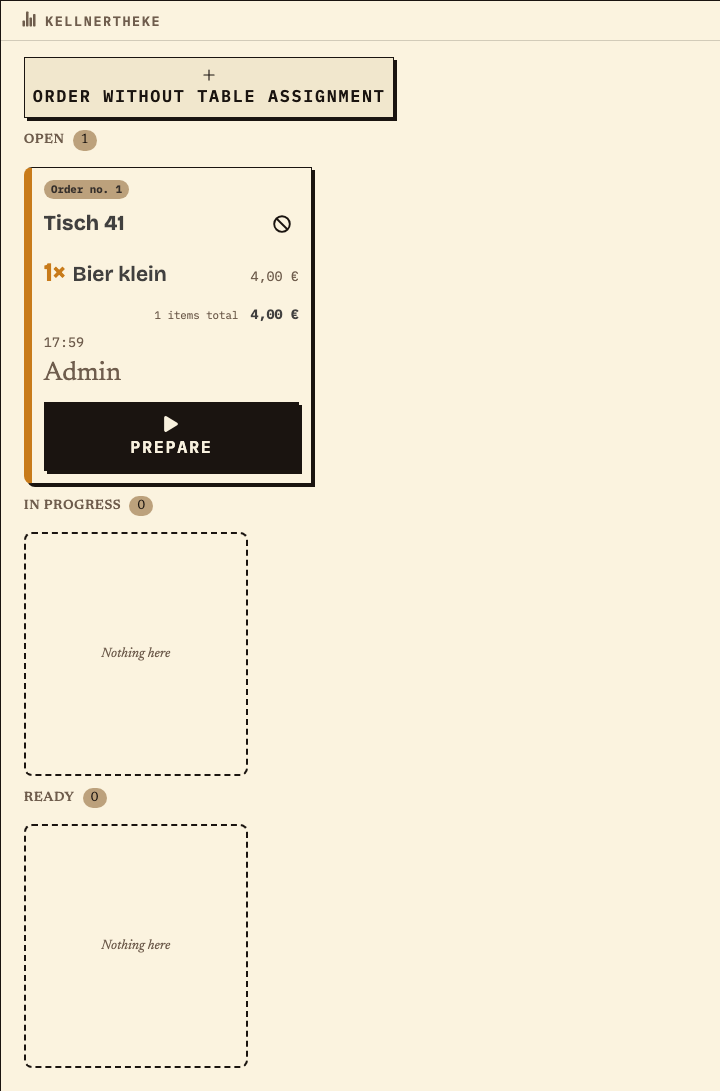
The bar sees only the drink for the same order number. Keeping the order number identical across both stations makes it easier to answer questions at the table and to hand over open work between shifts.
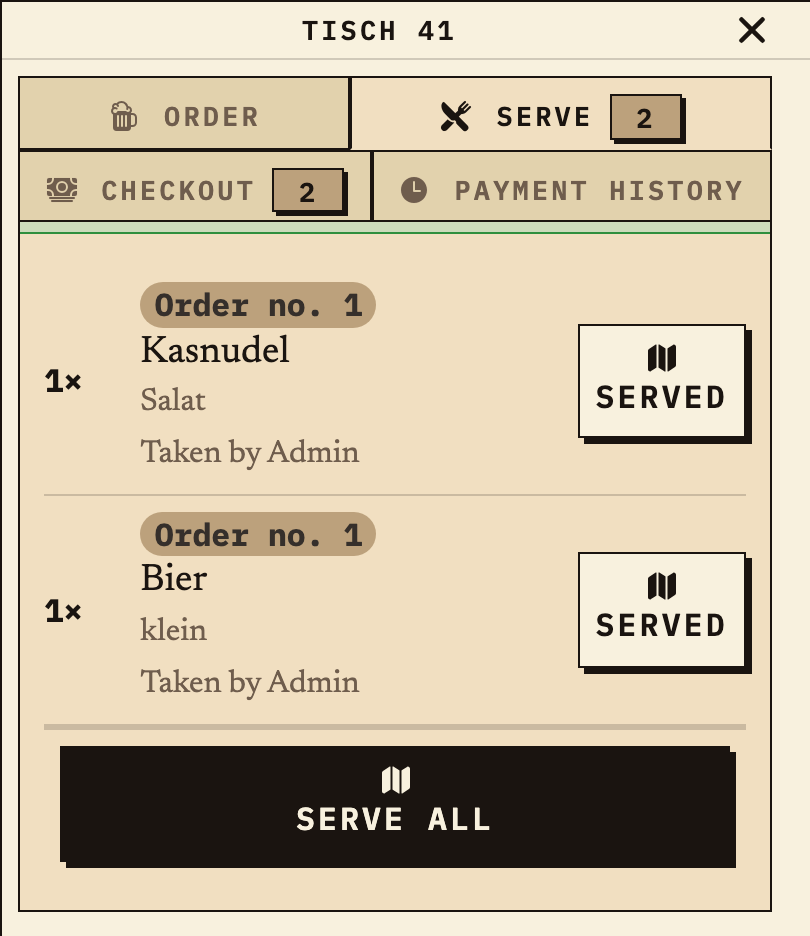
Once both items are marked ready, the order is available at the table for serving. The physical handover and any questions remain a job for the team on site; a displayed status does not replace a call or an agreed collection point.
Benefits at a glance
Four weeks before opening, the event lead checks that the local requirements and named deputies are documented. The menu is fixed as a short list (for example a beer in two sizes, one non-alcoholic drink and one or two meals), and the devices, chargers and power at each station are checked. At the rehearsal, one helper records a drink and a meal; the bar and kitchen leads verify their assigned items, take them through the station statuses and rehearse physical collection. At shift change, both station leads hand over open work and questions in person; both cash leads count and document the cash separately. The team checks the recorded quantities against its own stock and event notes afterwards. This is an illustrative workflow, not a customer account or a guarantee of error-free operation.
Frequently asked questions
Everything about setup, usage and costs.
Your plan sets out tasks and responsibilities. For orders during the festival, you can try Bierblock: helpers take orders on their phones, and the kitchen and bar see their assigned items. The devices need internet access. Explore the workflow in the public demo first.
Start without an account. Register to save. Your own demo events allow up to 20 test orders.
See pricing