For clubs that run their own festivals

Club festival software: One order for the kitchen and the bar

At a volunteer club festival the floor team serves the tables and passes each round on digitally. One order can hold a drink and a meal; the bar sees only the drinks, the kitchen only the food – same order number, prepared separately. At shift change the team reviews the open items together. The devices need internet access to share updates.

The Problem

Three points where an order gets stuck

From the table through the kitchen and bar to the next shift, responsibility changes several times.

Handwriting and shouted orders

What was noted at the table is not always legible at the serving point – questions cost time.

Drink and meal kept apart

A round contains a beer and a meal. Without a shared order, the kitchen does not know what the bar already has.

Shift change without a status

The next waiter does not know which items are open, in progress or ready.

The Solution

The order path at a club festival – from the round to the analytics

Bierblock covers the standard case: the floor team takes the order on a phone, the two serving points work separately, and at shift change the status is visible to everyone.

Set up before the festival

Create products, prices, tables and the two serving points (kitchen and bar), assign each product to the right station and hand out helper access. A rehearsal with a drink and a meal at the venue shows where the items appear.

Ordering system for club festivals

Take the order at the table

Choose the table, tap the drink and the meal, check the quantity and submit the one order.

Prepare separately

The bar receives only the drinks, the kitchen only the food – both under the same order number. Each station runs its item through open, in progress and ready.

Questions and handover

At shift change, review the open and ready items together and agree who will follow up on a question. After the festival, the ordered quantities show what was in demand.

Club festival evaluation
01

What does a mixed round look like on the phone?

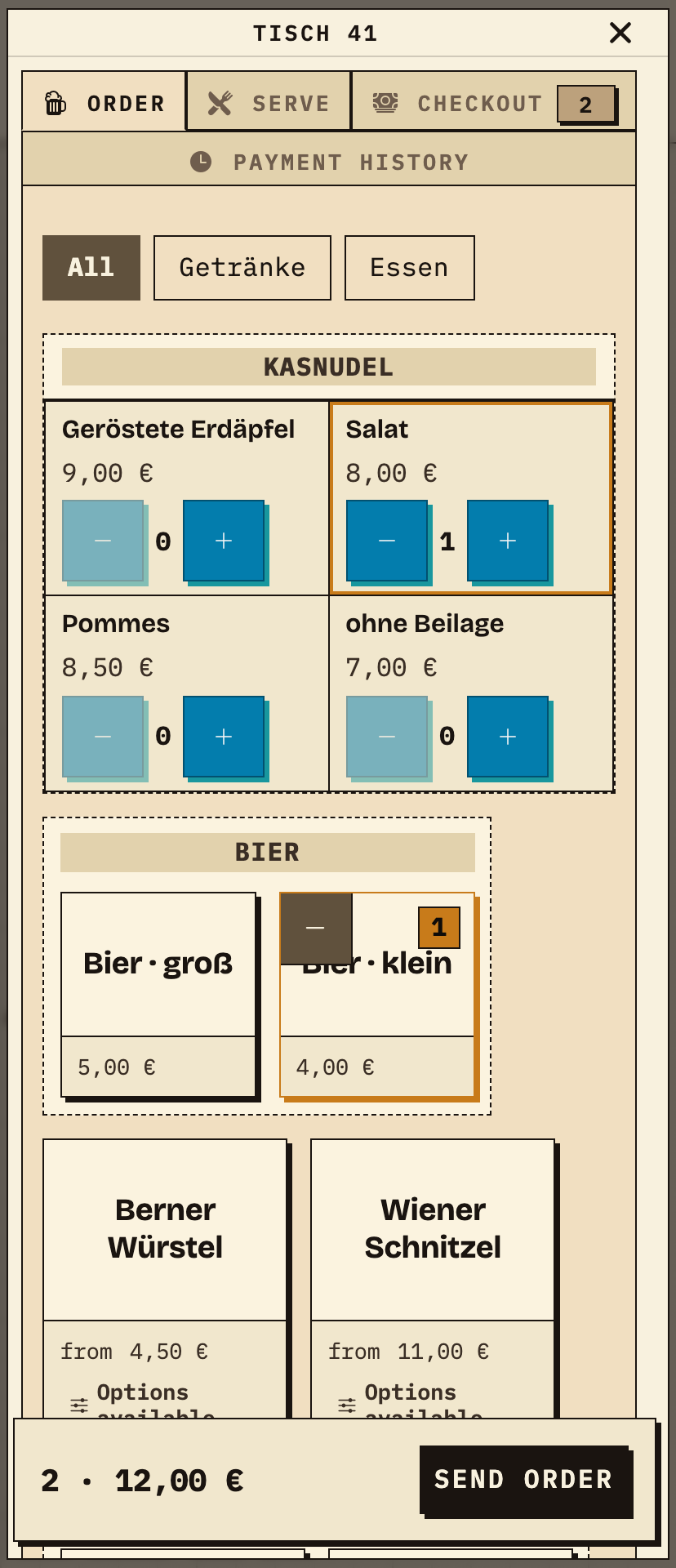
At table 41 the floor team takes a round: 1× Kasnudel with salad for the kitchen and 1× small beer for the bar. Both items sit in one order; before submitting, the cart shows the table, the items and the total.
Observation
The order screen shows table 41, 1× Kasnudel salad and 1× small beer, together 2 items and €12.00.
Next check
Submit the order and check that each serving point receives only its own item.
Phone at table 41: Kasnudel salad and small beer selected, cart 2 items €12.00, send order button
Table 41: drink and meal in one order, 2 items, €12.00 (sample data).
02

Which item does the kitchen see?

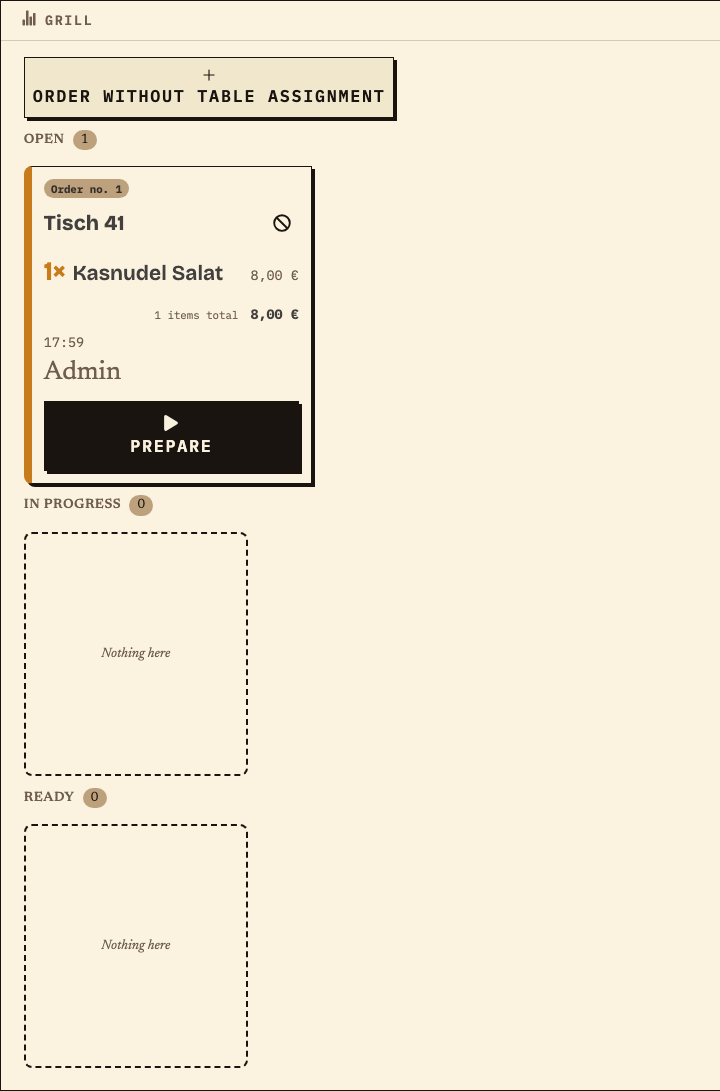
After submitting, the same order no. 1 appears on the food monitor: table 41, 1× Kasnudel salad. The drink item of this order does not appear here – the kitchen marks only its dish as “Prepare”.
Observation
Food monitor (station “Grill”): order no. 1, table 41, 1× Kasnudel salad, 1 item, €8.00, status Open.
Next check
Move the dish to in progress and ready once it is ready to serve.
Food monitor with order no. 1 for table 41, only 1× Kasnudel salad, 1 item €8.00, status Open, prepare button
Kitchen (food serving point): only the dish of this round, same order no. 1 (sample data).
03

Which item does the bar see?

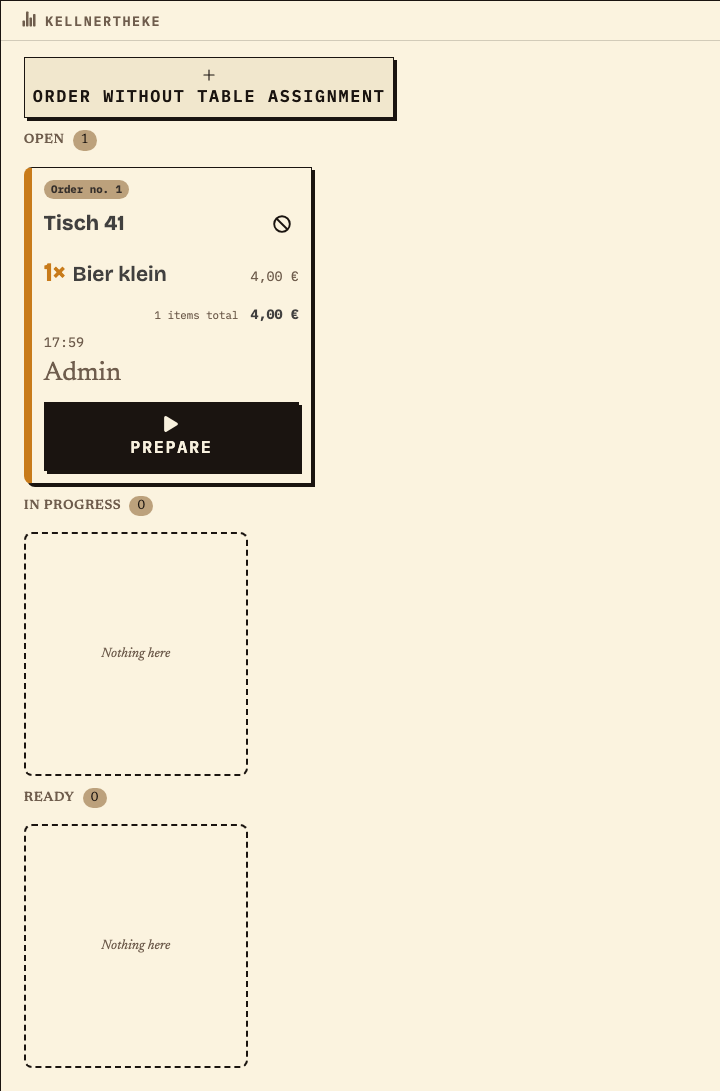
The same order no. 1 runs in parallel on the drinks monitor: table 41, 1× small beer. The dish is missing here – kitchen and bar share the order but each sees only its own item.
Observation
Drinks monitor (Kellnertheke): order no. 1, table 41, 1× small beer, 1 item, €4.00, status Open.
Next check
Move the drink to in progress and ready; both items continue separately.
Drinks monitor with order no. 1 for table 41, only 1× small beer, 1 item €4.00, status Open, prepare button
Bar (Kellnertheke): only the drink of the same order no. 1 (sample data).
04

How is the round handed over?

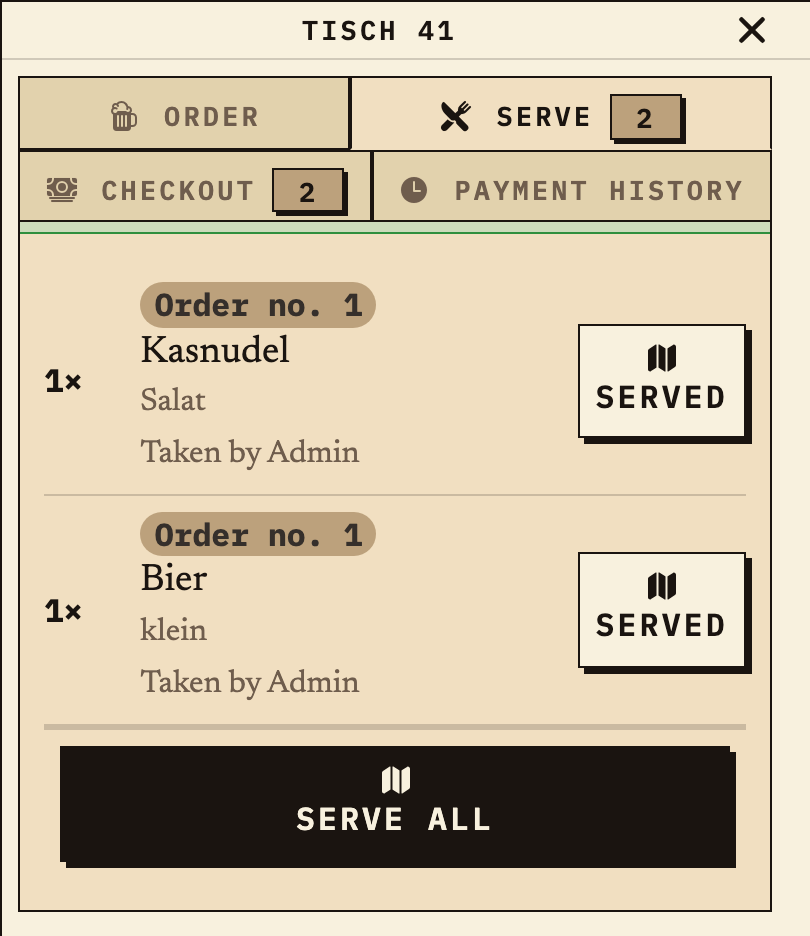
Once both items are ready, they appear at the table on the “Serve” tab and are served in one step. At the shift change before that, the outgoing and incoming volunteers review this status together.
Observation
Table 41, Serve tab: order no. 1 with 1× small beer and 1× Kasnudel salad, both ready to serve.
Next check
Serve them or – for open items – pass the question to the agreed contact.
Table 41, Serve tab: order no. 1 with small beer and Kasnudel salad, both served, serve all button
Handover at the table: the one round is ready to serve (sample data).

Benefits at a glance

How Bierblock helps your team

  • Drink and meal in one order, split at the kitchen and bar
  • See open, running and ready items at shift change
  • Review ordered quantities after the festival
Fictional example

An example from festival operations

Questions and scope

If another item is added after submission, the floor team records it as a follow-up order and directs the question to the agreed contact instead of resending the first order. At shift change, both helpers review the open items on the monitor. To choose the right system and compare plans, compare the options on the ordering-system page for club festivals; for a single serving point with no handover, a legible paper slip may still be enough.

Frequently asked questions

What organisers often ask.

Everything about setup, usage and costs.

Do our helpers need their own app?
No. The floor team and the two serving points open the configured access in a browser. Decide beforehand who takes orders and who runs the kitchen or bar, and try the devices at the venue.
How does Bierblock separate drinks and food?
Each product is assigned to a station. When a table orders a beer and a meal, the bar receives only the drink item and the kitchen only the food item – both under the same order number. Check the assignment in a rehearsal.
What happens at a shift change?
The monitor and the table tab show open, running and ready items. Outgoing and incoming helpers review this status together and agree who will follow up on an open question.
What happens if the internet goes down?
The kitchen, bar and floor team need internet access to share new orders. During a short interruption, an order may wait on the device where it was entered and be sent later; other devices cannot see it until then. Check the waiting order on the original device before entering it again, and agree on a fallback for longer outages.
Can we rehearse the workflow before the festival?
Yes. Set up the festival and test a mixed order with a drink and a meal in a rehearsal. The public demo can be explored for free.

Ready?

See how your team could take orders.

Open the public demo to explore order taking, the kitchen and the bar. No account is needed. To prepare your own setup, start a test event afterwards.

Open the demo — no sign-upBuild your own test event

Start without an account. Register to save. Your own demo events allow up to 20 test orders.

See pricing