Ownership stays with the board
“We will take care of it” is not ownership. Without a name and a deadline, the same people end up with the work again.
Guide: planning through follow-up BierblockDELogin
From the first committee meeting to the follow-up: record who owns each task, when it is due and how you will recognise that it is done. The list is ordered by preparation, setup, operations, handover and follow-up. The optional digital ordering block sits separately at the end. Two rows show completed examples for the volunteer rota and the cash handover.
For club boards, organising committees and volunteers
Each task includes a suggested role and a relative time. Add the actual date and a verifiable result – for example a confirmed volunteer list, a cash handover record, a log entry or a photo. Two rows are filled in as examples and can be overwritten. The list works without software. The final block “Optional: digital ordering” is only for teams using Bierblock; the other tasks work independently. It is not a legal checklist: confirm local requirements, permits and deadlines with the responsible authorities; the detailed steps are in the “Organising club festivals” guide.
Entries are not saved. Print the completed list before reloading, or record it separately. Your browser will ask before leaving the page with unsaved entries.
The Problem
The task itself is rarely the problem; the unclear handover is. These three gaps return at many club festivals.
“We will take care of it” is not ownership. Without a name and a deadline, the same people end up with the work again.
Guide: planning through follow-upShifts, cash and keys change without a shared review. The list records who took over and when.
Organise bar service and handoversDigital ordering is optional. Teams using it need a separate preparation block and should check devices and connectivity first; teams working without software skip it.
Check devices and connectivityThe Solution
The list covers five festival phases and works without Bierblock. The optional software block is separate at the end.
Preparation, setup, operations, handover and follow-up are separate. At every committee meeting you can see which phase is next.
Confirm the suggested role and add the actual calendar date. Unfilled shifts and replacements stay visible.
Shift-plan tool (German)Note how completion was recognised: a confirmed volunteer list, a cash handover record, a log entry, a photo or a joint count.
Cover every shift, name replacements and count cash together at every handover. The example rows show what the result looks like.
If you use Bierblock, set up products, tables, stations and access, then rehearse a test order. Otherwise skip the optional block.
Benefits at a glance
The image shows the volunteer rota as a real print preview of the same list. Task, owner, deadline and check share one row; the example values are marked as test data. The cash handover sits in the handover section.
The example row records who reviewed the rota, when the review took place and how completeness was recognised: every shift covered, two replacements named, and the rota displayed at the clubhouse and in the helper access area.
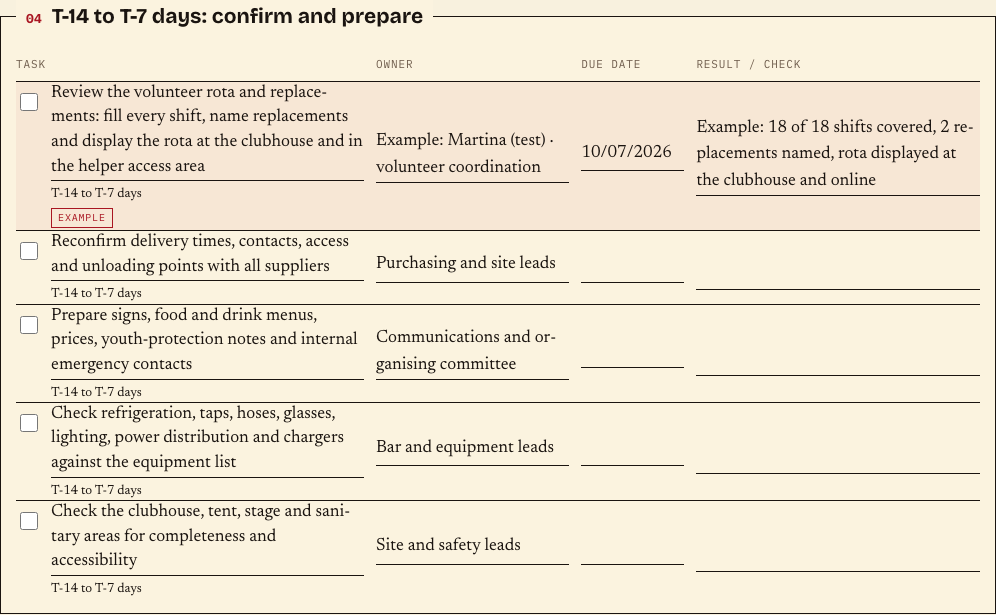
This turns a task into a traceable close: one responsible person, one deadline and a result that a second person can check. The cash handover follows the same pattern.
Frequently asked questions
Everything about setup, usage and costs.
Ready?
Open the public demo to explore order taking, the kitchen and the bar. No account is needed. To prepare your own setup, start a test event afterwards.
Start without an account. Register to save. Your own demo events allow up to 20 test orders.
See pricing