For bar teams at busy festivals

Fewer bar mistakes: Check the order before it reaches the counter

The wrong table, an unclear drink choice or an order prepared twice: the error matrix orders five common cases by cause, team countermeasure, visible check and limit. A rehearsal follows the same mixed order at entry, Grill and Kellnertheke and ends with passed or not passed. Bierblock shows order details and progress; your team remains responsible for checking and coordinating the work.

The Problem

Start with a concrete failure mode

List what went wrong, discuss a possible cause and agree on an organisational check before the next event.

Wrong table

Possible cause: the table was mixed up or direct sale was treated as table service. Team check: confirm the table and compare it with the guest request before sending; Bierblock step: the selected table appears in the cart and on the station ticket.

Wrong variant or quantity

Possible cause: similar names or a rushed selection. Team check: use unique product names and check position and quantity before sending; Bierblock step: the sent item appears with product details on the station monitor.

Wrong station

Possible cause: the product is assigned to the wrong station or the station is not staffed. Team check: test station routing and name a contact per station; Bierblock step: each station sees only its own ticket.

Unclear status

Possible cause: the status was not advanced or the handover between helpers is unclear. Team check: agree who maintains Open, In progress and Ready; Bierblock step: the monitor shows three processing states per station.

Duplicate entry after an interruption

Possible cause: an order waits locally and is not visible on the monitor. Team check: check the local queue on the submitting device before re-entering; Bierblock step: locally waiting orders appear only after transmission.

The Solution

Team checks supported by Bierblock

Use each digital step as a check point. Decide who can correct or cancel an already submitted order under your roles and process.

Check table and direct sale

Confirm the table before sending and keep direct sale without a table as its own path. The station ticket shows the table assignment that was actually entered.

Check product, variant and quantity

Use unique product names and compare the selected position with the guest request. The summary shows what will be sent; the check remains a team task.

Test station routing with a mixed order

Send one drink and one meal in the same order. Grill and Kellnertheke must show the same order number with their own item only.

Maintain status and handover

The station moves items through Open, In progress and Ready. Agree who updates the status and who takes over open items at a shift change; Ready is not collected or paid.

Treat errors after submission as cancellations

Do not silently change a sent item. Use the cancellation flow allowed for the role and re-enter the correct item; collected items cannot be cancelled. Keep a fallback for longer connection loss.

Error matrix: cause, countermeasure and product limit

Every case has an organisational countermeasure and a visible check. On narrow screens, scroll the table sideways; the last column states what remains a team task.

Possible causeTeam countermeasureWhat Bierblock showsLimit / team task
Wrong tableTable mixed up, or direct sale confused with table service.Confirm the table while taking the order and compare it with the guest request before sending; keep direct sale without a table on its own path.The selected table assignment in the cart; table 41 on the station monitor.The app does not check whether the guest is actually sitting at that table. That remains a team agreement.
Wrong variant or quantitySimilar names, rushed selection or unclear abbreviations.Use unique product names and variants; check product, variant and quantity before sending.Position and quantity in the cart; the sent item appears with product details on the monitor.The app does not replace clear product setup or a final check before sending.
Wrong stationThe product is assigned to the wrong station, or the station is not staffed.Test station routing before the festival; name a responsible person and a question route for each station.After sending, the item appears only at its assigned station; Grill and Kellnertheke show separate tickets.A wrong setup is not detected automatically; the rehearsal must reveal it.
Unclear statusThe status was not advanced, or the handover between helpers is unclear.Agree who maintains Open, In progress and Ready, and who takes over open orders at a shift change.The monitor shows three processing states per station.“Ready” means processing is complete, not collected or paid.
Duplicate entry after an interruptionAn order waits locally and is not visible on the monitor; someone enters it again.First check the local queue on the submitting device; during a longer outage keep paper notes separately and reconcile after reconnection.Locally waiting orders become visible on the monitor only after transmission.There is no automatic duplicate lock and no guaranteed transmission time.
01

The mixed test order at the table

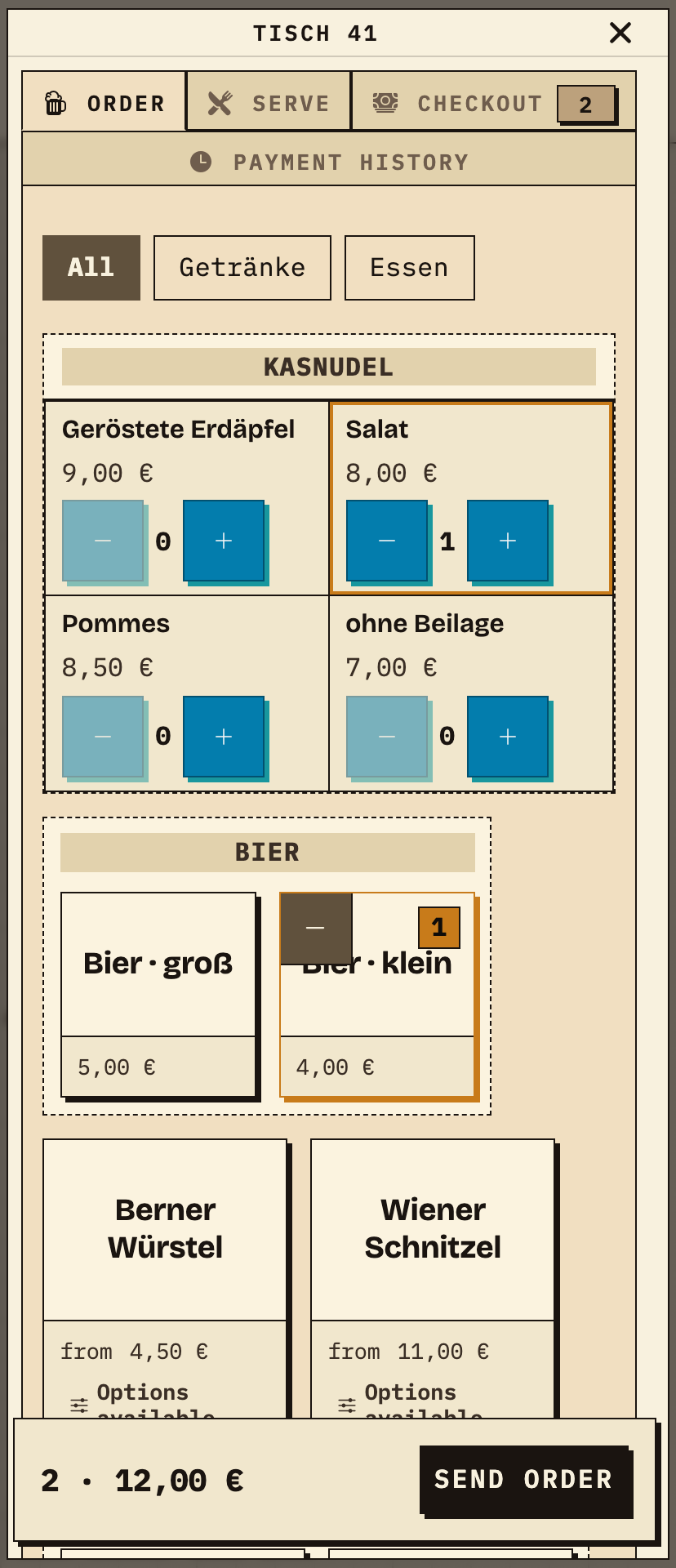
The team selects table 41 and adds a small beer and a Kasnudel with salad. The order shows two items for €12.00 before sending.

Observation
Table 41: 1× small beer (€4.00) and 1× Kasnudel Salat (€8.00), total 2 · €12.00.
Next check
Send the order and check the same number at both stations.
Bierblock order entry on a phone: table 41 with 1× small beer and 1× Kasnudel Salat, total 2 · €12.00 and a Send order button
The same test order: table 41, small beer and Kasnudel Salat, total €12.00 before sending (test data).
02

The meal reaches Grill

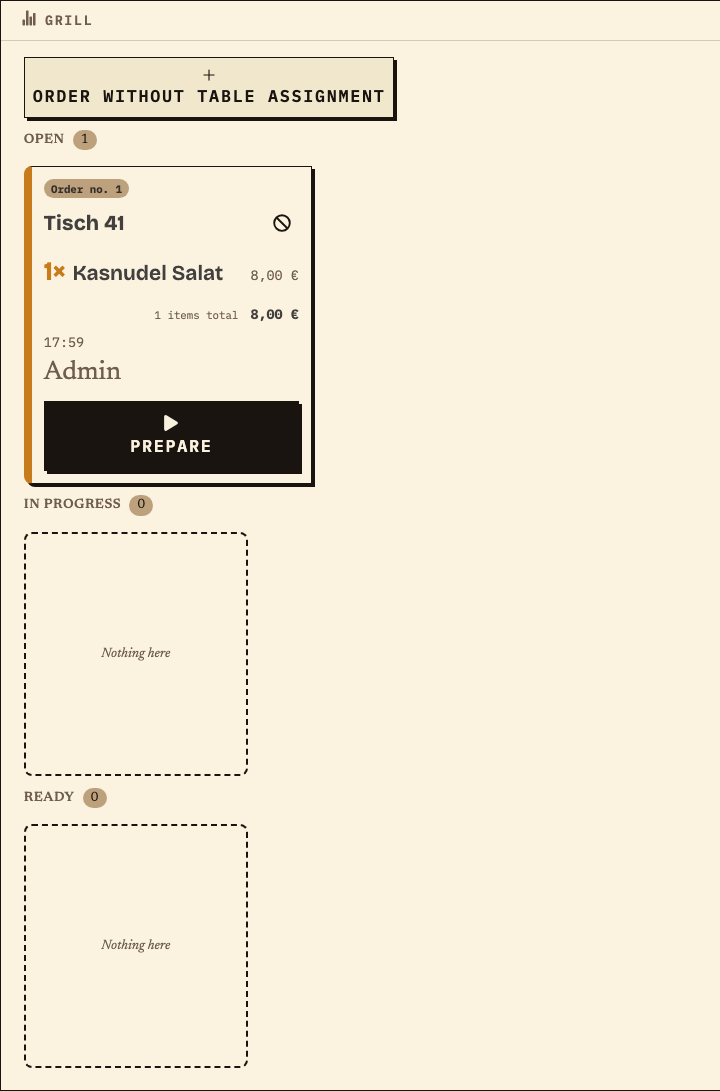
The kitchen ticket shows the same order number and table, but only the meal.

Observation
Order no. 1, table 41, 1× Kasnudel Salat (€8.00), status Open.
Next check
Advance the status; Ready is not collected or paid.
Bierblock station monitor Grill: order no. 1, table 41, 1× Kasnudel Salat, €8.00, status Open
Meal of the same order: no. 1, table 41, Kasnudel Salat at Grill (test data).
03

The drink reaches Kellnertheke

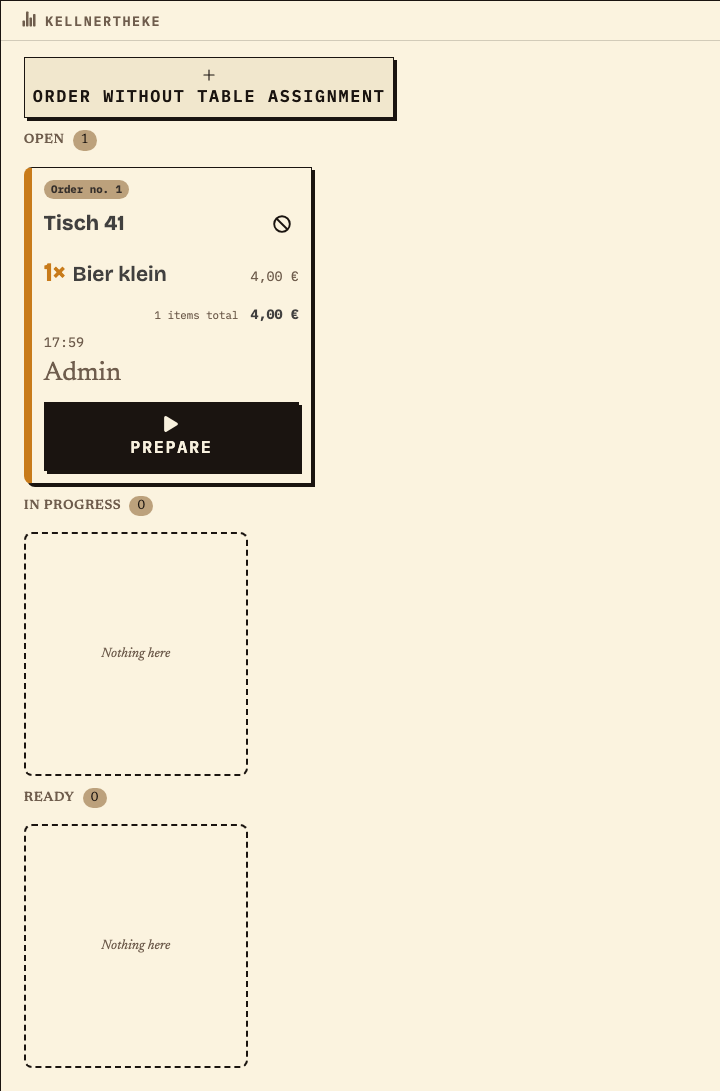
The bar ticket also carries order no. 1 and table 41, but only the drink.

Observation
Order no. 1, table 41, 1× small beer (€4.00), status Open.
Next check
Compare both station views before judging the correction or re-entry.
Bierblock station monitor Kellnertheke: order no. 1, table 41, 1× small beer, €4.00, status Open
Drink of the same order: no. 1, table 41, small beer at Kellnertheke (test data).

Benefits at a glance

What this page helps you do

  • Check products, quantities and table before submitting
  • Investigate a missing order before entering it again
  • Practise corrections and volunteer handovers
Fictional example

An example from festival operations

Fictional example: Correct a table and station error through handover

During a rehearsal, a helper selects the wrong table for a mixed food-and-drink order and catches it before submission, then checks the corrected table and station assignments in the summary. If the same mistake is found after submission, the team checks the item status and uses the cancellation process allowed for that role; a waiter PIN needs a second helper PIN and reason, while a station PIN can cancel its own order. Collected items cannot be cancelled. The station then tracks the corrected item through Open, In progress and Ready; service confirms actual collection separately. The team can verify the correction in the assigned station view and hand over any remaining question. This scenario is fictional, not a measured customer result.

Frequently asked questions

What organisers often ask.

Everything about setup, usage and costs.

Does the monitor prevent duplicate preparation automatically?
No. It shows successfully transmitted orders and their processing status, but it does not replace responsibility. Agree who takes over an order and, after an interruption, first check whether it is only waiting locally on the submitting device.
What happens to a locally waiting order?
Until it is transmitted, it is visible only on the submitting device and not in the shared station view. Check the queue there; switching devices does not automatically restore untransmitted data. Agree a fallback for longer outages.
Can a wrong order be corrected after submission?
Before submission, change the selection. Afterwards, use the cancellation flow for the wrong item and enter it again if needed. The required permission depends on the role; items already collected cannot be cancelled.
Who may cancel a position?
This depends on the role: organisers and admins can cancel without a second approval. A station can cancel its own orders without a second person; for other orders it needs approval. Waiter PINs require a second person with PIN and a cancellation reason.
Does “Ready” mean the order is collected or paid?
No. “Ready” means the station has marked its processing as complete. Collection and payment are separate steps.
What does the shared live view require?
The devices need an internet connection. Test Wi-Fi or mobile data at the actual workstations with the intended devices; a local network without internet does not provide a shared live view.

Ready?

See how your team could take orders.

Open the public demo to explore order taking, the kitchen and the bar. No account is needed. To prepare your own setup, start a test event afterwards.

Open the demo — no sign-upBuild your own test event

Start without an account. Register to save. Your own demo events allow up to 20 test orders.

See pricing