For kitchen teams at club festivals

Kitchen management: See which food orders need preparing

Soup, hot meals or snack platters: Bierblock shows the kitchen the food items assigned to its station. Drinks go to the bar. The kitchen team moves each item from Open to In progress and marks it ready. Ready means prepared, not collected or paid. Agree with the service who collects the food. The devices need a connection for the shared view.

The Problem

What makes kitchen management at festivals hard

Kitchen and bar may be apart, so a shared status can help the teams coordinate.

Orders arrive by hand.

With paper, the items reach the kitchen only after someone carries the note there.

No shared list of open items.

Without a shared view, it is harder to see which recorded portions remain open.

Prepared, collected and paid get mixed up.

Without separate steps it is unclear whether a dish is only prepared, already with the guest or already paid.

The Solution

How the kitchen works a food round

The kitchen sees only the food items assigned to its station in the browser. An incoming round appears in the Open column; the team moves it to In progress and marks it ready. Drinks run through the bar, and service confirms collection separately.

Open the station access

The kitchen signs in with its configured station access and lands directly on the monitor. Event management sets up the station and product assignment beforehand.

Open, In progress, Ready

“Prepare” starts the work, “Mark ready” finishes preparation. The status says nothing about collection or payment.

Agree collection with service

Service confirms collection at the table; checkout is a separate step. The kitchen sees its food, the bar its drinks.

01

At the kitchen station: the food arrives

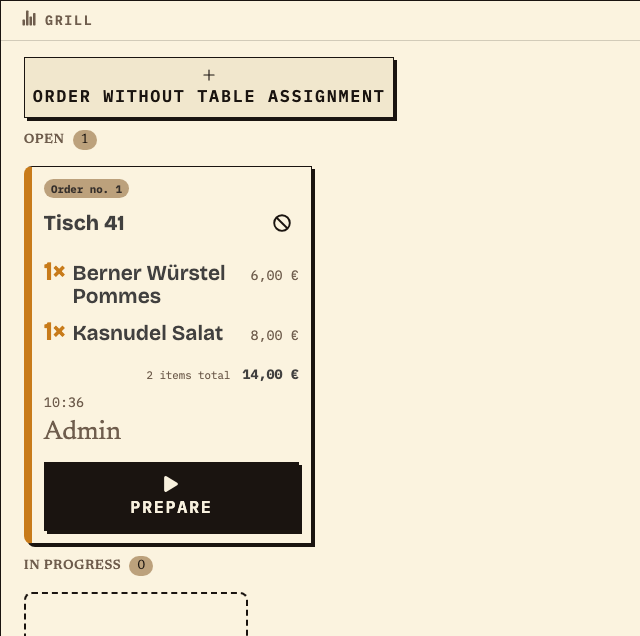
The kitchen opens its configured station access in the browser and lands on the monitor. Event management has assigned the food items to the “Grill” station; drinks do not appear there. Order no. 1 for table 41 sits in the Open column: 1× Berner Würstel Pommes and 1× Kasnudel Salat.
Observation
Grill station: Open 1, In progress 0. Order no. 1, table 41, 1× Berner Würstel Pommes (€6.00) and 1× Kasnudel Salat (€8.00), total €14.00.
Next check
“Prepare” moves the items to In progress; “Mark ready” follows.
Grill kitchen station: open order no. 1 for table 41 with Berner Würstel Pommes and Kasnudel Salat, total €14.00 and a Prepare button
Grill kitchen station: order no. 1 for table 41 with two dishes, status Open (test data from the demo festival).
02

Marked ready: the same order at the table

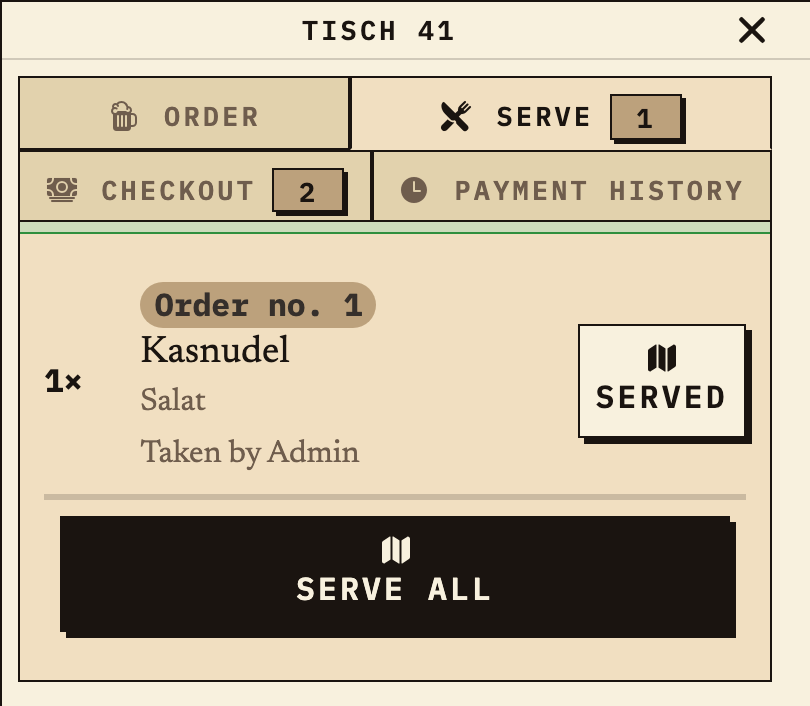
After “Mark ready”, preparation is complete. Service sees the Kasnudel Salat from the same order under “Serve” and confirms collection there. “Checkout” is another separate step. The kitchen status alone does not say whether the food has reached the guest.
Observation
Table 41, “Serve” tab: order no. 1, 1× Kasnudel Salat, buttons “Served” and “Serve all”. The “Checkout” tab is separate.
Next check
Service marks the dish as served; payment is recorded separately under “Checkout”.
Table 41 on the phone in the Serve tab: Kasnudel Salat from order no. 1, Served and Serve all buttons, separate Checkout tab
Detail of the same order at the table: the Kasnudel Salat is marked ready and shown under “Serve” (test data from the demo festival).
03

After the festival: recorded food quantities

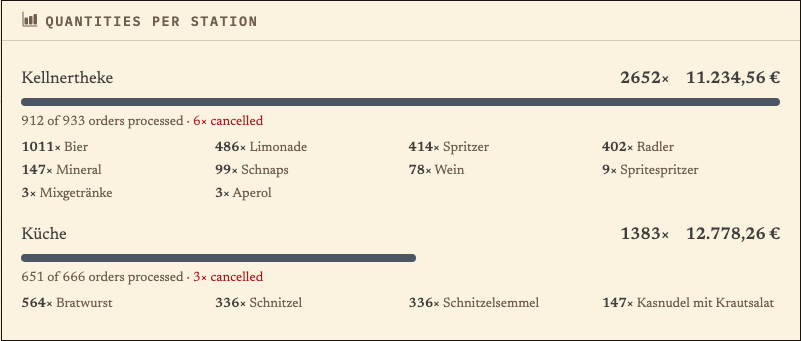
The station analytics show the quantities and order values recorded for the kitchen in the example. These are ordered quantities, not a measure of portions actually handed out, consumption, profit or team performance. For the debrief, compare them with your own notes.
Observation
Separate analytics case “Küche”: 1,383 recorded units, €12,778.26 order value. 651 of 666 orders completed, 3 cancelled. Top items: 564× Bratwurst, 336× Schnitzel, 336× Schnitzelsemmel, 147× Kasnudel with coleslaw.
Next check
Use the figures as a starting point for purchasing and the debrief, not as proof of consumption.
Bierblock analytics quantities per station: Küche 1,383 recorded units and €12,778.26 order value, 651 of 666 orders completed, 3 cancelled
Separate analytics case: recorded kitchen quantities in the demo festival, not an output or consumption measurement (test data).

Benefits at a glance

How Bierblock helps your team

  • See the food assigned to your kitchen station
  • Work Open, In progress and Ready separately
  • Keep preparation, collection and payment distinct
  • Run drinks and food through separate stations
Fictional example

An example from festival operations

Test an order at the kitchen station

Fictional rehearsal: A table orders soup and two drinks. The soup is assigned to the kitchen and the drinks to the bar. After submission, the kitchen team checks whether the soup appears at its station, moves it to In progress and then marks it Ready. Service confirms collection at the table; checkout is a separate step. If the soup is missing at the station, the responsible person checks product assignment and connection before anyone re-enters the same order. This is a test workflow, not a customer story.

Frequently asked questions

What organisers often ask.

Everything about setup, usage and costs.

How do I set up a kitchen station?
An event manager with the required permission configures the station and product assignments. The kitchen then opens its designated station access in a browser and sees only the assigned food items; it does not need an organiser account for this.
Can the kitchen mark an order as ready?
Yes. “Mark ready” finishes preparation. Collection is confirmed separately in the service workflow; checkout is its own step.
Does the kitchen see drink orders?
Only if event management assigns drinks to that station. In the usual split, the kitchen sees food and the bar sees drinks.
Can the kitchen create products itself?
No. Products and station assignment are configured in event management. The kitchen sees its station and the products assigned to it.
What does the kitchen need for Bierblock?
A suitable device with a supported browser and display. An existing tablet can work if screen, power supply and connection at the kitchen counter suit the workflow; test it there with a complete test order.
What do the kitchen figures after the festival mean?
The station analytics show recorded order quantities and order values per station. They say nothing about portions actually handed out, consumption, profit or team performance; compare them with your own notes for purchasing and the debrief.

Ready?

See how your team could take orders.

Open the public demo to explore order taking, the kitchen and the bar. No account is needed. To prepare your own setup, start a test event afterwards.

Open the demo — no sign-upBuild your own test event

Start without an account. Register to save. Your own demo events allow up to 20 test orders.

See pricing