Ordering system for a fire brigade festival: Decide on devices, access and period
Whether one order-taking device and one serving screen are enough, or whether floor service, kitchen and bar need separate devices, depends on your workflow and shifts. This page takes you from the choice through preparation to the right booking. The detailed two-evening workflow is on the fire brigade festival software page.
One evening with one team, or two evenings with a shift change?
Both situations are fictional fire brigade festivals. They are not a size recommendation; they show which workstations, devices and access you should clarify before choosing.
01
Scenario A: One evening, one serving point, a steady team
Four helpers run one serving point; food and drinks come from the same place. There is no table assignment and no shift change. A legible paper slip can be enough here. If you still take orders digitally, one order-taking device and one screen showing all items are sufficient. Beforehand, check that the device connects reliably to the internet at the venue.
02
Scenario B: Two evenings, floor service, kitchen and bar
Floor service takes orders at tables, the kitchen serves food and the bar serves drinks. Different helpers work the second evening and the shift change. Here a separate screen per serving point makes sense, and each person needs suitable access; open orders must stay visible during the handover. Preparation covers products, stations, access, devices and a test order with food and a drink.
All paid plans include the same features; your dates and the required access period decide. Amounts and terms come from the central pricing overview.
01
One festival in one month
The one-time purchase costs €99 and opens one month from activation. It fits when your festival falls within that period and no other date is planned. There is no subscription and no automatic renewal.
02
Several dates within 24 months
Event pack 6 costs €149 and provides six events; pack 9 costs €199 for nine. The credit is valid for 24 months from purchase; a multi-day festival counts as one event. Without a subscription, an event uses one credit from the 21st order and remains usable without limits afterwards. This fits if you plan several festivals but do not want a subscription.
03
Several festivals per year
The monthly plan costs €49 per month and can be cancelled at any time; access remains until the end of the paid period. The yearly plan costs €299 for twelve months and renews automatically. Both include all features and up to 30 events per calendar year under fair use.
04
Calculate first, then book
Two festivals in different months require two one-time purchases. Compare an event pack or a subscription using your actual dates. The full overview with access periods and terms is on the pricing page.
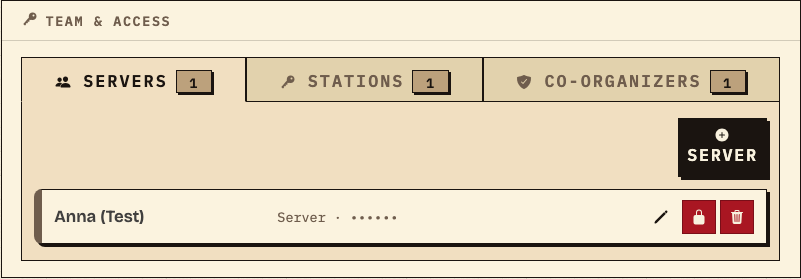
In Team & Access, the event lead defines who takes orders and which serving points exist. The example shows a helper access “Anna (Test)” and one entry each under Stations and Co-organizers. The PIN is hidden and shared separately from the access link.
Observation
The “Waiters” tab contains one test access; “Stations” and “Co-organizers” each show one entry.
Next check
Before the festival, check that every planned person and every serving point has its own access.
Team & Access with a test access; the PIN is hidden and each tab shows one station and one co-organizer entry (fire brigade festival test data).
02
Take an order on a phone
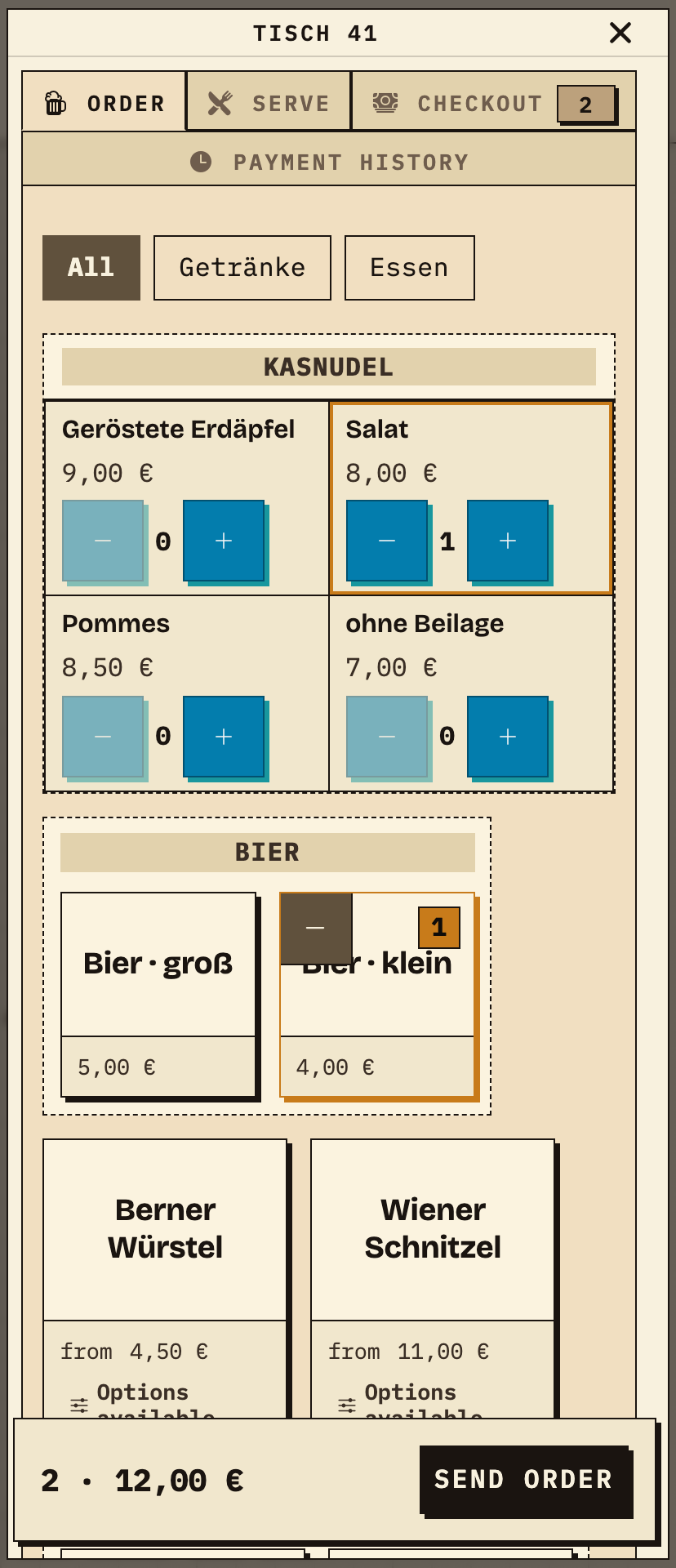
Floor service selects the table and taps a drink and a dish. In the example, table 41 orders a small beer and a Kasnudel with salad; the total shows two items for €12.00. Orders are sent from the browser; no fixed POS terminal is required.
Observation
The phone shows table 41, 1× small beer and 1× Kasnudel salad selected; the total is 2 · €12.00.
Next check
During the rehearsal, send a mixed order and check that it arrives at both serving points.
Table 41: small beer and Kasnudel salad, total €12.00, before sending (fire brigade festival test data).
03
The kitchen sees only its dishes
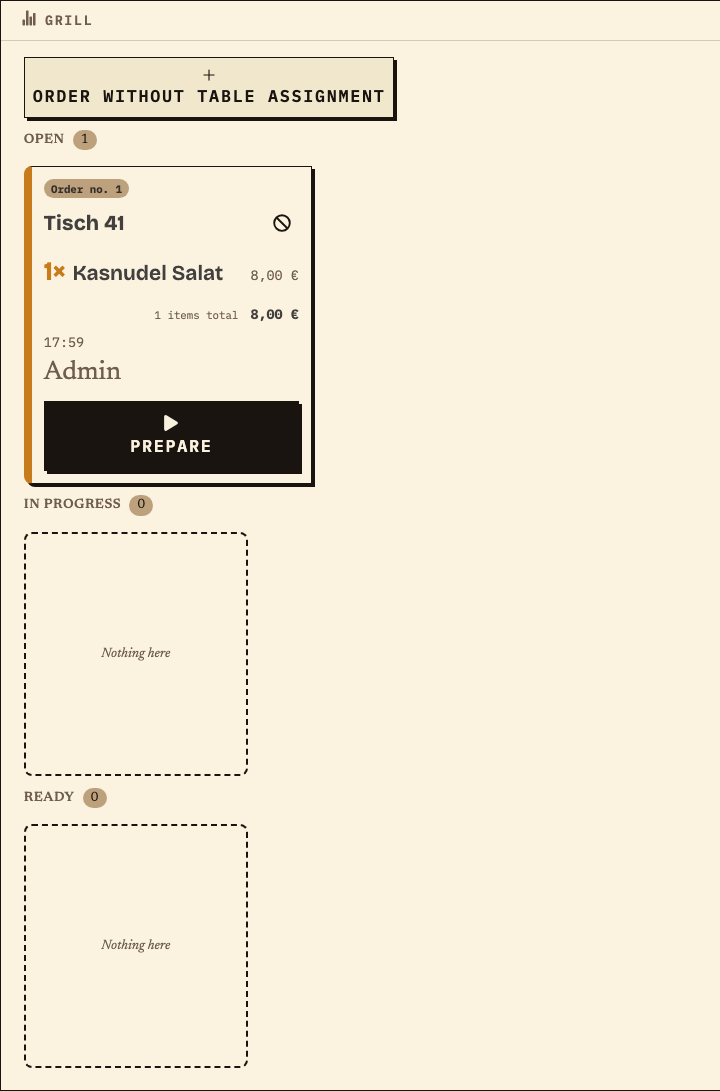
After sending, the dish of the same order no. 1 appears on the Grill station monitor: table 41, Kasnudel salad, €8.00, status Open. The kitchen selects “Prepare” and later marks the item as ready.
Observation
Order no. 1, table 41, 1× Kasnudel salad, €8.00, status Open.
Next check
Check that dishes are assigned to the right station and drinks appear at the bar.
Kitchen ticket for the same order: the dish at the Grill station (fire brigade festival test data).
04
The bar sees only its drinks
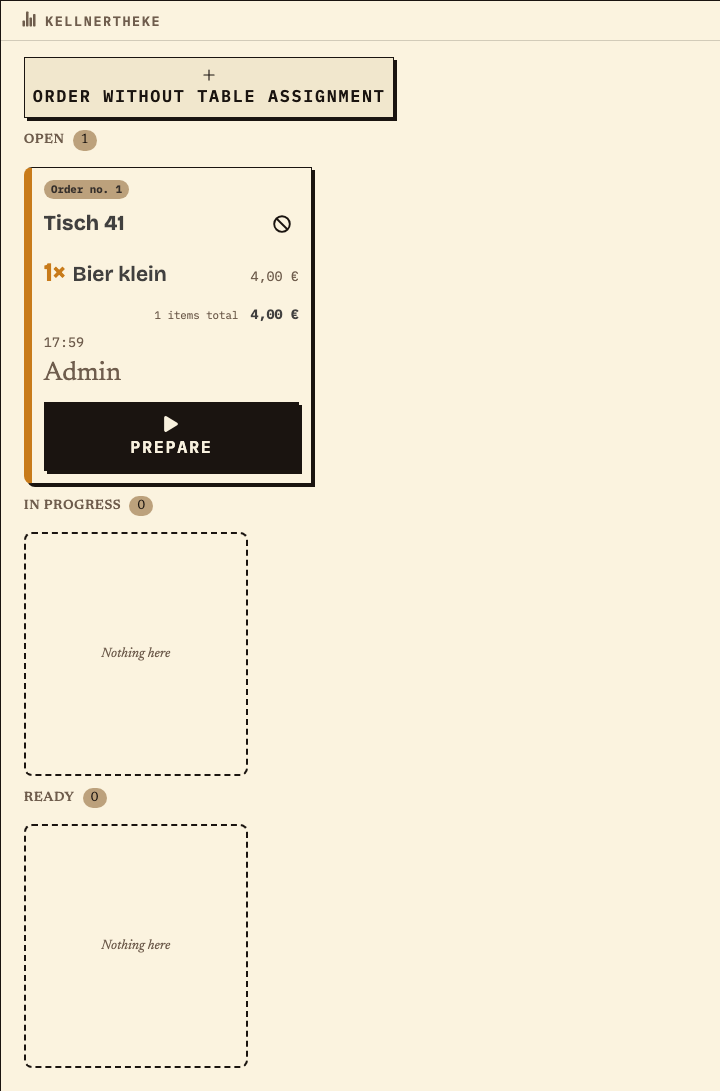
The beer from the same order appears at the Kellnertheke station: table 41, 1× small beer, €4.00, status Open. Each serving point handles only its items; floor service continues the order at the table.
Observation
Order no. 1, table 41, 1× small beer, €4.00, status Open.
Next check
At the shift change, review open items on both monitors and record the handover.
Drink ticket for the same order: the beer at the Kellnertheke (fire brigade festival test data).
Work material
Preparation and device list for your fire brigade festival
Work through the rows in this order. The “Result / check” column states the result that shows the step is done; the right-hand column is pre-filled with a fictional fire brigade festival.
Fictional example in the right-hand column (test data): floor service at twelve tables, food from the kitchen, drinks from the bar, two evenings, shift change at 21:00. The values are a pattern, not a recommendation for your size.
Step or entry
What you define
Result / check
Example: fire brigade festival (test data)
Scroll horizontally to see the full table.
Entries are not saved. Print the completed list before reloading or record the values separately.
Benefits at a glance
What this page decides for you
||||Define workstations, devices and stations for your team
||||Clarify access and briefing before the first festival evening
||||Match access period and cost to your festival dates
Fictional example
An example from festival operations
Example: two evenings and one more date in the year
A fire brigade celebrates on two evenings in July; a comradeship evening with a bar follows in November. The €99 one-time purchase covers one month and fits the two July evenings, not the November date. Assuming both events go beyond the test limit of 20 orders, two purchases would be needed with the one-time option. Event pack 6 costs €149 once and provides six events as credit valid for 24 months; the two dates use one credit each. Brigades running several festivals compare the monthly plan (€49 per month) or the yearly plan (€299 for twelve months, up to 30 events per calendar year under fair use). This is an example, not a recommendation: your dates and the terms on the pricing page decide.
Frequently asked questions
What organisers often ask.
Everything about setup, usage and costs.
Does every helper need their own account?
Waiters and stations do not need their own account; they open their access via link and PIN in a browser. Co-organizers are invited by email and sign in with their own account. Decide beforehand who has which role, and share the PIN and access link separately.
How many devices do we need?
Plan one order-taking device per person taking orders and one browser for each serving point that should see its items. Paid plans do not charge separately for devices or helpers. Test the planned number at the venue.
Do two festival evenings count as two events?
For event credit, a multi-day festival counts as one event. With the one-time purchase, the period counts: one month from activation covers both evenings as long as they fall within that month.
Does the fire brigade commander have to set up Bierblock?
No. The event leads configure products, stations and access. The commander needs to know the workflow but does not have to work on the device.
What happens during an internet outage?
The kitchen, bar and floor service need internet access to share new orders. During a short interruption, an order may wait on the device where it was entered and be sent later. Other devices cannot see it until then. Check the waiting order on the original device before entering it again, and agree on a fallback for longer outages.
Can we try Bierblock beforehand?
The public demo is free. Demo events in an account are limited to 20 orders each; to operate beyond that test limit, you need an active subscription or event credit. Rehearse with the planned devices and your festival workflow.
Is there a special fire brigade version?
No. Clubs and fire brigades use the same Bierblock version; products, stations and access are configured per event.
Ready?
See how your team could take orders.
Open the public demo to explore order taking, the kitchen and the bar. No account is needed. To prepare your own setup, start a test event afterwards.
We measure page views, calls-to-action clicks, and opening the print dialog for work materials using a random, pseudonymous identifier on our servers. Work-material entries are not collected. No advertising cookies or sharing with third parties. You can withdraw consent at any time via “Cookie settings” in the footer.Privacy
We measure page views, calls-to-action clicks, and opening the print dialog for work materials using a random, pseudonymous identifier on our servers. Work-material entries are not collected. No advertising cookies or sharing with third parties. You can withdraw consent at any time via “Cookie settings” in the footer.Privacy